Lucky's Warband Stockist
- By
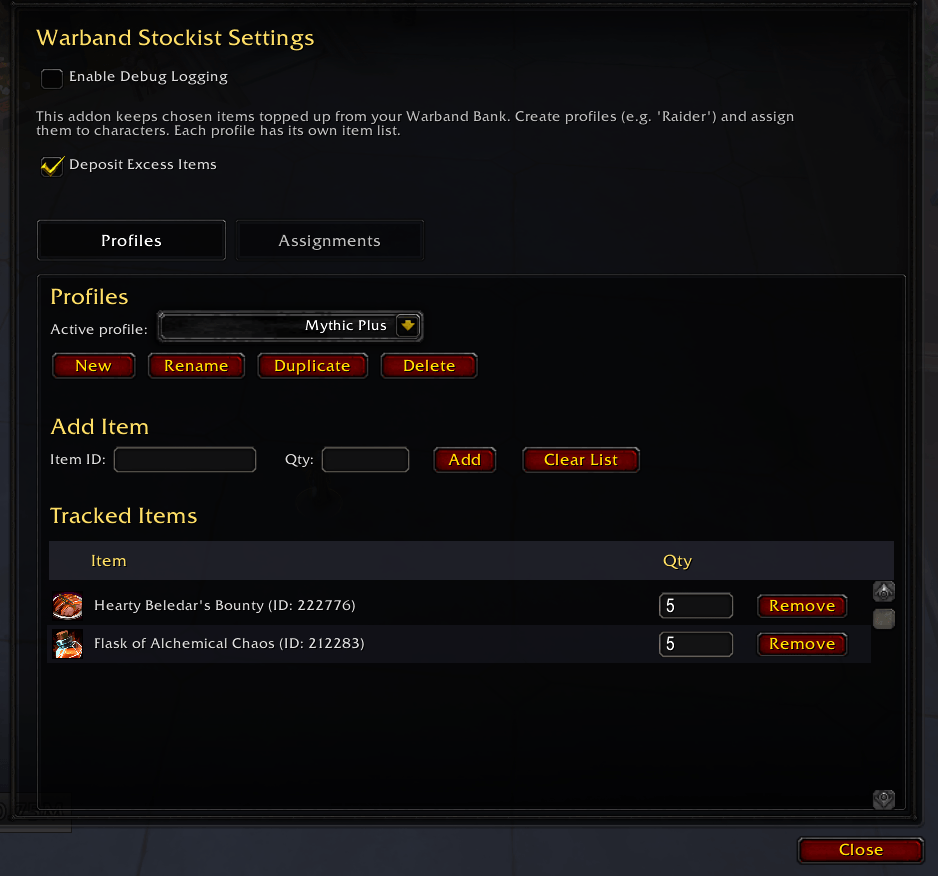
Warbank Stockist automatically manages item quantities between your bags and the Warband Bank, keeping your inventory tidy and ready for adventure.
Wow_af6f31Sxzx.png
Description
Lucky's Warband Stockist
Keep chosen items and gold topped up across your characters using the Warband Bank.
Features
- Stock sets: Build item lists for raiding, crafting, gathering, leveling, or any other purpose, and give each character as many as you like.
- Every Character sets: A set can stock all your characters, new ones included, with any character left out from the Assignments page.
- Keep in Bags or Deposit All: A Keep in Bags set withdraws each item up to its Keep amount. A Deposit All set sends every item on it to the Warband Bank.
- Standard sets: Add ready-made sets that follow a rule instead of a list: every reagent of a category, such as Herbs or Cloth, all lumber, all housing dyes, one unused Thalassian Treatise for each of your professions each week, or your warbound gear. Create All makes a reagent set for every category you don't have one for yet. A reagent set can be switched to Withdraw All, so a selling character takes every reagent of that category from the Warband Bank, leaving each item's Reserve behind. Each standard set lists every item it covers, newest expansion first, and any of them can be excluded.
- Always Deposit Master List: A built-in Deposit All set for every character. Pick up an item at the bank and a drop slot slides out under the Bank Queue window; drop the item on it to add it to the list and deposit it straight away.
- Automatic withdrawals: Opening the Warband Bank withdraws missing items until your bags reach the Keep amounts of the character's sets. When two sets list the same item, the larger amount wins.
- Return Extras: Anything in your bags above an item's Keep amount goes back into the Warband Bank.
- Reserves: The Warband Bank always keeps at least a chosen amount of an item, and only characters marked Priority withdraw below it.
- Warbound auto-deposit: A Warbound Items set deposits warbound armor, weapons, tier tokens, and anything else warbound from your bags when the bank opens, before the restock runs, on the characters you give it to. A Gear Quality option leaves armor and weapons below a chosen quality in your bags.
- Automatic bank sorting: Clean up and sort the Warband Bank once the deposits finish.
- Assignments: See the sets every character runs at a glance, choose each character's other sets, mark Priority characters that may withdraw below your reserves, or ignore a character so none of your sets run for it.
- Flexible item entry: Add items by item link or item ID, or pick up a bag item and drop or click it onto the Item ID field, and set how many to keep.
- Set management: Create, rename, duplicate, and delete sets. A renamed set stays on every character that uses it.
- Searchable item lists: Filter large sets by item name or item ID. Each item shows its rarity and crafting quality, and you choose where the quality icon sits.
- Gold targets: Keep characters at a chosen gold amount using level brackets, with optional per-character overrides.
- Low stock warnings: A set can add its items to the Reminders window at login, and when you enter a city or inn, listing what a character's bags are short of and how many the Warband Bank can cover. The window fades after a time you choose, stays up while you are resting, or stays until you close it, and the minimap button can turn red while anything is short.
- Restock from the Auction House: A button beside the Auction House buys what your sets keep on this character that your bags are short of and the Warband Bank cannot cover. Click once to see the price, again to buy.
- Bank Queue: A window beside the bank lists the items still to move, with a progress bar. Pause it mid-run, or switch to Manual mode to review the list and press Start yourself. Lucky's Grab-bag's bank moves share the same queue. The window also lists the sets this character runs.
- Manual transfers: Deposit or withdraw a single item with slash commands while the Warband Bank is open.
- Minimap access: Open settings from a draggable minimap button, which can be hidden in settings.
Installation
Install from CurseForge, or place the Luckys_Warbank_Stockist folder in World of Warcraft/_retail_/Interface/AddOns/.
Lucky's Utils is required. CurseForge release packages include it automatically.
Usage
- Open Options > AddOns > Lucky's Warband Stockist, or enter
/wbs. - On the Sets page, create or select a set, then add its items and how many of each to keep.
- On the Assignments page, tick the sets each character should use. Sets with Every Character on are listed at the top and already apply to everyone.
- Open the Warband Bank. Missing items are withdrawn automatically, and your deposit, reserve, and gold rules are applied.
Slash Commands
| Command | Action |
|---|---|
/wbs |
Open the settings panel |
/wbs report |
Print every item your sets keep on this character, with how many you have |
/wbs autoopen [on|off|toggle] |
Control whether settings open automatically when this character logs in |
/wbdeposit <itemID> |
Deposit one of the specified item while the Warband Bank is open |
/warbanddeposit <itemID> |
Alias for /wbdeposit |
/wbwithdraw <itemID or item link> |
Withdraw one of the specified item while the Warband Bank is open, ignoring reserves |
/warbandwithdraw <itemID or item link> |
Alias for /wbwithdraw |
/wbhelp |
Print the manual transfer command list |
Settings
Open settings with the minimap button, /wbs, or Options > AddOns > Lucky's Warband Stockist.
- What's New: Highlights from recent releases, the installed versions, and links to the rest of the suite.
- Sets: Create empty or standard sets, rename, duplicate, and delete them, choose each one's Set Type, Every Character, Low Stock Warning, Current Expansion Only, warbound category and Gear Quality options, and edit its items and Keep amounts or exclude items from a standard set.
- Assignments: Tick the sets each character uses, mark Priority characters, or move unused characters into the ignored section and back again.
- Reserves: Set how many of each item the Warband Bank always keeps.
- Gold: Set target gold by level range and add overrides for individual characters.
- Bank: Sort the Warband Bank after deposits, pick Auto or Manual for the Bank Queue, or hide its window, the Always Deposit slot, or the Active Sets list. Choose where a reagent's quality icon sits in the item lists. Set how long the Reminders window stays up (0 keeps it until you close it), keep it open while resting, or turn the minimap button red while anything is short.
The minimap button and debug logging are toggled from the buttons in the panel's title bar.
A note on AI
My addons are made by one person who plays the game and wants them to work properly. I use AI tools to move faster, mostly on code, bug hunting, and docs, but every change is reviewed and tested in game before release. If a feature feels off or something breaks, that's mine to fix, and the Discord is the fastest way to reach me.
Author
Lucky Phil
Lucky's Warband Stockist Team