WACHEONUI (와천의) – Azeroth Weather Observatory
- By
Description
WACHEONUI (와천의) – Azeroth Weather Observatory
하늘의 비밀을 풀고, 다가올 날씨를 예측하다.
WACHEONUI is a community-powered weather observation addon for World of Warcraft: Forever.
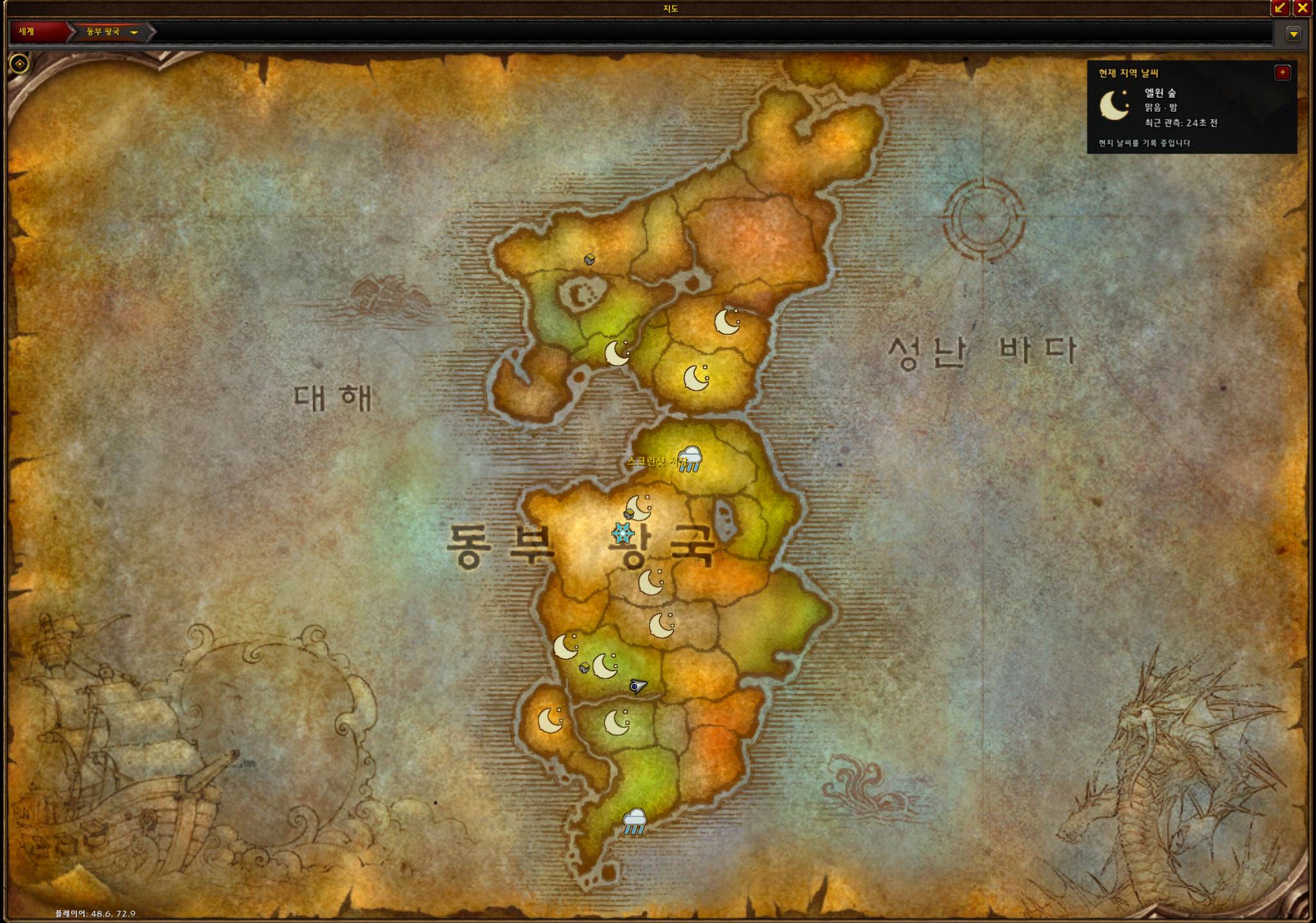
와천의는 월드 오브 워크래프트: 포에버에서 아제로스 각 지역의 날씨를 자동 관측하고, 지도에 표시하며, 다른 사용자와 관측 정보를 공유하는 애드온입니다.
🇰🇷 한국어 안내
주요 기능
1. 자동 기상 관측
-
현재 지역의 날씨를 자동으로 관측하고 기록합니다.
-
날씨 종류와 강도, 관측 시각을 저장합니다.
-
마지막 관측 정보를 이용해 다른 지역의 날씨를 확인할 수 있습니다.
2. 세계지도 및 지역별 날씨 표시
-
세계지도와 대륙지도에 지역별 날씨 아이콘을 표시합니다.
-
관측 기록이 없는 지역은 하늘색 물음표로 표시합니다.
-
관측 시각과 정보 출처를 확인할 수 있습니다.
-
지역 날씨 패널의 위치와 표시 설정을 조절할 수 있습니다.
3. 미니맵 날씨 표시
-
미니맵 주변에 날씨 및 시간 관련 표시를 제공합니다.
-
지원되는 설정을 통해 애니메이션과 위치를 조정할 수 있습니다.
4. 기상 정보 공유
-
다른 와천의 사용자와 관측 데이터를 교환합니다.
-
지원되는 길드·커뮤니티·파티 통신 기능을 활용합니다.
-
관측자가 많아질수록 더 넓은 지역의 기상 정보를 수집할 수 있습니다.
5. 특이 기상 현상 제보
-
자동 API 관측으로 구분하기 어려운 뇌우, 번개, 강풍, 안개 등의 현상을 수동으로 기록할 수 있습니다.
-
수동 제보는 자동 관측과 구분되며, 모든 제보가 검증된 날씨를 의미하지는 않습니다.
설치 및 기본 사용법
-
CurseForge 앱으로 설치하거나 다운로드한
Wacheonui폴더를 게임의Interface/AddOns폴더에 넣습니다. -
게임의 애드온 목록에서 와천의를 활성화합니다.
-
게임에 접속해 여러 지역을 탐험하면 지원되는 날씨 정보가 자동으로 기록됩니다.
-
세계지도 또는 대륙지도를 열어 지역별 날씨 아이콘을 확인합니다.
-
미니맵 아이콘과 설정 UI를 이용해 표시 방법을 조절합니다.
-
다른 와천의 사용자와 정보를 공유하려면 통신 설정을 확인합니다.
주요 명령어
| 명령어 | 기능 |
|---|---|
/wcn |
도움말 및 명령어 목록 |
/와천의 |
와천의 명령어 실행 |
/wcnui |
설정 UI |
/wcn status |
관측 및 공유 상태 |
/wcn network |
네트워크 연결 정보 |
/wcn share on |
관측 정보 공유 활성화 |
/wcn share off |
관측 정보 공유 비활성화 |
/wcn sync |
지원되는 그룹 통신을 통한 동기화 요청 |
/wcn history |
관측 기록 확인 |
/wcn map |
지도 표시 관련 기능 |
/wcn report fog |
안개 현상 수동 기록 |
/wcn report wind |
강풍 현상 수동 기록 |
/wcn report thunder |
천둥 현상 수동 기록 |
/wcn report lightning |
번개 현상 수동 기록 |
/wcn reports |
수동 제보 기록 확인 |
/wcnclock |
미니맵 시간·날씨 표시 모드 설정 |
/wcnanim on |
날씨 애니메이션 활성화 |
/wcnanim off |
날씨 애니메이션 비활성화 |
일부 명령어와 설정은 설치 버전에 따라 다를 수 있습니다. 자세한 명령어는 게임 내 /wcn으로 확인하세요.
날씨 표시 종류
맑음, 구름, 흐림, 비, 폭우, 눈, 뇌우, 돌풍, 모래폭풍 및 미관측 상태 등을 표시하거나 기록하는 것을 목표로 합니다.
게임 API가 모든 기상 현상을 개별적으로 제공하는 것은 아니므로, 일부 현상은 자동 구분이 불가능하거나 수동 제보가 필요할 수 있습니다.
위상별 날씨 공유 개발 안내
서로 다른 위상에서 관측된 날씨가 혼합되지 않도록 독립적인 위상 식별 및 관측 정보 분리 기능을 개발하고 있습니다.
현재는 테스트 단계이며, 위상 후보를 식별하는 방식이 실제 게임 서버의 위상 구분과 정확히 일치하는지는 검증 중입니다.
주의사항
-
와천의는 관측 기반 애드온이며 미래 날씨를 정확히 예측한다고 보장하지 않습니다.
-
다른 지역의 관측 정보는 현재 날씨와 다를 수 있습니다.
-
위상, 서버 환경, 게임 API 및 통신 제약에 따라 관측 결과가 달라질 수 있습니다.
-
다른 플레이어와의 정보 공유는 지원되는 통신 경로와 애드온 설치 여부에 영향을 받습니다.
-
개발 중인 기능은 업데이트에 따라 변경될 수 있습니다.
🇺🇸 English Guide
Features
Automatic Weather Observation
-
Detects supported in-game weather conditions.
-
Records weather types, intensity and observation timestamps.
-
Preserves the latest available regional observations.
Interactive World Map
-
Displays regional weather icons on world and continent maps.
-
Marks unobserved regions with a blue question mark.
-
Shows observation timestamps and available source details.
Minimap and Interface
-
Provides compact weather and time indicators.
-
Supports configurable display options and weather animations.
Community Weather Sharing
-
Exchanges weather observations with other WACHEONUI users through supported in-game communication channels.
-
Supports group synchronization and community-based weather reporting.
Manual Weather Reports
-
Allows players to record unusual weather phenomena such as thunder, lightning, wind and fog.
-
Manual reports are distinguished from automatic observations.
How to Use
-
Install and enable WACHEONUI.
-
Explore Azeroth to collect weather observations automatically.
-
Open the world map to inspect regional weather information.
-
Use the minimap icon or settings interface to adjust the display.
-
Enable sharing with
/wcn share onwhen appropriate. -
Use
/wcnto view available commands.
Useful Commands
| Command | Description |
|---|---|
/wcn |
Help and available commands |
/wcnui |
Settings interface |
/wcn status |
Observation and sharing status |
/wcn network |
Network information |
/wcn share on |
Enable weather sharing |
/wcn share off |
Disable weather sharing |
/wcn sync |
Request supported group synchronization |
/wcn history |
Observation history |
/wcn report fog |
Report fog |
/wcn report wind |
Report strong wind |
/wcn report thunder |
Report thunder |
/wcn reports |
View manual reports |
Experimental Layer-Aware Sharing
Layer-aware weather observation and synchronization are under development.
The system aims to prevent observations from different world layers from being incorrectly merged. Reliable layer identification is still being tested and is not guaranteed.
Important Notes
WACHEONUI is an observation tool, not a guaranteed weather forecasting service.
Weather reports may become outdated. Weather detection, layer identification and data sharing are subject to game-client limitations. Some weather effects cannot be independently identified by the available API.
Compatibility
-
Game: World of Warcraft: Forever
-
Addon: WACHEONUI – Azeroth Weather Observatory
-
Development status: Actively maintained
-
Current public release: v0.8.4
About the Project
WACHEONUI (와천의) aims to build a collaborative weather observation network across Azeroth.
Uncover the secrets of the skies and predict the weather ahead.
Created by Yame92 (야매92)
This is an independent community addon project and is not affiliated with or endorsed by Blizzard Entertainment.
License: All Rights Reserved.
WACHEONUI (와천의) – Azeroth Weather Observatory Team