VuMaster
- By
A lightweight minimap utility for quick and easy control of your master volume and audio channels.
VuMaster01.jpg
VuMaster02.jpg
Description
VuMaster
Tired of constantly opening the system menu just to adjust your game audio? VuMaster is a lightweight, clean, and highly accessible World of Warcraft addon that gives you instant control over your audio settings directly from a handy minimap button. Whether you're hopping into a Discord call, entering a loud raid, or just want to enjoy the zone's music, VuMaster lets you tweak everything on the fly without breaking your immersion.
✨ Key Features
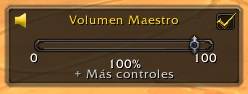
- Quick Volume Control: Instantly adjust your Master Volume using a native-looking slider right from the minimap.
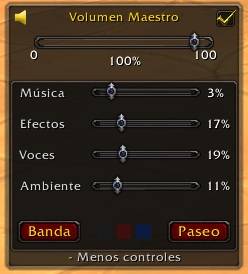
- Granular Channel Tuning: Expand the panel to fine-tune specific audio channels like Music, Sound Effects, Dialogs, and Ambience.
- 1-Click Audio Profiles: Quickly swap between pre-configured equalizations. Switch to "Raid Mode" (prioritizes voices and effects, lowers music) or "Walk Mode" (a balanced immersive experience) with a single click.
- Customizable Themes: Tailor the panel's appearance to fit your UI. Choose between a Classic Noir design, a Horde-inspired Red, or an Alliance-inspired Blue.
- Smart Anchoring: Use the "Pin" feature to keep the volume panel visible while you play, or let it auto-hide seamlessly when you click away.
- State Memory: The addon remembers your panel position, color theme, and visibility state across sessions.
⚙️ How to Use
- Left-Click the VuMaster icon on your minimap to toggle the main volume control.
- Click on "+ More controls" inside the panel to expand options, adjust individual audio channels, apply quick profiles, or change the window's visual theme.
🌍 Multilanguage Support
VuMaster is fully localized out of the box! It supports English, Spanish, German, French, Portuguese, Russian, and Italian. The addon will automatically adapt to your game client's language.
If you like this addon, please consider spreading the word! Feel free to leave your feedback and suggestions in the comments.
The VuMaster Team