Vortex Raid Tool
- By
Your raid's assignments in game with the room picture beside them, and a Professions tab: every craft, who in the guild can make it and what it needs — kept current by the guild itself, no spreadsheet.
Description
Vortex Raid Tool
The in-game half of Vortex Raid Tool, for World of Warcraft: The Burning Crusade Anniversary guilds (WoW: Forever from its launch day): your raid's assignments with the room picture beside them, a Professions tab for the whole guild, and your resistance gear, known recipes, guild bank and guild roster read off your own character instead of typed into a spreadsheet.
Who in the guild can make it
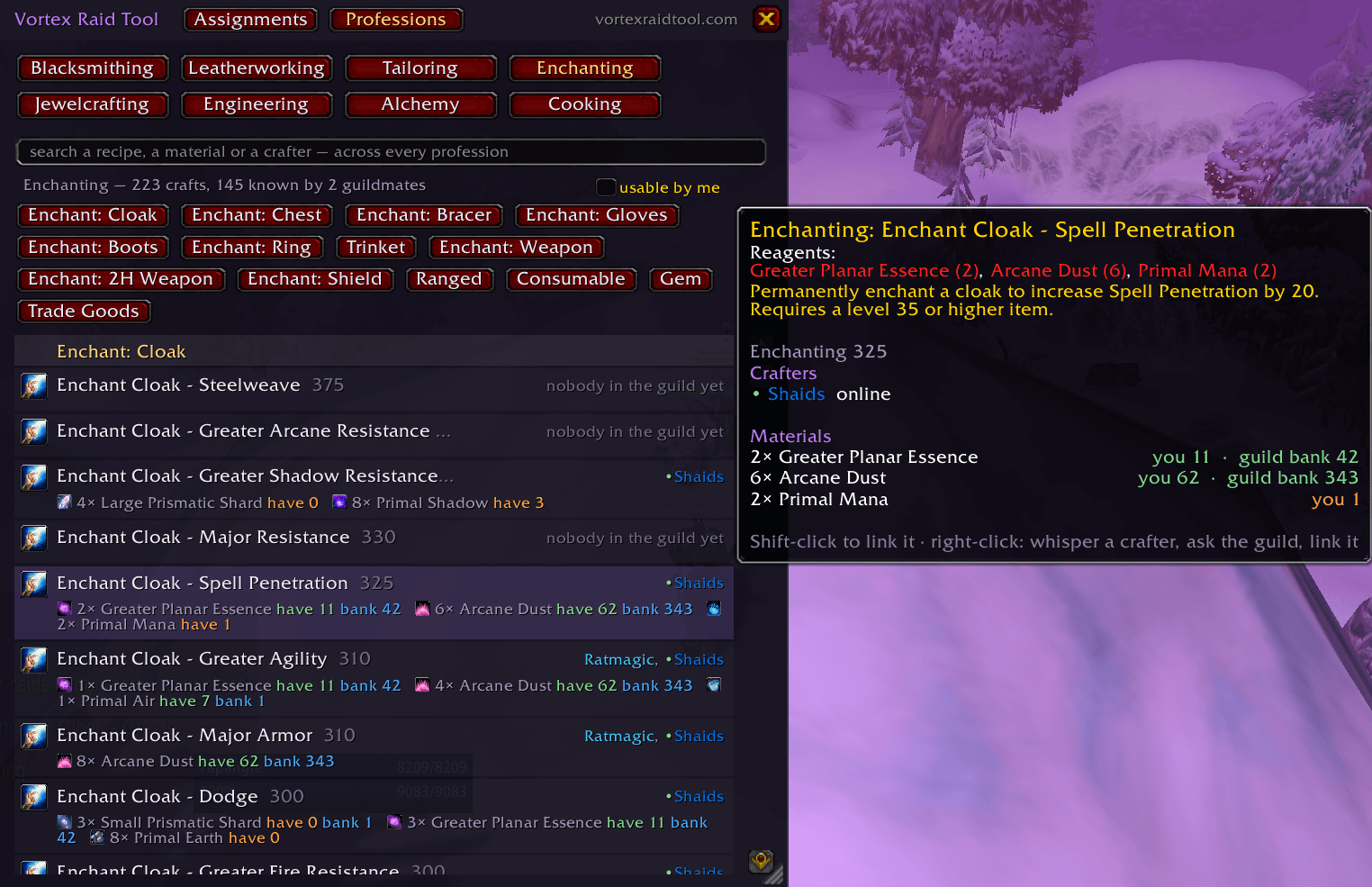
The Professions tab. Every craft of every profession — Blacksmithing, Leatherworking, Tailoring, Enchanting, Jewelcrafting, Engineering, Alchemy and Cooking — grouped by slot the way a character sheet reads, highest skill first. Pick a profession, pick a slot (Wrist, Cloak enchants, Consumables…) and each row names the guildmates who know the recipe, in class colour, with a green dot when they are online right now. A craft nobody in the guild has yet is still listed, so you can see what the guild is missing.
What it needs. Hover a row and the materials are there, exactly as the crafter's own profession window lists them, with icons and counts. Search a recipe, a material or a crafter across every profession, or type /vrt who mongoose. Shift-click a row to link the item in chat; right-click for the crafters, and one click whispers.
Nobody maintains it. The guild keeps the list current by itself. Open a profession window and your recipes, with their materials, reach every guildmate who runs the addon; a client that logs in asks the guild for whatever it lacks, and asks again every half hour. The more of the guild runs it, the more complete the tab gets. This part needs nothing but the addon: no website, no account, nothing to set up.
What you see at the pull
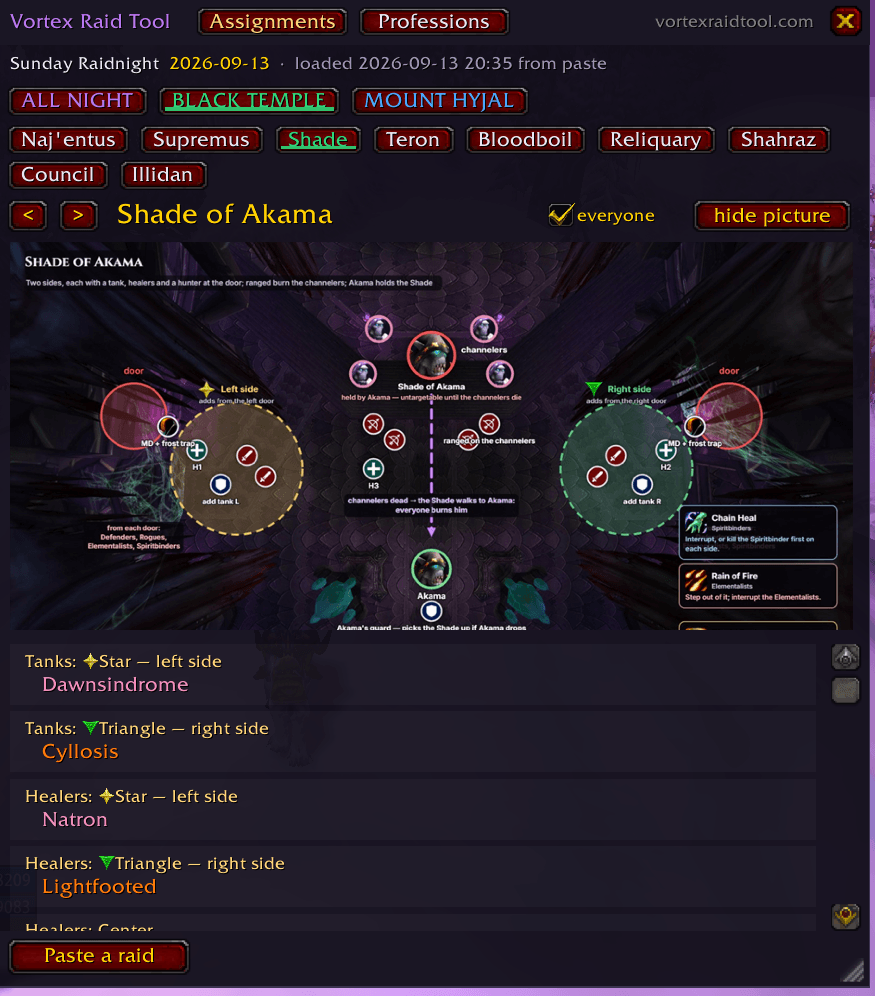
Your own jobs for the boss you are on. Who interrupts, who dispels, which mark you stand on, which group you are in — your name highlighted in the list, everyone in their class colour, and the room picture beside it. Click the boss you want or let it follow your target.
The picture is the point. The room pictures from the assignment sheets ship inside the addon — every Black Temple, Mount Hyjal and Sunwell Plateau boss, Illidan phase by phase — so you can see where to stand without alt-tabbing to a browser mid-pull. Drag to move, wheel to zoom.
Your raid leader hands it to everyone. One officer sends the sheet over the raid channel and nobody else copies anything. A row changed at the pull — a swap, a sub, someone dead — reaches the raid the moment it is decided, marked as changed, and can be put back.
What it does without being asked
Your resistance gear. It reads what you actually own — worn, in your bags, in your bank — counting gems and enchants, per slot, so a resistance set is real numbers instead of a guess typed into a spreadsheet. Open your bank once and what is in there keeps counting wherever you are.
Your known recipes. Open a profession window, Enchanting included, and your list is kept for every character of yours in the guild, alts included: whichever one you are on, your answer covers all of them. No screenshots, no spreadsheet, no asking in guild chat whether anyone can make the thing.
The guild bank and the guild roster, for whoever runs the guild: the bank as you saw it, and the roster as the game lists it — names, ranks, notes, last online — so the officers' pages match the game.
And the guild keeps itself up to date. Whatever one client reads reaches the guildmates who run the addon, over the game's own addon channel: your gear when it changes, your recipes when you learn one, the bank when someone opens it. Nothing is printed in anybody's chat — the addon does not write in chat at all, except one line when the raid leader sends or changes the assignments; everything else it has to say goes to its own log (/vrt log). So one person's uploader carries the whole guild to the website, and twenty-five raiders do not each need to install anything but this. /vrt share off keeps a character out of it.
What it needs
The addon is free, and the Professions tab and the guild sync work with nothing else. What the rest displays is made on vortexraidtool.com, which your guild sets up once — a Discord bot and a site that builds assignments from your Raid-Helper comp and works out loot priority from your Warcraft Logs. Want to see it on your own raid first? Paste a Raid-Helper event link at vortexraidtool.com/hub/try — no account.
Being straight about the money: raid assignments are part of the paid tier ($5 a month or $49 a year, with 14 days of it free for every new guild, no card). Loot priority, wishlists, loot history, the request queues and the resistance-set tracking this addon feeds are all on the free tier. If your guild does not use the site at all, this addon still gives you the Professions tab and the guild sync, and nothing else.
A raider needs nothing but the addon. One person in the guild sets the rest up.
Installing
The CurseForge app installs and updates it like any other addon — that is the way to have it, because the whole raid stays on the same version without anyone asking.
By hand: extract the VortexRaidTool folder into
World of Warcraft\_anniversary_\Interface\AddOnsOne folder, the pictures inside it, nothing else to install. Restart the game — a /reload is not enough for an addon the client has never seen. If it does not appear, tick Load out of date AddOns on the character screen.
Upgrading from 0.3.0 or older: the pictures used to be a second folder. Delete Interface\AddOns\VortexRaidTool_Pictures or the game keeps drawing the old copies of the pictures.
Commands
/vrt and /vortex are the same command.
/vrt |
open and close the window |
/vrt paste |
paste a raid from the assignments page |
/vrt send |
send it to everyone in the raid who has the addon (raid leader or assistant) |
/vrt as <name> |
look up another name's assignments — on an alt, type your main |
/vrt ask |
ask the raid for resistance gear (raid leader or assistant) · /vrt ask recipes asks the guild for recipes — every character of each raider's in the guild answers (a rank that can promote) · /vrt ask version asks everyone's addon version |
/vrt gear |
what it has read off your own character · /vrt gear <slot> one item, every way it was read |
/vrt bank |
the last guild bank read, and whether the reader is listening |
/vrt guild |
the last guild roster read — every character, rank and note — and a fresh one |
/vrt who <text> |
the professions tab: every craft by slot, who in the guild has it and what it needs — /vrt who mongoose searches |
/vrt sync |
ask the guild for what this client lacks — it does so by itself after login and every half hour |
/vrt share on|off |
take part in the guild keeping itself up to date: gear, recipes and bank reads (on unless you say otherwise) |
/vrt log |
everything the addon has done lately — it never writes in chat |
/vrt comms |
what this client has actually sent and heard |
/vrt reset |
put changed rows back the way the sheet has them |
/vrt clear |
forget the raid |
/vrt minimap |
hide or show the minimap button |
What leaves your game
Nothing, except to your own guild. A World of Warcraft addon cannot make a network request at all — everything here travels over the game's own addon channel to other people in your raid or guild who have it, and reaches the site only through an officer who runs the uploader on their own PC. A client only ever speaks for its own character.
What the uploader carries from the SavedVariables: your character's resistance gear and known recipes, the guild bank as you saw it, and the guild roster as the game lists it — names, ranks, levels, classes, the guild notes and how long since each was online. All of it is already visible to every member in the guild window; it goes only to your own guild's site, where officers use it to keep the roster straight. Every read is stamped with the game client it came from and the realm, so a guild that plays two games sends each read to the right site and a site never takes the other game's.
Where to shout about it
Bugs, requests and questions: the help Discord, linked from vortexraidtool.com. What changed in each version: vortexraidtool.com/changes.
Vortex Raid Tool Team