Voidsim - Wow Forever Sim Export
- By
Export your character data to Sim your World of Warcraft: Forever character on voidsim.io/forever. Get your DPS breakdown, best gear and best loot.
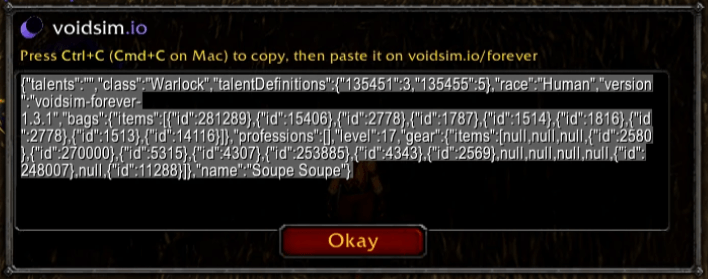
voidsim exporterpng.png
Description
Voidsim - WoW Forever Sim Export exports your WoW Forever character so you can simulate it on voidsim.io/forever. Get your DPS breakdown, find your Best Gear, and see which loot is your biggest upgrade. Free, in your browser.
Click the minimap button (or type /vsf), copy the export, and paste it into the Import character box on voidsim.io/forever. That's it.
Why sim on voidsim.io
- DPS in your browser. The simulation engine runs locally on voidsim: no uploads, no queue, no account.
- Full damage breakdown. See exactly where your damage comes from, ability by ability, with crit rates.
- Best Gear & Best Loot. Compare upgrades and rank your loot so you know what to chase.
- Editable talents & gear. Import your character, then tweak talents, gear, enchants, and consumables and re-sim instantly.
- Shareable reports. Every sim gets a permalink you can send to your friends and guild.
How to use it
- Install the addon.
- Click the Voidsim minimap button, or type
/vsf. - Press Ctrl+C to copy the export.
- Open voidsim.io/forever, paste into Import character, and hit Import.
- Set your simulation settings and press Run.
Commands
/vsf— open the export window (text pre-selected to copy)/vsf minimap— show or hide the minimap button/vsf help— list commands
Report a problem
Found a bug or a wrong number? Tell us on voidsim's Discord.
voidsim is an independent theorycrafting workspace. The WoW Forever simulation engine is the open-source wowsims/forever project, which voidsim compiles and runs in your browser.
The Voidsim - Wow Forever Sim Export Team