Screenshot 2026-10-09 161451.png
Screenshot 2026-10-09 161436.png
Screenshot 2026-05-06 222937.png
Screenshot 2026-05-06 192137.png
Screenshot 2026-05-06 191837.png
Description
VoidShieldHelper
A lightweight indicator for Discipline Priests that shows how likely your next Penance casts are to proc Void Shield, and how many charges you are holding.
Requires WoW 12.1 or later.
Setup
Two things need to be in place. The debug window shows a green line for each once it is found.
- Power Word: Shield on an action bar. The addon tells whether you hold a charge from the PW:S button's icon. Place the spell directly from the spellbook; a macro that casts PW:S will not work. If you use a macro, put the raw spell in any spare slot on another bar. It does not need to be visible.
- The Void Shield buff in Blizzard's Cooldown Manager (recommended). Turn the Cooldown Manager on (Options → Gameplay → Advanced), open its settings, and move the Void Shield proc buff into Tracked Buffs or Tracked Bars. This lets the addon tell 1 charge from 2. It works even though the icon only shows while the buff is up.
Without step 2 the addon still works, but it has to guess the charge count from your casts, and more Penance casts are recorded as unknown.
On first login the lights appear in the centre of the screen with the debug window beside them. Drag them where you want, click Options on the debug window (or type /vsh) to customise, then lock the frames.
Reading the lights
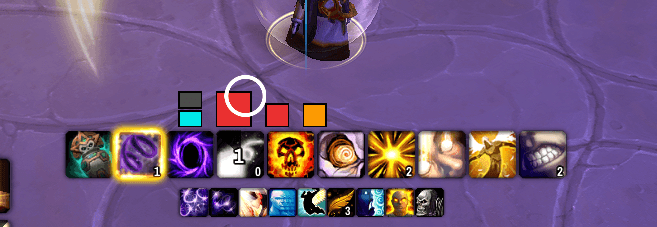
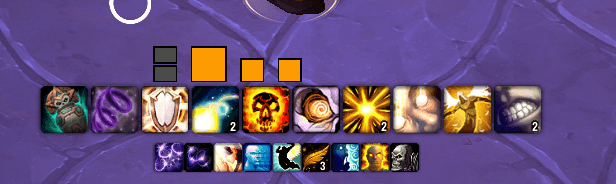
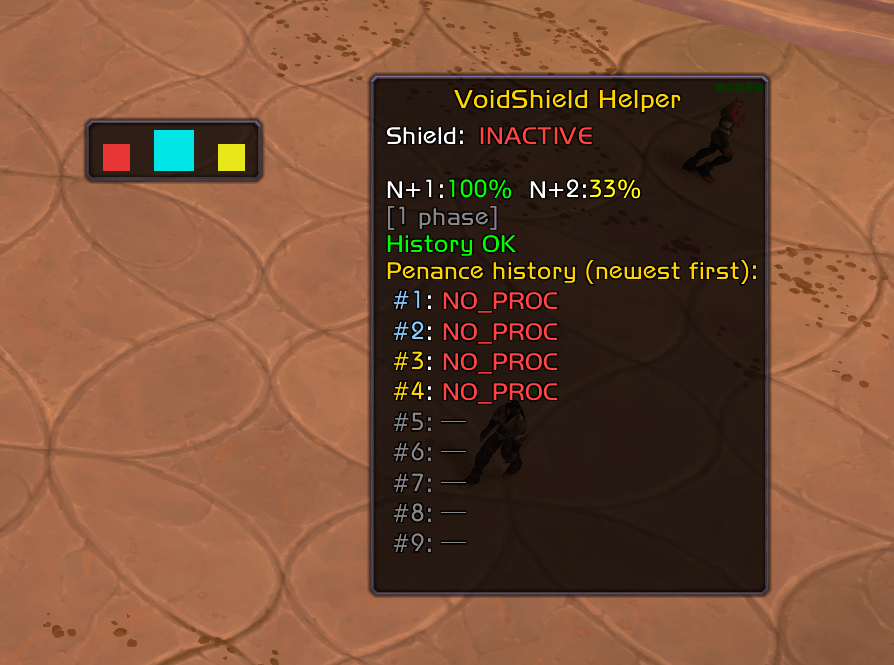
The frame has four slots, one per card of the Penance deck:
[status] [N+1] [N+2] [N+3]
| Slot | Meaning |
|---|---|
| Status | One light per Void Shield charge. Lit = charge held. |
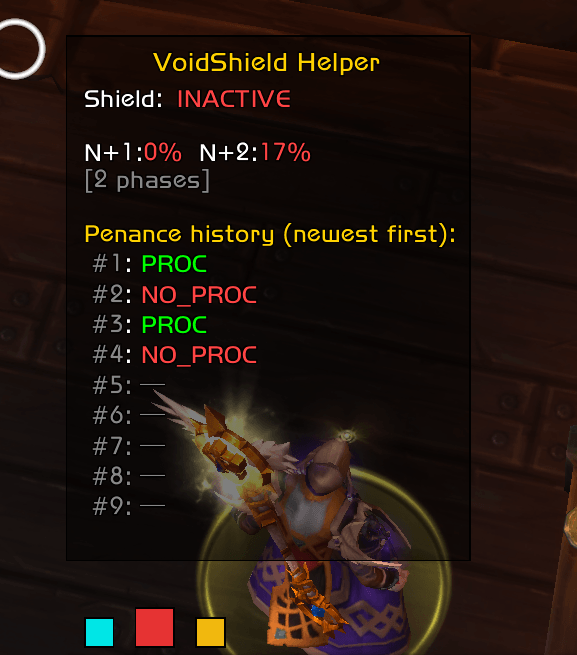
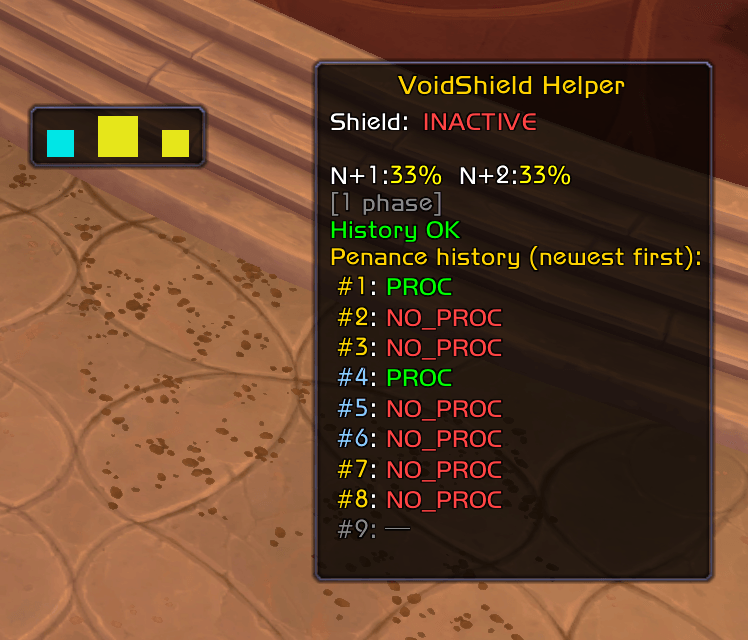
| N+1 (large) | Chance your next Penance procs |
| N+2 | Chance the Penance after that procs |
| N+3 | Chance the one after that procs |
Prediction colours: cyan (100%, will proc) → green (≥ 66%) → yellow (≥ 33%) → orange (< 33%) → red (0%, won't proc) → grey (not enough data). A smooth gradient is used by default; discrete steps are available in the options.
The glow: when you hold 2 charges and the next Penance could still proc, the status lights play the same glow your action bars show for a proc. That proc would be wasted at the cap, so spend a charge first.
How it works
Void Shield follows a deck mechanic: every 4 Penance casts contain exactly one proc, so the first card is 25% and the odds rise as cards are turned without a proc. The addon doesn't know where in the deck you started, so it tracks every possible starting position in parallel, drops the ones your cast history rules out, and averages the rest.
Void Shield holds up to 2 charges. Mind Blast grants a charge outright; it never turns a deck card, so it doesn't affect the prediction.
A Penance is recorded as unknown when the addon can't tell whether it procced: always at 2 charges (there is no room for a third), and at 1 charge if the Cooldown Manager isn't tracking the buff.
Options
Open with /vsh, the Options button on the debug window, or ESC → Options → AddOns → VoidShieldHelper.
Sizes and directions are set relative to the layout, so they keep their meaning when you switch between horizontal and vertical: along is the direction the four slots run, across is perpendicular to it.
| Tab | What you can change |
|---|---|
| General | Show the debug window, lock frames, hide out of combat, frame scales, proc-check delay, prune offsets on zone entry, smooth or discrete colours |
| Frame | Forecast frame background colour, border and texture |
| Layout | Horizontal or vertical, alignment across (start / center / end), spacing along |
| Prediction | Texture, size of N+1 and of N+2 / N+3, border |
| Status | Texture, total size along and across, stack direction and spacing, held / empty colours, border |
| Debug | Debug window background, border and texture; the event log |
Locking makes both frames fully click-through: no dragging, and clicks pass to whatever is underneath. The Options button is hidden while locked; use /vsh.
Textures come from LibSharedMedia if another addon provides it.
Debug window
Shows the current charge count (prefixed with ~ when it is inferred from your casts rather than read from the Cooldown Manager), whether PW:S and the Cooldown Manager buff were found, the raw N+1 / N+2 / N+3 percentages, and your recent Penance history coloured by deck. Hide it from the General tab once you're set up.
Acknowledgements
- 12.1 deck and charge support adapted from Void Shield Tracker by anozireth, a port of this addon.
- Proc detection approach inspired by Void Shield Proc Tracker.
- Void Shield deck mechanic explained in this video.
Feedback & bugs
Please report issues on the GitHub repository or via the CurseForge comments.
Void Shield Helper Team