VoidcoreAdvisor Reborn
- By
VoidcoreAdvisor Reborn
VoidcoreAdvisor Reborn is a continuation of the addon VoidcoreAdvisor by rolferik12. It is made with the author's permission, using his MIT license, his name and his original files, with my own improvements integrated on top. All credit for the original addon goes to rolferik12. The original is no longer updated and does not work on the current patch; Reborn keeps it alive.
What it does
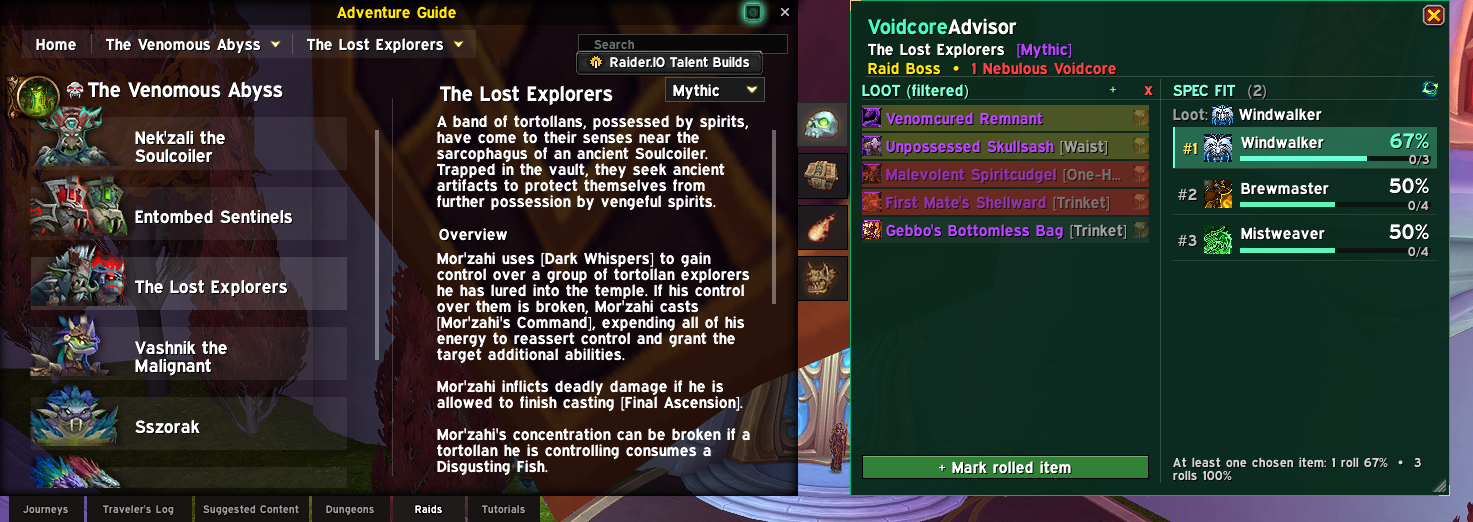
VoidcoreAdvisor Reborn is a World of Warcraft addon for Retail (patch 12.1.7) that helps you make informed decisions when spending Nebulous Voidcores. It attaches a side panel to the Adventure Guide (Encounter Journal) that displays the full loot pool for each raid boss or Mythic+ dungeon, broken down by specialization, alongside probability rankings that show which loot spec gives you the best odds of receiving the items you are after.
When you open the Adventure Guide and browse a boss or dungeon, the addon automatically shows every item available from that source. You can select the specific items you are chasing, and the panel recalculates the probability for each of your specializations in real time, telling you the exact percentage chance that a Voidcore roll will land on one of your selected items for each spec. Specs with smaller remaining loot pools rank higher because each individual item has a greater share of the roll.
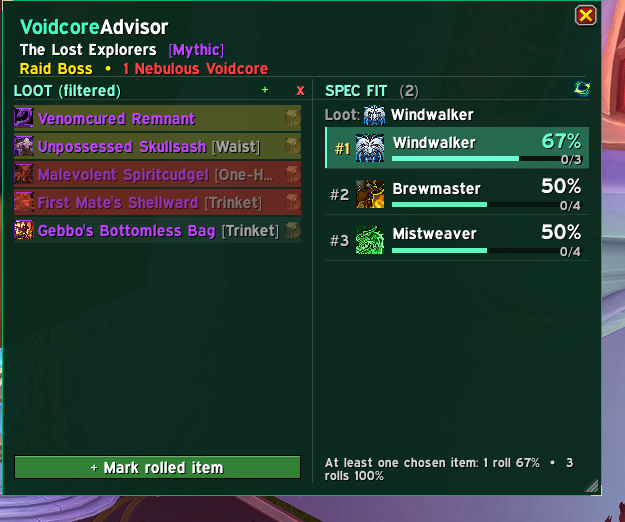
The addon tracks which items you have already obtained, either through manual marking, through automatic detection after boss kills and Mythic+ completions, or by scanning your loot specializations against the Nebulous Voidcache to determine which items each spec can receive. Obtained items are excluded from the remaining pool calculations, so your probability numbers stay accurate as you gear up over the course of a season. Item selections and obtained status are saved per character.
What's new in Reborn
- Works on the current patch (the removed global item functions were replaced with their
C\_Itemversions). - Fixed Voidcore rolls not being tracked when the boss selected in the Adventure Guide was not the boss that dropped the item. Rolls saved by the old version are applied again when you log in.
- Loot of The Unbinding of Kith'ix ships with the addon, for every class and spec. A banner warns you when a newer raid is missing from the data, and
/void liveraidreads it from the Adventure Guide. - New Mark rolled item bar in two steps: press it, click the items you got (they dim right away), then press it again to save. Hold Shift to mark everything between two clicks.
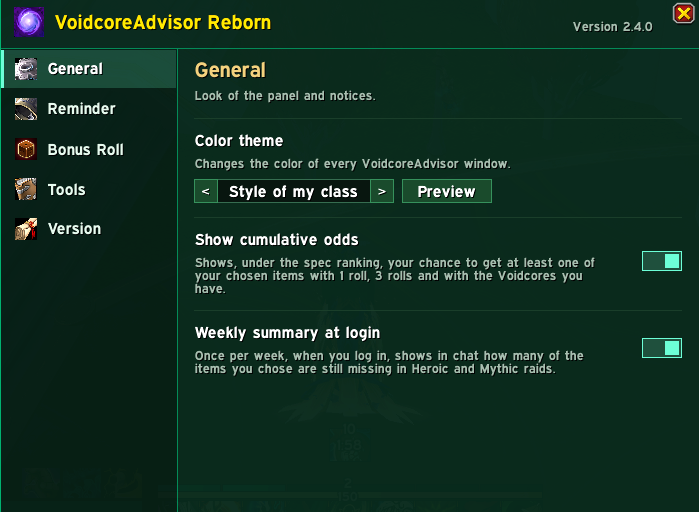
- Cumulative odds under the spec ranking: your chance to get at least one chosen item with 1 roll, 3 rolls and with the Voidcores you have.
/void cores(Voidcores you have, spent this week and needed for your list),/void next(where to spend the next one, best first),/void history(your rolls and luck) and/void chars(what each of your characters still needs).- Wishlist: item priorities (
/void prio, best in slot or alternative, used by the spec ranking),/void wishto paste a list of item IDs or links (for example from Raidbots) and a green + button that chooses everything your loot spec can still get. - A weekly summary at login tells you how many chosen items you still miss, and the raid overview links to the list of all your characters.
- A settings window of its own (
/void openor the addon button in the game's Options) with tabs for the look, the reminder, the bonus roll, shortcuts to every tool and a Version tab with what each version adds and the credits. - A new spec ranking with a progress bar per spec, and items that will not drop for the spec in use tinted red (dark = already obtained).
- The panel shows the difficulty (Normal, Heroic, Mythic, Raid Finder, or Mythic+) next to the boss or dungeon name.
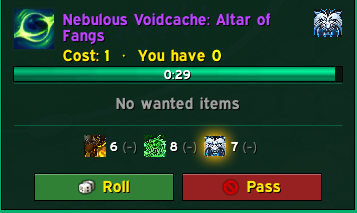
- Redesigned bonus roll window with a green Roll button, a red Pass button, a timer with the time left and an optional "Are you sure?" confirmation. It is enabled by default.
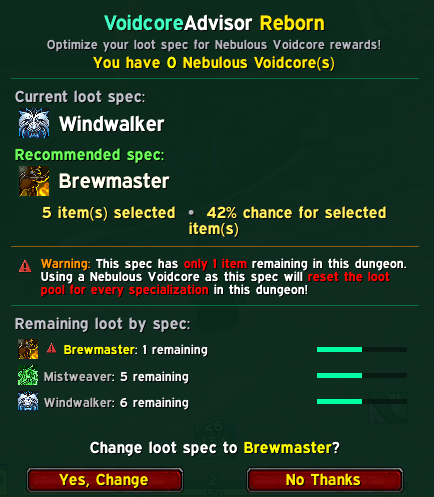
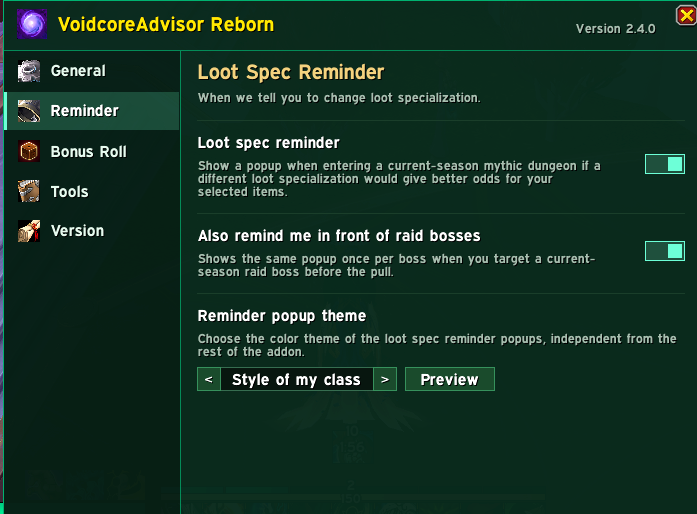
- The loot spec reminder also appears in front of raid bosses (once per boss, again after a wipe), with its own option and a flat themed look.
- 22 color themes: venom green (default), void purple, arcane blue, light, fire, frost, red, one for each class, plus one that follows you. The color theme, the roll window and the reminder each have their own selector and a Preview button in the settings window.
/void openopens that window directly. /void missinglists every item you still need, best odds first./void panelopens the Adventure Guide on a boss or dungeon./void exportand/void importcopy your marked items between characters.- The panel can be moved and resized, and the raid overview shows a progress bar per boss. The raid overview explains what to do instead of showing an empty table.
- Louder warning when only 1 item is left for your spec.
- All texts translated in 11 languages.
/void debugopens a window with the information to attach to a bug report.
Important: disable or remove the original VoidcoreAdvisor before using Reborn, because both use the same saved variables.
Mythic+ dungeons and raids
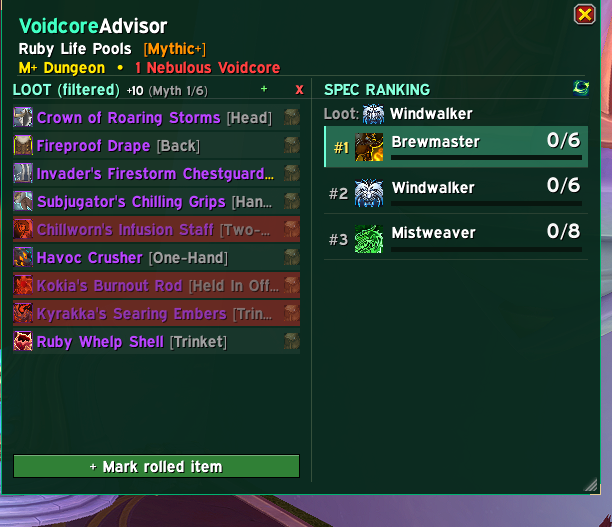
The panel works for raid bosses (Normal, Heroic, Mythic) and for Mythic+ dungeons, with an adjustable key level that updates tooltip item levels to match the Voidcore reward track. Slot filters and spec/item filtering with cross-column highlighting help you compare options.
Mark rolled item
Got an item from a Voidcore roll that the addon did not track? Press the green Mark rolled item bar at the bottom of the loot list, then click the items you got. Click an item again to unmark it, or hold Shift and click a second item to mark everything in between.
Bonus roll window
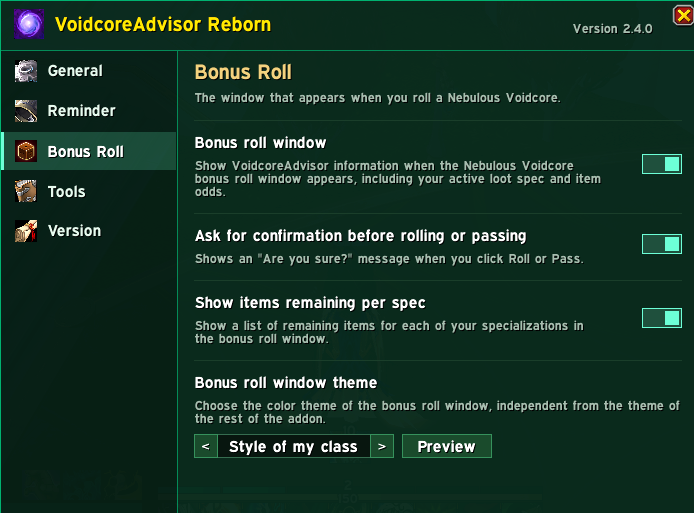
When a Nebulous Voidcore prompt appears, Reborn replaces the default prompt with a window that shows the item, your Voidcore count, the cost of the roll, your active loot spec, the wanted items you still need, per-spec counts and a live timer. The green Roll button and the red Pass button can ask "Are you sure?" before acting (optional, on by default), so you cannot spend a Voidcore by accident. A red warning and a sound alert you when only 1 item is left for your spec. You can preview the window without spending anything with the Preview button next to the roll window theme in the options.
Automatic Voidcache loot scanning
The addon can read the Nebulous Voidcache tooltip for every one of your loot specializations to determine exactly which items each spec can receive. Items that a spec cannot receive are marked as obtained, which removes them from that spec's remaining pool and keeps the probability numbers accurate without any manual work. The scan waits until the tooltip data has fully loaded, stops if you enter combat or change your loot spec, and saves a backup first; if the results look wrong, type /void restore to roll back.
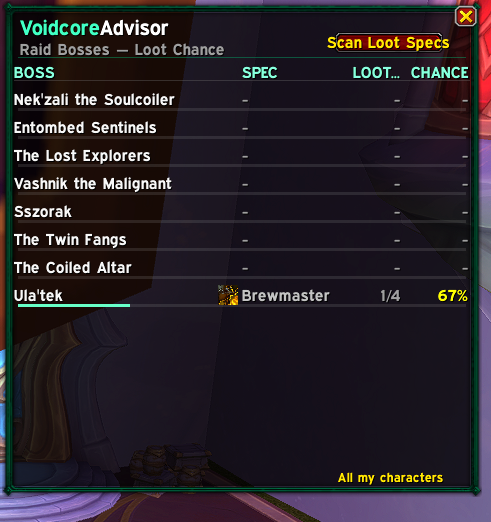
Mythic+: click Scan Loot Specs in the top-right corner of the Dungeon Overview. Raid: click it in the Raid Overview. Both buttons are disabled inside instances and while a scan is running.
Overviews
Dungeon Overview: ranks the current-season Mythic+ dungeons by your best possible Voidcore odds, with slot buttons to narrow the ranking to the pieces you are targeting.
Raid Overview: lists every boss with its best spec, the items remaining, the probability and a progress bar, so you can see which bosses are still worth rolling on.
Loot spec recommendations
When you enter a current-season Mythic+ dungeon, the addon checks whether your active loot spec is the best match for the items you selected. If another spec gives better odds and you have a Voidcore to spend, a popup shows your current spec, the recommended one and the odds, and lets you switch with one click. It appears once per dungeon and can be disabled.
Options, themes and commands
The settings window (type /void open, or press the button of the addon in Game Menu > Options > AddOns) lets you choose the color theme of the panel, of the bonus roll window and of the reminder popup (each with a Preview button) and toggle the bonus roll window, the confirmation step, the recommendation popup (also in front of raid bosses), the cumulative odds line and the per-spec item lists.
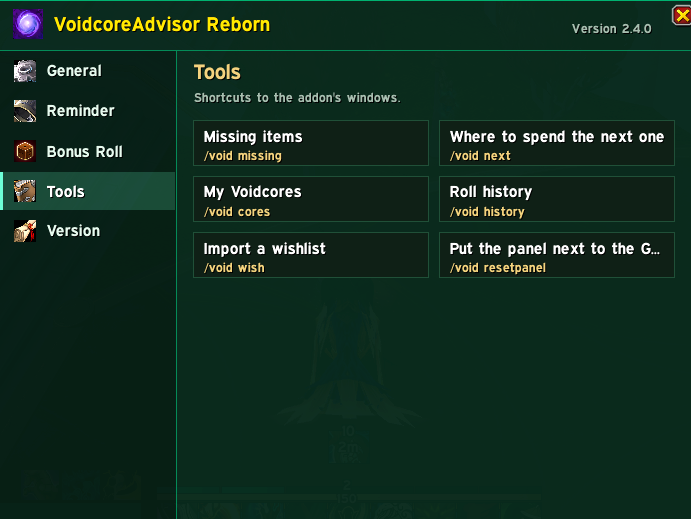
/voidshows the list of commands./void openopens the addon settings window (themes, previews and tools)./void panel \[name\]opens the Adventure Guide on a boss or dungeon./void missing \[14|15|16\]lists every item you still need for your loot spec./void cores \[14|15|16\]shows the Voidcores you have, spent this week and needed for your list./void next \[14|15|16\]ranks bosses and dungeons by your chance of a chosen item./void historyshows your Voidcore rolls with each item's icon and your luck compared with the odds./void charslists what each of your characters still needs./void prio <item> bis|alt|clearsets an item priority./void wish \[min gain %\]chooses items from a pasted list of IDs, links or a Raidbots list./void select \[clear\]chooses everything your loot spec can still get from the open boss./void exportand/void importcopy your marked items between characters./void theme <name>changes the window colors (green, purple, blue, light, fire, frost, red, class, or a class such as mage or priest)./void previewopens the sample window to try themes./void resetpanelputs the panel back next to the Adventure Guide./void perfshows the memory and CPU used by the addon./void debug,/void restore,/void replaylog,/void liveraid,/void version.
Frequently asked questions
I used the original VoidcoreAdvisor. Do I lose my data? No. Reborn uses the same saved variables, so your marked items and choices carry over. Remove or disable the original addon, put the VoidcoreAdvisorReborn folder in your AddOns folder and start the game.
What do I have to disable? The original VoidcoreAdvisor. Both register the same options and saved variables, so running them together causes errors. Reborn warns you in chat if it finds the original enabled.
A new raid is not in the addon yet. Reborn tells you with a message and a banner. Type /void liveraid to read its loot from the Adventure Guide, or wait for the next release.
How do I report a bug? Type /void debug in game, copy the text and open an issue on GitHub (there is a bug report template) or leave a comment here.
Credits and license
Original addon and artwork by rolferik12 (MIT license, copyright 2026 rolferik12). Reborn is maintained by KingKhaax and released under the same MIT license.
Found a bug or have an idea? Open an issue on GitHub or leave a comment, and tell me which character, boss and difficulty it happened on.
VoidcoreAdvisor Reborn Team