
VitushaUnitFrames
- By
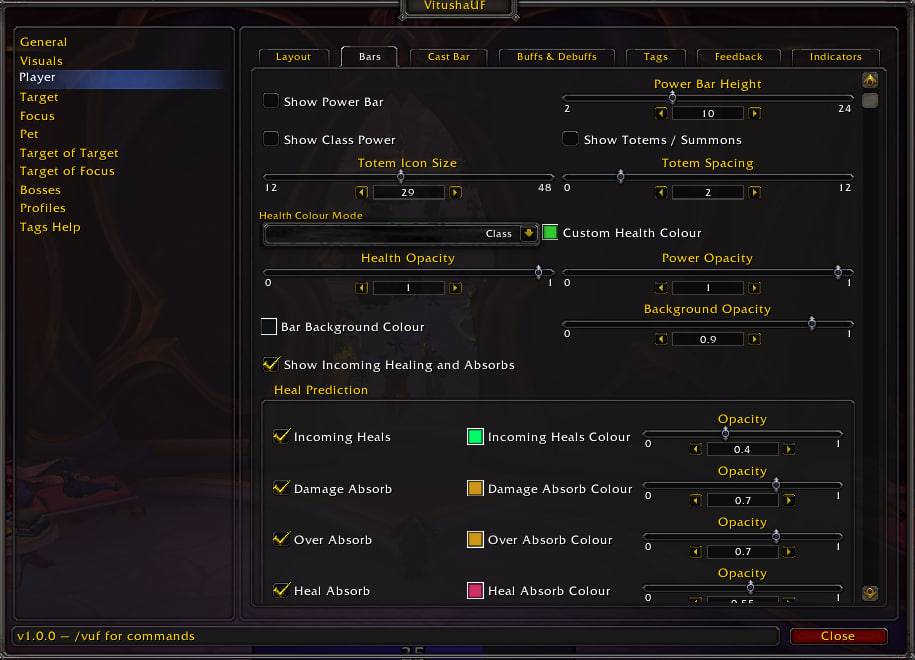
photo_2026-09-06_11-06-01.jpg
Description
oUF-based unit frames for retail, configured entirely in game - no Lua editing, no config files.
Player, target, focus, pet, target-of-target, focus-of-target and eight boss frames, each with its
own layout, bars, text, auras and indicators.
A fresh install comes up in the layout the screenshots show rather than as bare boxes in the middle
of the screen. Everything in it is still one click from being moved, resized or turned off.
## Frames
Width, height, position, strata and anchor parent per frame. Drag them with `/vuf unlock`, or type
the numbers in. The Player frame's settings copy onto the Target in one click. Boss frames share one
set of settings and take a growth direction and spacing for the stack.
## Bars
Health, power and cast bar, each with its own texture, colour and opacity. Health prediction draws
incoming heals, absorb shields and heal absorbs. The cast bar can be detached from the frame and
shows the latency zone, an optional spell icon inside or outside the bar, and the moment an
empowered cast banks a stage.
## Text
Four tag slots per frame, positioned and sized individually, on the health or power bar. Health,
power, name and absorb tags with abbreviated and precision variants — `[curhp:abbr]`,
`[perhp:prec]`, `[curhpperhp]`, `[absorbs:truncate]`, `[curpp:mana]`, `[name:short]`. The Tags Help
tab lists every tag with a sample of what it prints.
## Auras
Buff and debuff rows per frame with their own size, spacing, maximum count and position. Growth is a
pair - the direction the row runs and where the next line starts - or `Auto`, which reads both from
the corner the row is pinned by. `Icons per Line` decides where a line breaks. Cooldown text takes
configurable breakpoints and colours, "only mine" filters cut the row down to your own auras, and a
dispel highlight tints the health bar in the colour of whatever you can remove.
## Class resources
Combo points, holy power, soul shards, chi, arcane charges, essence and Soul Fragments; death knight
runes as their own row; monk Stagger; the secondary mana bar for the classes that have one. One row
for totems, statues, treants and other guardians, right-click to dismiss, in combat as well as out
of it.
## Indicators and feedback
Raid target marker, leader and assistant, combat and PvP, each with its own position and size.
Target glow, mouseover glow, and range fading on the frames where it means something.
## While you set it up
Every frame can show sample health, fake auras and fake tag text while the options window is open,
so a layout can be built without a target in front of you.
## Profiles and media
Per-character profiles with copy, reset, delete, and import and export as text, plus optional
per-specialisation switching. Bar textures and fonts come from LibSharedMedia, so anything another
addon registers shows up in the pickers; the ten textures shipped here are listed first.
## Commands
| Command | What it does |
| --- | --- |
| `/vuf` | open the options window |
| `/vuf reset` | put every frame back to its default position |
Or click the minimap button, which can be turned off in General.
## Installation
Unpack into `World of Warcraft\_retail_\Interface\AddOns\` so the folder sits as
`AddOns\VitushaUnitFrames`. Nothing else is required — every library it uses is bundled.
## Credits
Built on [oUF](https://github.com/oUF-wow/oUF). Bundled libraries: Ace3, LibSharedMedia-3.0,
LibDispel-1.0, LibDeflate, LibRangeCheck-3.0, LibDualSpec-1.0, LibStub, CallbackHandler-1.0,
TaintLess.
The addon's own code is MIT-licensed. Bundled libraries and fonts remain the property of their
authors and carry their own terms.
VitushaUnitFrames Team
