
VisualRoute - Mythic+ Visual Guide Test
- By
A visual Mythic+ Dungeon Guide: Color-coded nameplates per pull, live minimap path & pins, and seamless MDT route import.
Screenshot 2026-08-26 050033.png
Screenshot 2026-08-26 052056.png
Description
Initial Release:
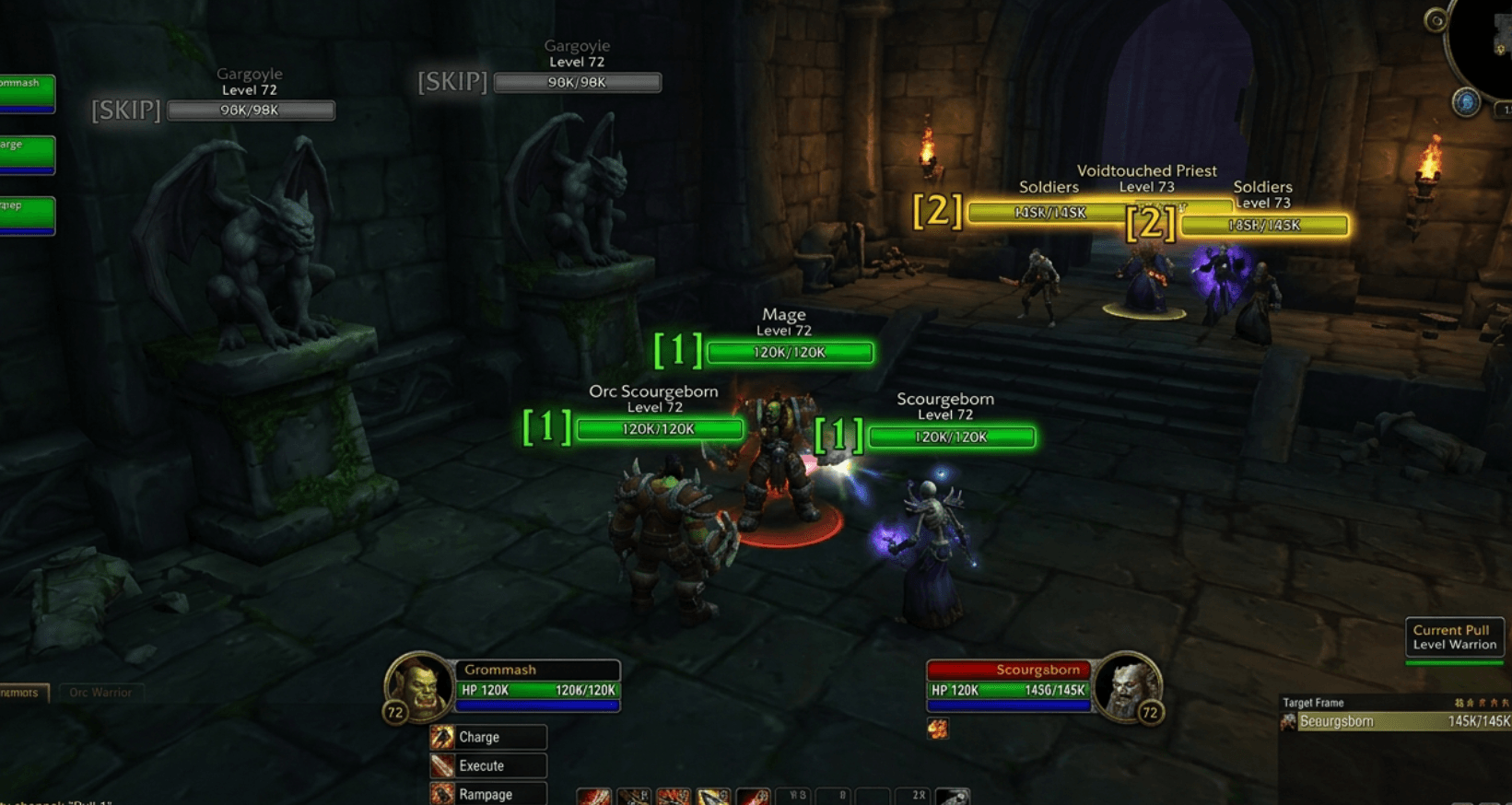
- Smart nameplate color-coding (Green = Pull 1, Yellow = Pull 2, Dimmed = Skip)
- Live 2D vector path & waypoint pins on the Minimap
- Multi-language menu (DE, EN, FR, ES) via Minimap button
- MDT / Wago.io string import support
- Auto combat-log death tracker & floating QuickBar HUD
📖 VisualRoute: Complete User Guide
VisualRoute is a lightweight, fully visual Mythic+ dungeon guide for World of Warcraft (Retail 11.x / 12.x). Unlike traditional route planners that block your screen with a large map window, VisualRoute renders all essential routing information directly into your normal view: over enemy nameplates, on the minimap, and through a compact floating HUD.
1. Smart Nameplate Color-Coding System
VisualRoute constantly checks all active enemies in your dungeon and color-codes their health bars based on your current route:
Color & Badge Breakdown:
- 🟢 Neon Green (
[1]Badge) — Active / Current Pull:- Highlights the exact enemies your group should pull and kill right now.
- Includes a glowing border and high-contrast green health bar.
- 🟡 Warm Yellow / Orange (
[2]Badge) — Next Pull (Upcoming):- Gives the tank and team an advance preview of the next pack so everyone can prepare positioning and cooldowns.
- ⚪ Dimmed Dark Grey (
[SKIP]Badge & Low Opacity) — Skip Mobs:- Mobs not included in the route are dimmed out (
alpha: 0.35). This visually alerts players not to pull or body-aggro them.
- Mobs not included in the route are dimmed out (
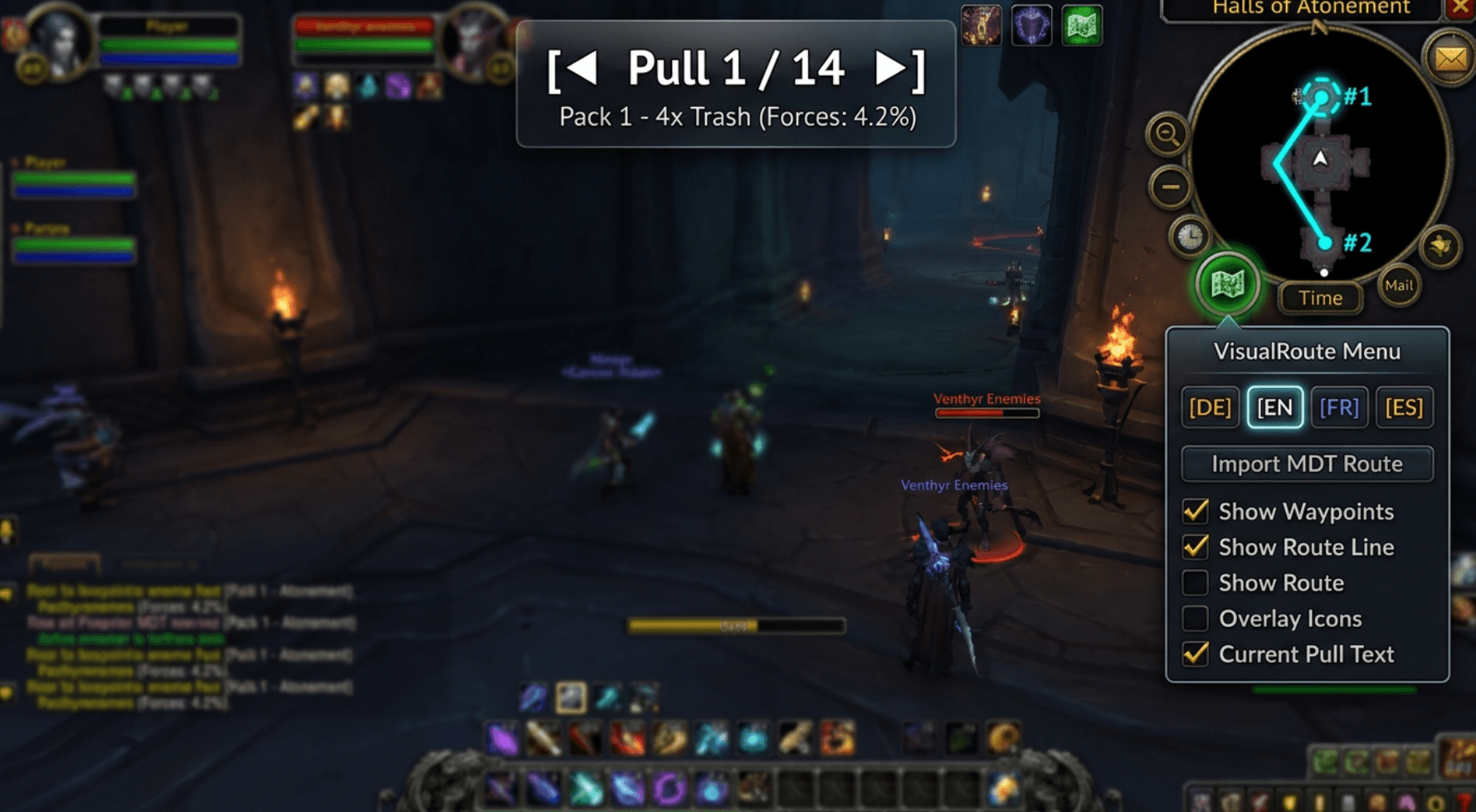
2. Minimap Waypoint Navigation & QuickBar HUD
VisualRoute renders the optimal path directly onto your Minimap and adds an unobtrusive control bar:
Key HUD Components:
-
QuickBar Widget (Top-Center):
- Displays the active pull index (
[◄] Pull 1 / 14 [►]). - Shows target Enemy Forces percentage and mob count.
- Movable: Left-click and drag it anywhere on your screen. The position is saved automatically.
- Manual Control: Click
◄or►at any time to manually override and switch pulls.
- Displays the active pull index (
-
Minimap 2D Path & Pins (Top-Right):
- Crisp cyan vector lines connect each room and objective.
- Numbered circular pins (
#1,#2,#3) show exact pack locations.
-
Interactive Minimap Button & Menu:
- A round green map button docked to your Minimap border (drag around the circle to reposition).
- Left-Click: Opens the quick settings menu:
- 🌐 Instant Language Selector: Switch between 🇩🇪 Deutsch, 🇬🇧 English, 🇫🇷 Français, and 🇪🇸 Español with one click.
- 📥 Import MDT Route: Opens the string importer.
- 🧪 Test Demo Route: Loads a live test route anywhere.
- 🔄 Reset Route: Resets back to Pull 1.
- ☑️ Quick toggles for HUD, Nameplates, and Minimap path.
- Right-Click: Instantly toggles the QuickBar HUD visibility.
3. Automatic Combat Progression
- Smart Death Tracking: VisualRoute monitors combat log death events (
UNIT_DIED). - When all mobs from the current pull are defeated, the addon automatically plays a soft chime and advances to the next pull.
- All enemy nameplates update instantly: the upcoming yellow group becomes neon green, and the next pack turns yellow.
4. How to Import MDT (Mythic Dungeon Tools) Routes
- In MDT or on websites like Wago.io / Keystone.guru, click Export and copy the string (
Ctrl+C). - In WoW, type
/vr import(or click the Minimap icon and choose Import MDT Route). - Paste the string into the text box with
Ctrl+V. - Click Import Route.
- Your custom route is active immediately!
VisualRoute - Mythic+ Visual Guide Test Team
