
Viliari Gather Routes
- By
Herb and ore routes for WoW Forever: route library, map navigation, GatherMate2 auto routes, sharing and farm-run stats.
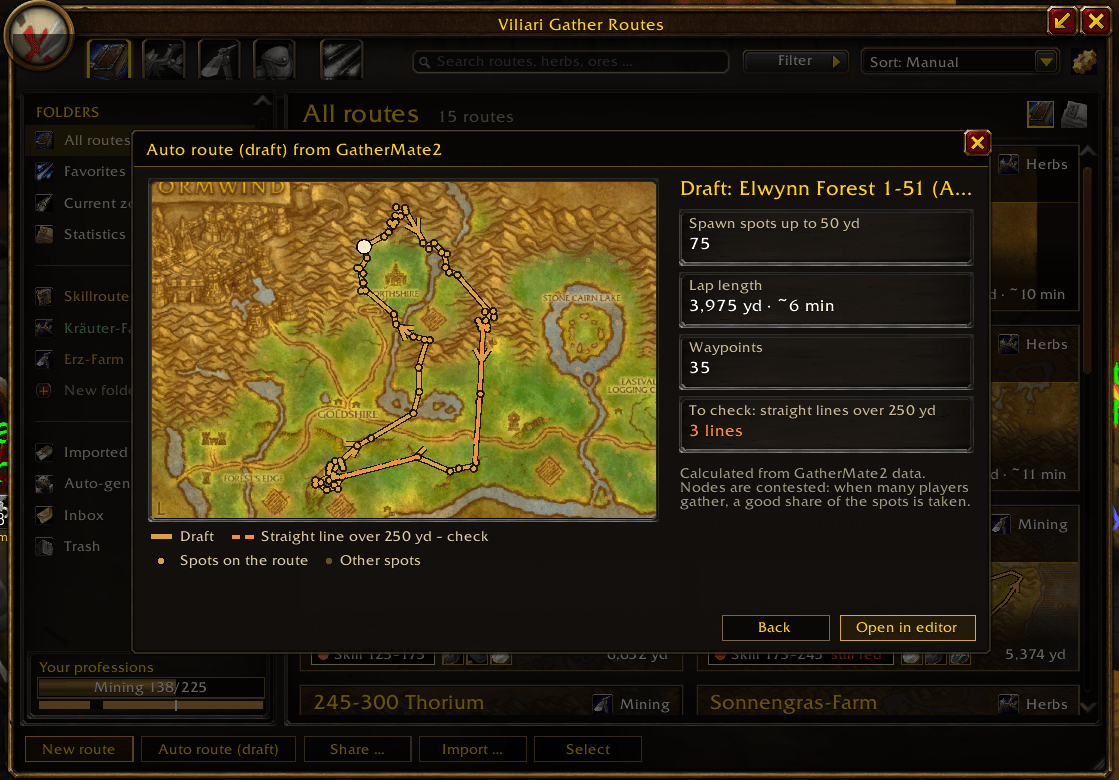
The draft loop with spawn spots, lap length and waypoints; straight lines over 250 yards are flagged to check in the editor.
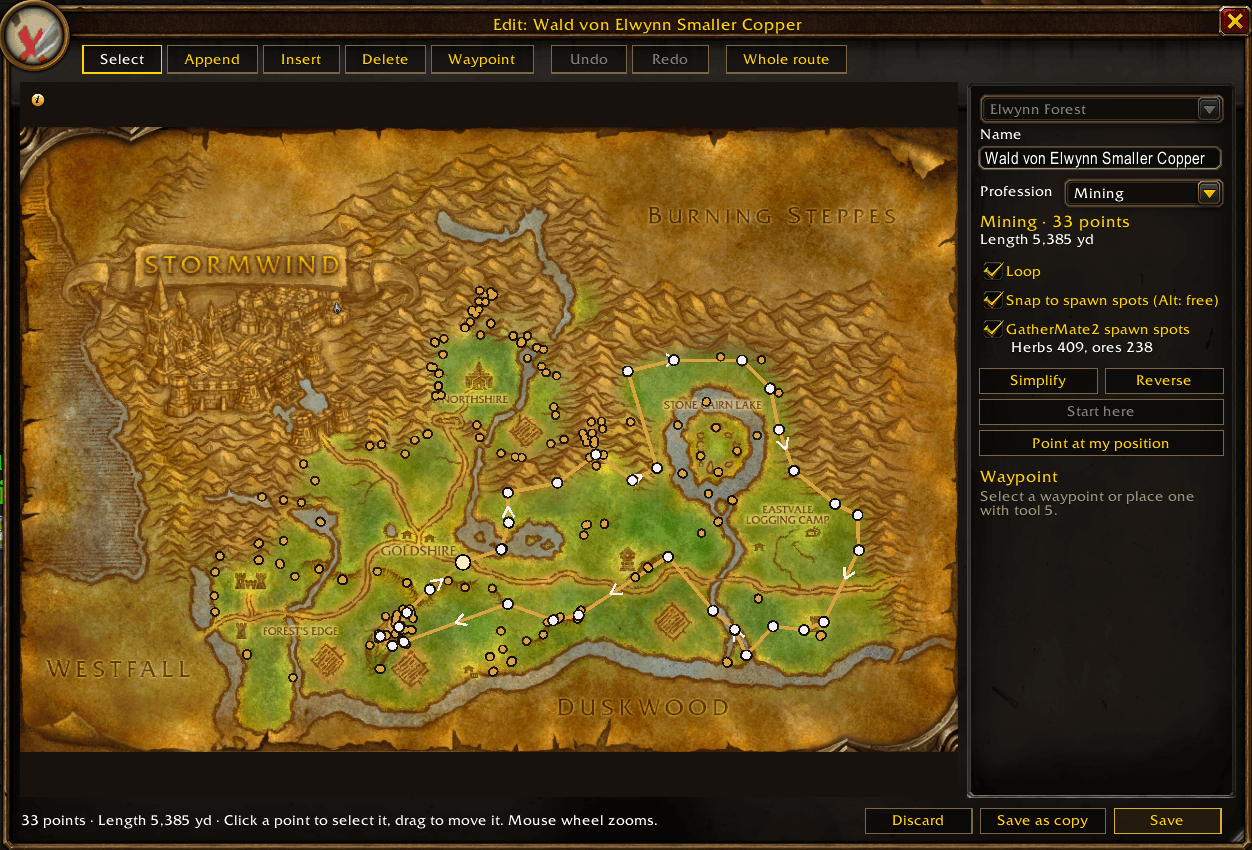
Draw and edit routes point by point: tools, undo, loop, snapping to GatherMate2 spawn spots, simplify and reverse.
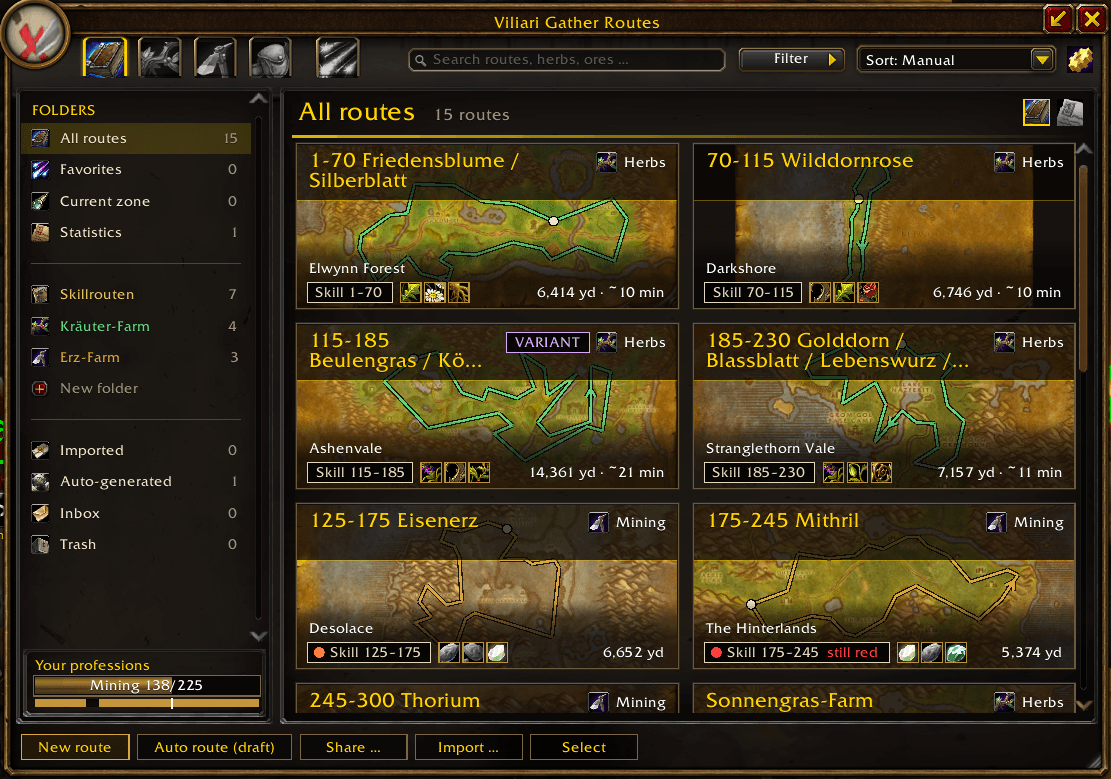
All routes as tiles with zone map, route line, skill badge, materials, length and lap time. Folders and views on the left.
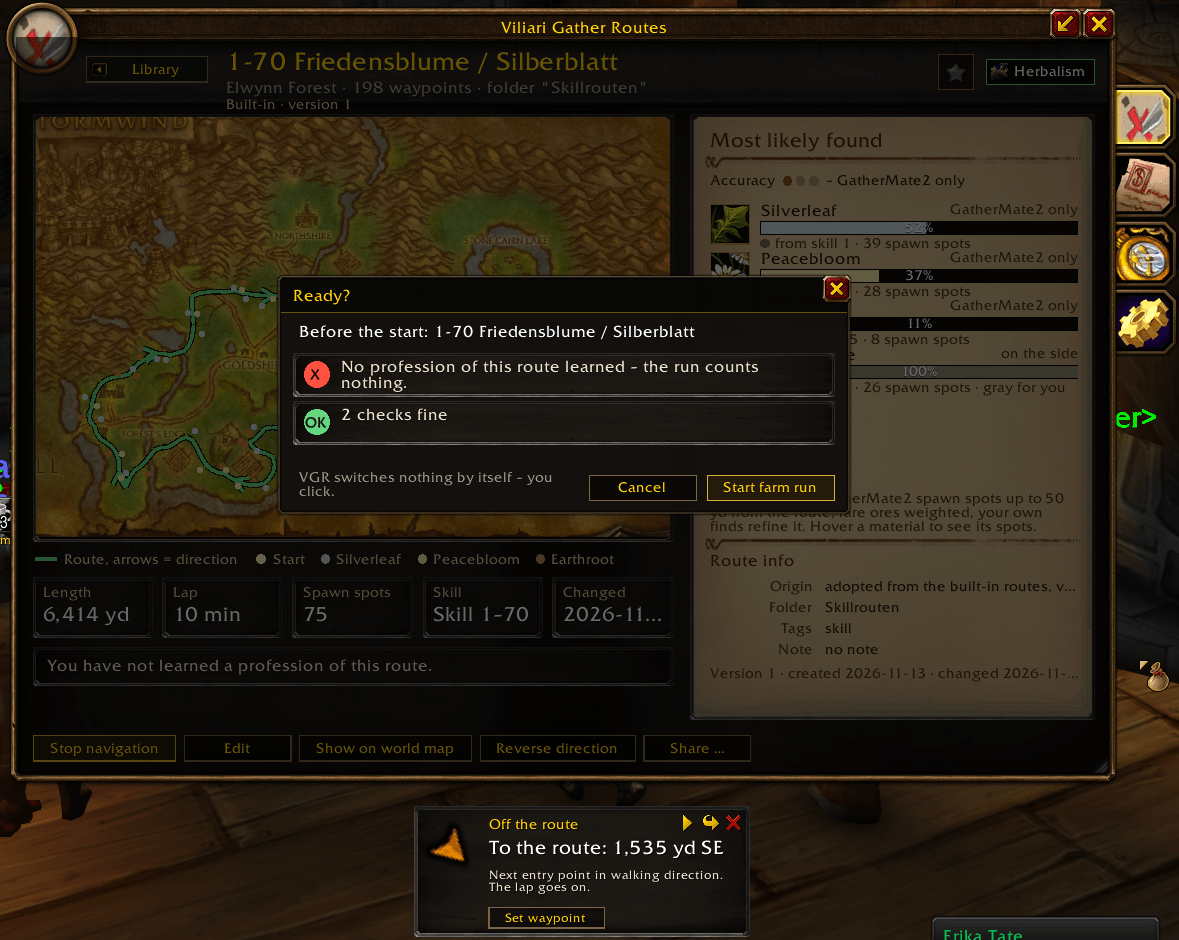
The ready check lists what needs attention before a farm run; below it, the waypoint guide points the way back to the route.
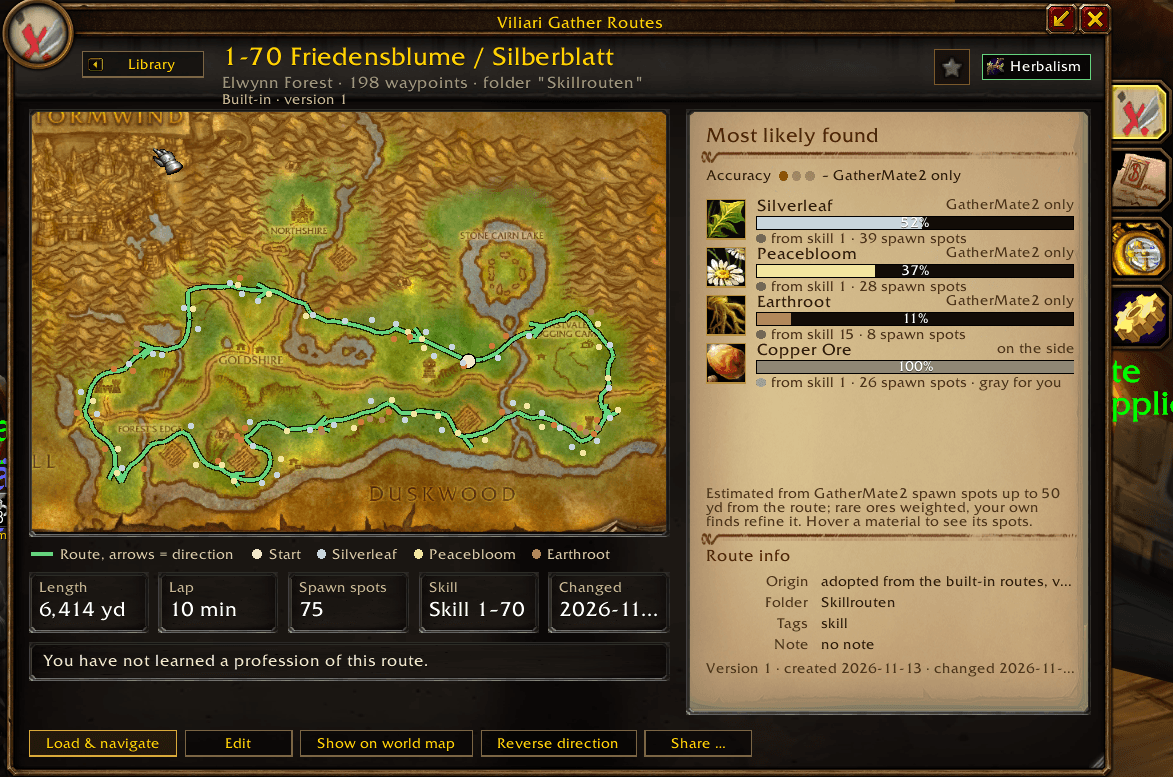
Large map with walking direction and spawn spots, plus length, lap time, skill range and "Most likely found" per material.
Description
German description below · Deutsche Beschreibung weiter unten.
English
Herb and ore routes for WoW Forever. Viliari Gather Routes (VGR) keeps your gathering routes in one library, guides you around them on the minimap and the world map, measures what a farm run brings and lets you share routes with other players. VGR is made only for WoW Forever (1.60.1); other clients are not supported.
Features
- Route library with map previews, folders, search and 13 built-in herb and ore routes
- Navigation on the minimap and the world map, with a waypoint guide that leads you around the route
- Your own routes: record them as you ride, draw them on the map or let VGR build a draft from GatherMate2 data (auto route)
- Materials and skill colors: which herbs and ores a route most likely gives, and where you still get skill-ups
- Farm runs that count laps, nodes and gold per hour (Gold/h)
- Sharing by chat link or copy code, also for Discord and forums
- English and German interface, including the names of the built-in routes
Quick start
- Type
/vgror left-click the minimap button to open the library. - Open one of the 13 built-in routes, or record or draw your own.
- Click Load & navigate on the route's page. The route appears on the minimap and world map, the waypoint guide shows the way, and a farm run starts (can be turned off under Farm runs in the options).
Optional addons
VGR needs no other addon; all libraries are included. These two add more, and VGR only reads their data:
- GatherMate2 with GatherMate2_Data: material profiles from spawn spot data, auto routes and snapping to spawn spots in the editor. Import the data once: Options > AddOns > GatherMate 2 > Import > "Import GatherMate2Data".
- Auctionator: Gold/h with the prices from your last auction house scan. Without it, VGR uses vendor prices.
Commands
| Command | What it does |
|---|---|
/vgr |
Open or close the library |
/vgr help |
List all commands |
/vgr rec |
Record a route; while recording: pause or resume |
/vgr run |
Start a farm run on the active or last route; while a run is going: pause or resume |
/vgr auto [zone] |
Auto route dialog (that zone or your current one): a draft from GatherMate2 spawn spots |
/vgr share |
Share dialog with chat link and copy code (/vgr share <name> for one route) |
/vgr import |
Paste a copy code (or Discord parts) |
/vgr diag |
Self test with a copyable report |
Sharing and privacy
- VGR never posts in chat by itself ("Insert into chat" only fills your edit box). It sends hidden addon messages only when you fetch a link, offer routes to your guild or group or use
/vgr ping, and to answer other players' pings and requests for your links (with the routes or a short refusal). - A chat link can be fetched for 60 minutes while you are online; "Withdraw" ends one link sooner,
/vgr share stopends all of them. Your own finds, farm runs and statistics are never shared. - Each character has a random, anonymous author id. Your name goes into copy codes only if you turn on "Write my name into copy codes" (off by default); a chat link shows your name in chat anyway.
/vgr block First Lastrefuses that player's link requests. All switches, including "Answer requests for my links" and "Answer /vgr ping": Options > AddOns > Viliari Gather Routes > Sharing.
Help
- Bug reports: type
/vgr diag, click "Select all", press Ctrl+C and paste the report into a comment on this page. Add what you did and what happened. The report contains no names, positions or routes. - Languages: English and German. Other client languages show the English texts.
- License: MIT. The embedded libraries keep their own licenses (see
THIRD-PARTY-NOTICES.txtin the addon folder); the map overlay data for the fully explored map previews comes from World of Warcraft client data. World of Warcraft is © Blizzard Entertainment.
Deutsch
Kräuter- und Erzrouten für WoW Forever. Viliari Gather Routes (VGR) verwaltet deine Sammelrouten in einer Bibliothek, führt dich auf Minimap und Weltkarte an ihnen entlang, misst, was ein Farm-Run bringt, und lässt dich Routen mit anderen Spielern teilen. VGR ist nur für WoW Forever gemacht (1.60.1); andere Clients werden nicht unterstützt.
Funktionen
- Routenbibliothek mit Kartenvorschau, Ordnern, Suche und 13 mitgelieferten Kräuter- und Erzrouten
- Navigation auf Minimap und Weltkarte, mit einem Wegweiser, der dich die Route entlangführt
- Eigene Routen: beim Reiten aufnehmen, auf der Karte zeichnen oder von VGR einen Entwurf aus GatherMate2-Daten bauen lassen (Auto-Route)
- Material und Skillfarben: welche Kräuter und Erze eine Route am ehesten bringt und wo du noch Skill bekommst
- Farm-Runs, die Runden, Vorkommen und Gold pro Stunde (Gold/h) zählen
- Teilen per Chatlink oder Kopiercode, auch für Discord und Foren
- Oberfläche auf Deutsch und Englisch, samt den Namen der mitgelieferten Routen
Schnellstart
- Tippe
/vgroder klicke mit links auf den Minimap-Knopf, um die Bibliothek zu öffnen. - Öffne eine der 13 mitgelieferten Routen oder nimm eine eigene auf bzw. zeichne sie.
- Klicke auf der Seite der Route auf Laden & navigieren. Die Route erscheint auf Minimap und Weltkarte, der Wegweiser zeigt dir den Weg, und ein Farm-Run startet (abschaltbar unter Farm-Runs in den Optionen).
Optionale Addons
VGR braucht kein anderes Addon; alle Bibliotheken sind dabei. Diese beiden bringen mehr, und VGR liest nur ihre Daten:
- GatherMate2 mit GatherMate2_Data: Materialprofile aus den Fundstellen-Daten, Auto-Routen und das Einrasten an Fundstellen im Editor. Importiere die Daten einmal: Optionen > AddOns > GatherMate 2 > Import > „Importiere GatherMate2Data“.
- Auctionator: Gold/h mit den Preisen deines letzten Auktionshaus-Scans. Ohne Auctionator rechnet VGR mit Händlerpreisen.
Befehle
| Befehl | Wirkung |
|---|---|
/vgr |
Bibliothek öffnen oder schließen |
/vgr help |
Alle Befehle auflisten |
/vgr rec |
Route aufnehmen; während der Aufnahme: pausieren oder fortsetzen |
/vgr run |
Farm-Run auf der aktiven oder letzten Route starten; während eines Runs: pausieren oder fortsetzen |
/vgr auto [Zone] |
Auto-Route-Dialog (diese Zone oder deine aktuelle): ein Entwurf aus GatherMate2-Fundstellen |
/vgr share |
Teilen-Dialog mit Chatlink und Kopiercode (/vgr share <Name> für eine Route) |
/vgr import |
Kopiercode (oder Discord-Teile) einfügen |
/vgr diag |
Selbsttest mit kopierbarem Bericht |
Teilen und Datenschutz
- VGR schreibt nie selbst in den Chat („In Chat einfügen“ füllt nur dein Eingabefeld). Unsichtbare Addon-Nachrichten sendet es nur, wenn du einen Link abrufst, Routen der Gilde oder Gruppe anbietest oder
/vgr pingbenutzt, und um Pings anderer und Abrufe deiner Links zu beantworten (mit den Routen oder einer kurzen Ablehnung). - Ein Chatlink lässt sich 60 Minuten lang abrufen, solange du online bist; „Zurückziehen“ beendet einen Link früher,
/vgr share stopalle. Deine eigenen Funde, Farm-Runs und Statistiken teilt VGR nie. - Jeder Charakter hat eine zufällige, anonyme Autor-ID. Dein Name steht nur in Kopiercodes, wenn du „Meinen Namen in Kopiercodes schreiben“ einschaltest (Standard aus); bei einem Chatlink zeigt der Chat deinen Namen ohnehin.
/vgr block Vorname Nachnamelehnt die Abrufe dieses Spielers ab. Alle Schalter, auch „Abrufe meiner Links beantworten“ und „Auf /vgr ping antworten“: Optionen > AddOns > Viliari Gather Routes > Teilen.
Hilfe
- Fehler melden: Tippe
/vgr diag, klicke „Alles markieren“, drücke Strg+C und füge den Bericht in einen Kommentar auf dieser Seite ein. Schreib dazu, was du getan hast und was passiert ist. Der Bericht enthält keine Namen, Positionen oder Routen. - Sprachen: Deutsch und Englisch. Andere Client-Sprachen zeigen die englischen Texte.
- Lizenz: MIT. Die eingebetteten Bibliotheken behalten ihre eigenen Lizenzen (siehe
THIRD-PARTY-NOTICES.txtim Addon-Ordner); die Overlay-Daten für die vollständig aufgedeckten Kartenvorschauen stammen aus den Client-Daten von World of Warcraft. World of Warcraft ist © Blizzard Entertainment.
Viliari Gather Routes Team


