Video Quest Helper
- By
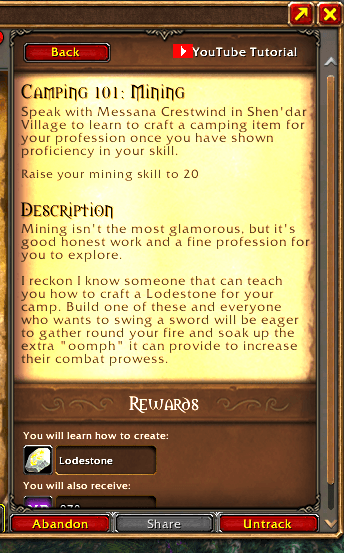
Adds a YouTube Tutorial button to quest details in WoW Forever, with a direct video link or quest-specific search.
youtube-tutorial-quest-log.png
Description
Stuck on a quest in World of Warcraft: Forever (1.60.1)? Open it in the quest log and click YouTube Tutorial to get a link you can copy into your browser.
- Saved walkthrough: The button gives you the direct video link, including a timestamp when available. The starter catalog covers the Cozy Sleeping Bag chain and The Horn of Xelthos.
- Other quests: The button gives you a YouTube search using the quest title and “WoW Forever”. A search is available even when the catalog has no match.
- Add your own walkthrough: Use
/vqh set QUEST_ID VIDEO_IDto save a link and/vqh clear QUEST_IDto remove it.
Install and use the CurseForge addon
- Install Video Quest Helper for WoW Forever (1.60.1) in the CurseForge app. For manual installation, extract the
VideoQuestHelperfolder intoWorld of Warcraft\_forever_\Interface\AddOns. - Launch WoW Forever and make sure Video Quest Helper is enabled under AddOns. If you updated it while WoW was open, type
/reload. - Open a quest in the quest log and click YouTube Tutorial. Copy the displayed link and open it in your browser.
Optional one-time Windows setup
For one-click opening in your browser, follow the Windows setup instructions on GitHub. Use the addon folder from the Windows package and run Install-Windows-Helper.cmd once. The helper starts immediately and launches automatically each time you sign in to Windows. In WoW, use Windowed or Windowed (Fullscreen), then click YouTube Tutorial.
Contact and support
Created by Razer Dev Studio / Denis Aleksandrov. The addon is free to use. Donations are optional.
- Discord community for feedback and video suggestions
- GitHub Issues for bug reports
- Support on Patreon
- Leave a tip via Revolut
Video Quest Helper Team