promotional bannermobile promotional banner

VendorTrash

Abandoned
Highlights the items in your inventory that you probably want to sell.
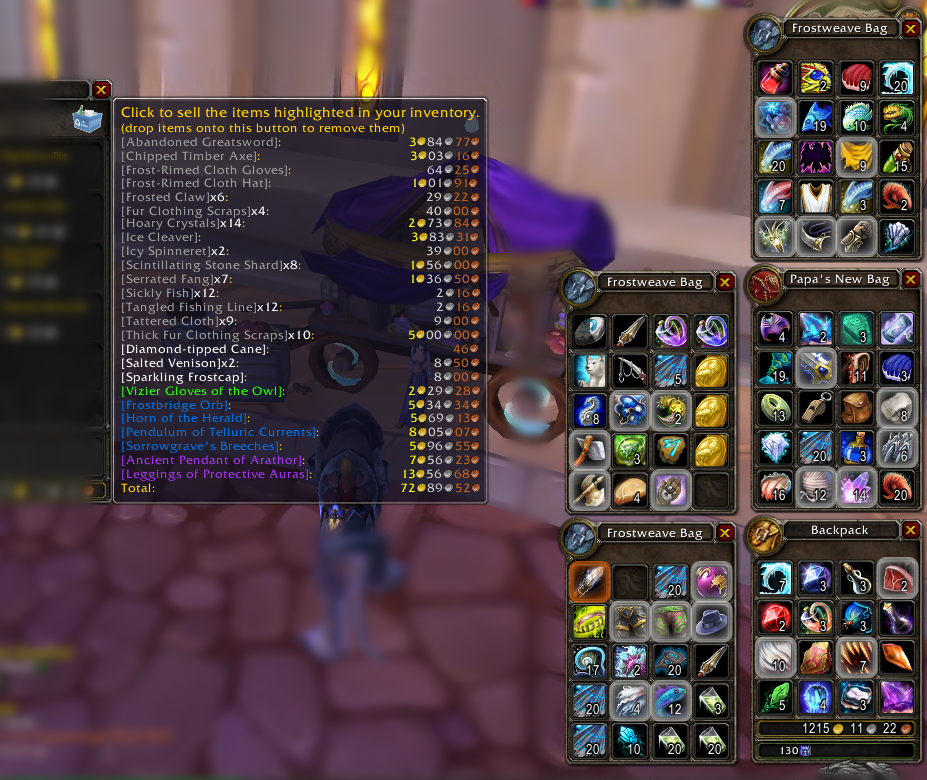
<p>The unimportant bits have been blurred for clarity. Ironic, isn't it?</p>
<p>Everything to be sold is listed in the tooltip, and sorted by name and quality. You can add or remove items by dropping them on the trash icon in the vendor window.</p>
<p>T...

The unimportant bits have been blurred for clarity. Ironic, isn't it?

Everything to be sold is listed in the tooltip, and sorted by name and quality. You can add or remove items by dropping them on the trash icon in the vendor window.

T...

Description

What It Does

Highlights the items in your inventory that you'll probably want to sell to a vendor. The 'cheapest' item is highlighted in orange, so you can easily decide what to throw away if your bags get too full.

It also adds a recycle icon to merchant windows, allowing you to sell all highlighted items with a single click.

And, as a bonus, it highlights the quest reward that can be sold to a vendor for the most money.

How It Does That

If you sell an item with a character, the item is learned to be trash for that character. If you buyback a sold item item, or drop an item on the 'recycle' button, the item is assumed not to be trash for that character.

If no preference is known for your current character, your other characters are considered. An item is considered trash if more of your other characters consider it trash than not.

If no preference can be determined, then by default, items with gray names are considered trash. Soul-bound items are also considered trash if their tooltips contain red text, which implies your character can't use it.

FAQ

Q: How do I tell it that something is trash?

A: Simply sell the item. It will learn by watching. You can also drag an item onto the recycle icon at a merchant to toggle its state.

Q: How do I tell it that something isn't trash?

A: If the item was accidentally sold, buy it back from the vendor, and it will stop trying to sell it. Otherwise, again, you can drop the item onto the recycle icon at a merchant to toggle its state.

The VendorTrash Team

profile avatar
  • 8
    Projects
  • 504.1K
    Downloads

More from _ForgeUser314193View all

  • LibDebug project image

    LibDebug

    • 7.1K
    • Addons

    This library is to make debugging AddOns a little easier.

    • 7.1K
    • October 3, 2018
    • Addons
    • +1
  • Chess project image

    Chess

    • 74.1K
    • Addons

    Chess

    • 74.1K
    • March 1, 2013
    • Addons
  • QuestHelper project image

    QuestHelper

    • 6.2M
    • Addons

    Tells you how to finish your quests in the easiest, fastest manner.

    • 6.2M
    • September 30, 2012
    • Addons
    • +1
  • QItemHotkey project image

    QItemHotkey

    • 360
    • Addons

    Adds a hotkey for the top-most quest item in Blizzard's watch frame.

    • 360
    • February 10, 2011
    • Addons
    • +1
  • LibDebug project image

    LibDebug

    • 7.1K
    • Addons

    This library is to make debugging AddOns a little easier.

    • 7.1K
    • October 3, 2018
    • Addons
    • +1
  • Chess project image

    Chess

    • 74.1K
    • Addons

    Chess

    • 74.1K
    • March 1, 2013
    • Addons
  • QuestHelper project image

    QuestHelper

    • 6.2M
    • Addons

    Tells you how to finish your quests in the easiest, fastest manner.

    • 6.2M
    • September 30, 2012
    • Addons
    • +1
  • QItemHotkey project image

    QItemHotkey

    • 360
    • Addons

    Adds a hotkey for the top-most quest item in Blizzard's watch frame.

    • 360
    • February 10, 2011
    • Addons
    • +1