VendorAlert
- By
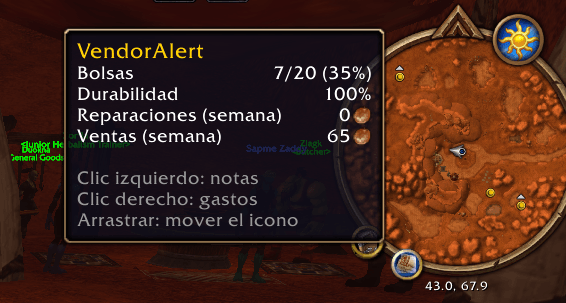
foto1.png
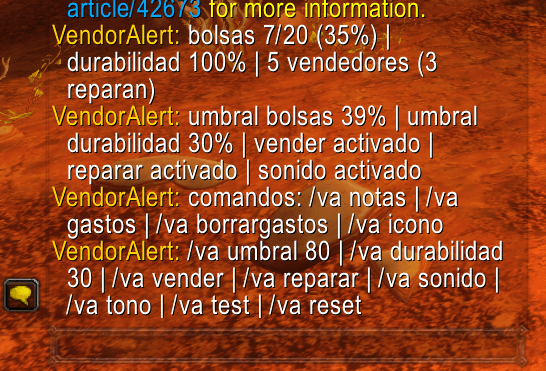
foto2.png
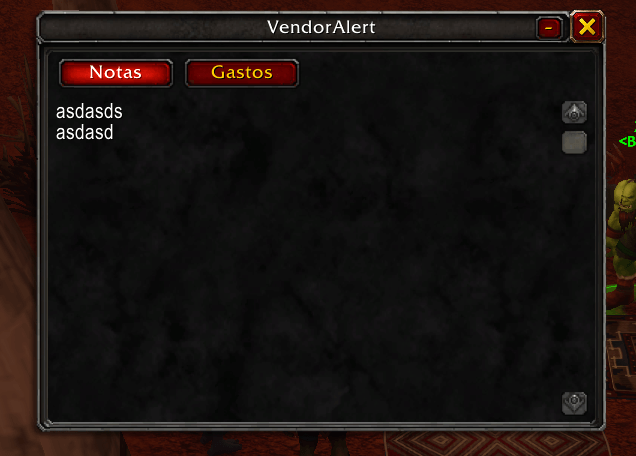
foto4.png
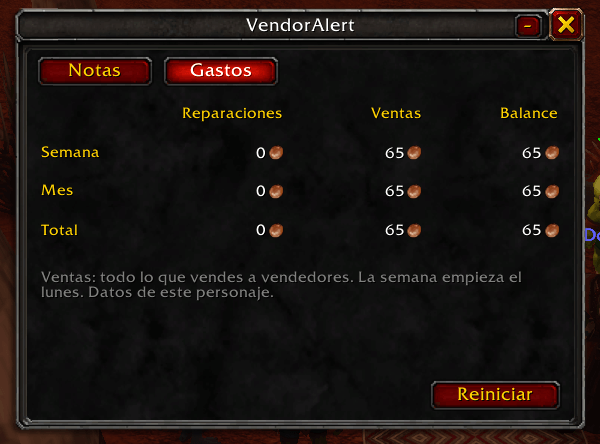
foto5.png
Description
VendorAlert
English | Español
Addon for World of Warcraft: Forever that helps you get ready for dungeons. It plays a sound when you pass near a vendor and your bags are almost full or your gear is damaged, sells your junk and repairs for you, and includes a notes window and an expense tracker.
Features
- Nearby vendor alert: plays a sound when you see a known vendor and your bags are over 80% full (configurable).
- Learns vendors automatically: each vendor is saved the first time you open their window, including whether they can repair.
- Auto-sell greys when you open a vendor, with a summary of the gold earned.
- Auto-repair if the vendor can repair and you have enough gold.
- Low durability warning when any gear piece drops below 30% (configurable).
- Notes: a small window to write your to-dos, movable and collapsible. Each character has its own notes.
- Expense tracker: what you spend on repairs and earn from sales, by week, month and total, with the balance.
- Minimap icon: left-click opens notes, right-click opens expenses. Drag it to move it.
- English and Spanish: follows your game language, or choose one with
/va lang. - Custom sound: use your own audio file.
Special bags (quivers, ammo pouches, soul bags) don't count towards the fill percentage.
Installation
- Download the latest version from CurseForge or from the Releases section of this repository.
- Extract the
VendorAlertfolder into:
World of Warcraft\_forever_\Interface\AddOns\- Restart the game and make sure VendorAlert is enabled in the AddOns list.
Commands
Every command also works with its Spanish word (shown in brackets).
| Command | What it does |
|---|---|
/va |
Shows the current status and the command list |
/va notes (notas) |
Opens or closes the notes window |
/va stats (gastos) |
Prints this week's, this month's and total expenses in chat |
/va resetstats (borrargastos) |
Clears this character's expense record |
/va icon (icono) |
Shows or hides the minimap icon |
/va lang en / es / auto (idioma) |
Changes the language |
/va threshold 80 (umbral) |
Bag fill percentage for the alert |
/va durability 30 (durabilidad) |
Durability percentage for the warning |
/va sell (vender) |
Toggles auto-selling greys |
/va repair (reparar) |
Toggles auto-repair |
/va sound (sonido) |
Toggles all sounds |
/va tone (tono) |
Switches between your custom sound and the raid warning |
/va test (prueba) |
Plays a test alert |
/va reset |
Clears the learned vendor list |
Custom sound
- Put your file in
VendorAlert\Sounds\namedalert.mp3oralert.ogg(alerta.mp3/alerta.oggalso work). OGG must be Vorbis; WoW doesn't play.wavor OGG Opus. - Fully restart the game (
/reloaddoesn't detect new files). - Test it with
/va test.
If there is no file, the game's raid warning sound is used.
Tips
- Enable friendly nameplates (Shift+V) to detect vendors from further away.
- Learned vendors are saved per account in
WTF\Account<ACCOUNT>\SavedVariables\VendorAlert.lua, so all your characters share them. Notes and expenses are saved per character.
Bugs and suggestions
Open an Issue in this repository. For Lua errors, run /console scriptErrors 1 and copy the full message.
License
Español
Addon para World of Warcraft: Forever que te ayuda a llegar preparado a las mazmorras. Te avisa con un sonido cuando pasas cerca de un vendedor y tus bolsas están casi llenas o tu equipo está dañado, vende la chatarra y repara por ti, e incluye una ventana de notas y un registro de gastos.
Funciones
- Alerta de vendedor cercano: suena un aviso cuando ves a un vendedor conocido y tus bolsas superan el 80% (configurable).
- Aprende vendedores solo: cada vendedor queda registrado la primera vez que abres su ventana, incluido si puede reparar.
- Vende objetos grises automáticamente al abrir un vendedor y muestra el oro obtenido.
- Repara automáticamente si el vendedor repara y tienes oro suficiente.
- Aviso de durabilidad baja cuando alguna pieza de tu equipo baja del 30% (configurable).
- Notas: una pequeña ventana para apuntar tus pendientes, movible y minimizable. Cada personaje tiene las suyas.
- Registro de gastos: lo que gastas en reparaciones y lo que ganas vendiendo, por semana, mes y total, con el balance.
- Icono en el minimapa: clic izquierdo abre las notas, clic derecho los gastos. Arrástralo para cambiarlo de sitio.
- Inglés y español: sigue el idioma de tu juego, o elige uno con
/va idioma. - Sonido personalizable: usa tu propio archivo de audio.
Las bolsas especiales (carcajes, munición, almas) no cuentan para el porcentaje.
Instalación
- Descarga la última versión desde CurseForge o desde la sección Releases de este repositorio.
- Descomprime la carpeta
VendorAlerten:
World of Warcraft\_forever_\Interface\AddOns\- Reinicia el juego y comprueba que VendorAlert esté activado en la lista de AddOns.
Comandos
Todos los comandos funcionan también con su palabra en inglés (entre paréntesis).
| Comando | Qué hace |
|---|---|
/va |
Muestra el estado actual y la lista de comandos |
/va notas (notes) |
Abre o cierra la ventana de notas |
/va gastos (stats) |
Muestra en el chat los gastos de la semana, el mes y el total |
/va borrargastos (resetstats) |
Borra el registro de gastos del personaje |
/va icono (icon) |
Muestra u oculta el icono del minimapa |
/va idioma es / en / auto (lang) |
Cambia el idioma |
/va umbral 80 (threshold) |
Porcentaje de bolsas llenas para la alerta |
/va durabilidad 30 (durability) |
Porcentaje de durabilidad para el aviso |
/va vender (sell) |
Activa o desactiva la venta de grises |
/va reparar (repair) |
Activa o desactiva la reparación automática |
/va sonido (sound) |
Activa o desactiva todos los sonidos |
/va tono (tone) |
Alterna entre tu sonido personalizado y el aviso de banda |
/va prueba (test) |
Reproduce una alerta de prueba |
/va reset |
Borra la lista de vendedores aprendidos |
Sonido personalizado
- Pon tu archivo en
VendorAlert\Sounds\con el nombrealerta.mp3oalerta.ogg(también sirvenalert.mp3/alert.ogg). El OGG debe ser Vorbis; WoW no reproduce.wavni OGG Opus. - Reinicia el juego por completo (
/reloadno detecta archivos nuevos). - Prueba con
/va prueba.
Si no hay archivo, se usa el sonido de aviso de banda del juego.
Consejos
- Activa las placas de nombre de aliados (Mayús+V) para detectar vendedores a distancia.
- Los vendedores aprendidos se guardan por cuenta en
WTF\Account<CUENTA>\SavedVariables\VendorAlert.lua, así que todos tus personajes los comparten. Las notas y los gastos se guardan por personaje.
Errores y sugerencias
Abre un Issue en este repositorio. Si es un error de Lua, activa /console scriptErrors 1 y copia el mensaje completo.
Licencia
VendorAlert Team