Veiðifélagi
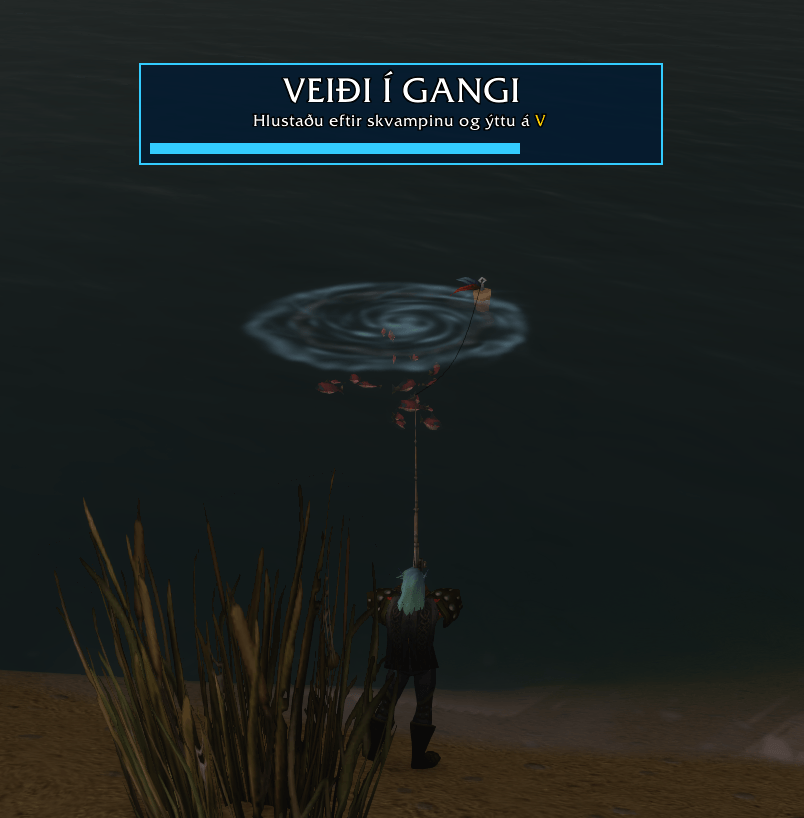
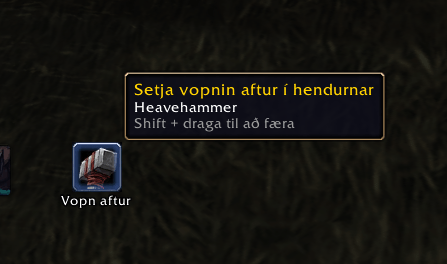
One key to equip your fishing pole, cast and reel in. Loud bobber splash, a big on-screen timer and a one-click button to put your weapons back on. No automation: nothing happens unless you press a key.
veidi1.png
1794868385705_image.png
Description
# Veiðifélagi - One-Key Fishing
A small fishing helper for **World of Warcraft: Forever**. *Veiðifélagi* is Icelandic for "fishing buddy".
One key does everything: it equips your fishing pole, casts, and reels in. While you fish, the bobber splash is made loud and a big sign shows how long the cast has left.
## No automation
The addon does nothing unless you press a key or click. It does not find the bobber, does not detect bites and never reels in for you. Reeling in uses Blizzard's own *Soft Target Interact* setting.
## Features
- **One key for everything:** press once to equip the pole from your bags, again to cast, and again when the bobber dips to reel in and loot.
- **Loud splash:** sound effects go to full volume and music, ambience and dialog are muted while you fish. Your own sound settings come back about 25 seconds after you stop.
- **Big sign:** an on-screen sign with a timer bar that turns red for the last 5 seconds of the cast.
- **Weapon button:** while the pole is equipped, a button on screen puts your previous main-hand and off-hand weapons back on with one click.
- **Right double-click to cast** when a fishing pole is equipped.
- **First-time setup:** a small window asks you to press the key you want to use.
- **English and Icelandic.**
## Getting started
1. Install the addon and log in. A small window opens: press the key you want to fish with (for example `F` or mouse button 4).
2. Press the key. If your pole is in your bags, it is equipped.
3. Press again to cast.
4. When the bobber dips, press the same key again to reel in.
## Commands
| Command | What it does |
|---|---|
| `/veidi` | Show status and help |
| `/veidi key` | Choose your key |
| `/veidi sound` | Toggle the loud bobber sound |
| `/veidi sign` | Toggle the big sign |
| `/veidi doubleclick` | Toggle right double-click casting |
| `/veidi onekey` | Toggle reeling in with the same key |
| `/veidi interact` | Toggle the soft interact + auto loot settings |
| `/veidi test` | Show the sign (hold Shift and drag to move it) |
| `/veidi reset` | Restore your sound and interact settings |
| `/veidi lang` | Switch between English and Icelandic |
## Good to know
- The addon changes two Blizzard settings: *Soft Target Interact* (always on, 30 yd range) and *Auto Loot*. `/veidi reset` puts them back the way they were.
- The pole cannot be equipped in combat, and the weapon button does not appear or disappear until combat ends.
- Entering combat turns the fishing mode off and restores your sound.
- Hold **Shift** and drag to move the sign or the weapon button.
Found a bug or have an idea? Leave a comment here.
Veiðifélagi Team