Vaultloom
- By
mainvault.png
mainvault.png
arsenal_bank.png
Description
💬 Discord and support:
Vaultloom
Your complete Warband, progression, inventory, collection, and quality-of-life hub for World of Warcraft Retail.
Vaultloom brings the most important information from all your characters together in one dark, Warcraft-inspired interface.
Track weekly progress, inspect saved equipment and inventories, plan upgrades, browse current content, manage collections, and activate only the optional tools you actually want to use.
Vaultloom 1.0 has been rebuilt from the ground up with:
✨ A completely new interface
🎨 Brand-new graphics
🗃️ A redesigned data structure
⚙️ An event-driven foundation
👥 Improved support for large Warbands
🧪 Vaultloom 1.0 is currently in public beta for World of Warcraft Retail 12.0.7.
👥 One Interface for Your Entire Warband
Vaultloom creates compact snapshots for every character you log into.
Select any saved character from the Warband sidebar to inspect their progression, equipment, currencies, professions, inventories, and weekly activities, even while that character is offline.
Character cards can display:
• Character level and item level
• Class, specialization, and realm
• Current gold
• Activity Score
• Great Vault progress
• Primary professions
• Main-character status
• Last synchronization time
The expanded Warband overview displays all saved characters inside a larger, independent window.
It includes:
🔎 Search and filters
↕️ Character sorting
🛠️ Profession search
🪪 Full character cards
📜 Support for large character rosters
🏛️ Main Vaultloom Areas
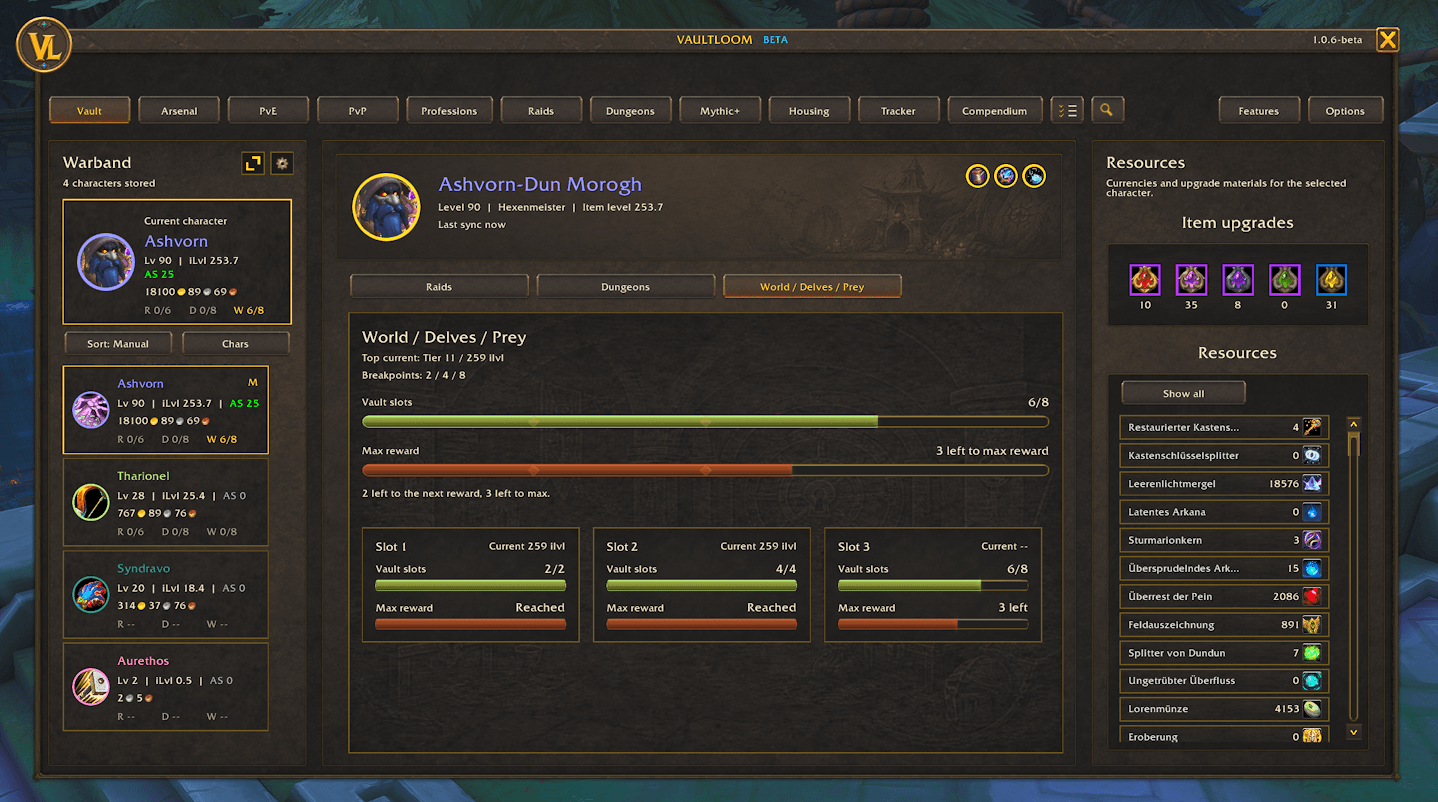
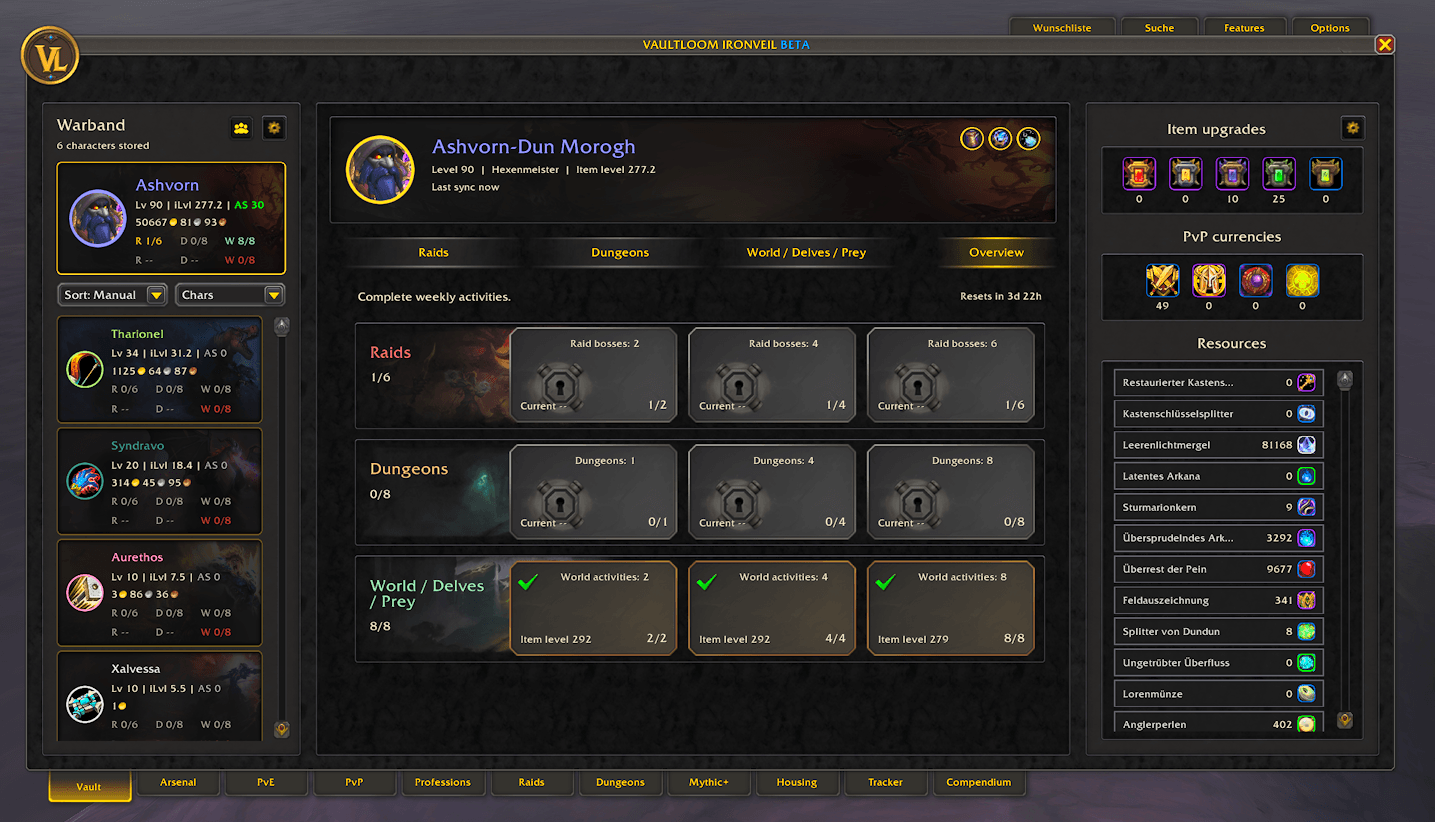
🏆 Great Vault
Track the selected character’s current Great Vault progress across:
• Raids
• Dungeons
• World activities
• Delves
• Prey Hunts
Vaultloom shows unlocked reward slots, current reward levels, the next reward breakpoint, and the remaining progress required for the maximum weekly reward.
💎 Resources
Inspect important currencies, upgrade materials, and tracked resources for the selected character.
Vaultloom remembers the latest saved values, allowing you to compare resources between characters without logging back into every alt.
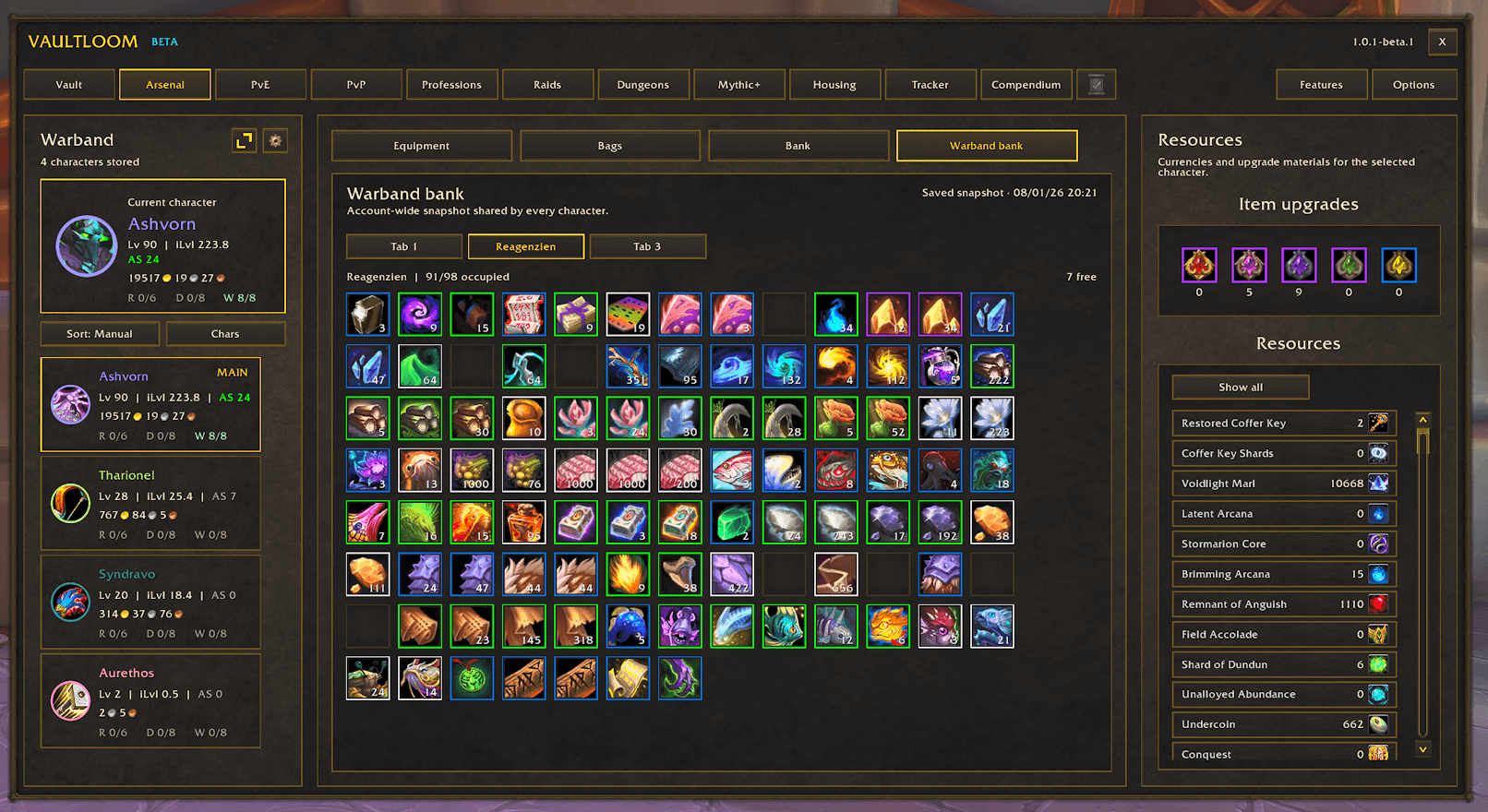
⚔️ Arsenal
The Arsenal stores and displays:
• Equipped items
• Item levels
• Missing enchants
• Empty sockets
• Inserted gems
• Upgrade status
• Durability
• Bag contents and layouts
• Personal bank contents
• Reagent bank contents
• Warband bank contents
Equipment and inventory snapshots remain available while characters are offline.
Bank contents are saved after the corresponding bank has been opened once on that character.
🐉 PvE Progress
The PvE area organizes current character objectives into clear categories:
• Weekly quests
• Daily objectives
• Active world events
• Delves
• Prey Hunts
• Rare enemies
• World activities
• Darkmoon Faire
Vaultloom tracks quests that are:
✅ Completed
📜 Accepted
❌ Missing
🎁 Ready to turn in
Accepted quests can be opened directly by clicking their Vaultloom row.
Rare entries can also include:
• Daily completion status
• Mount rewards
• Coordinates
• One-click Blizzard waypoints
🛡️ PvP Progress
Track current weekly PvP objectives, including:
• Rotating weekly quests
• War Mode quests
• Battleground objectives
• Arena and skirmish objectives
• PvP Brawls
Quest progress and completion states are stored separately for every character.
🛠️ Professions
The Professions area tracks:
• Weekly profession quests
• Treatise quests
• Darkmoon profession quests
• Unspent profession knowledge
• Crafting concentration
• Recipe cooldowns
• Last profession scan
Clicking a profession entry for the currently logged-in character opens that profession directly.
Optional profession icons and information can also be displayed on Warband character cards.
🏰 Raids
Browse current raid content with:
• Raid and boss selection
• Difficulty filters
• Class-specific loot filters
• Weekly boss completion
• Encounter information
• Loot sources
• Very rare item markers
• Wishlist integration
Items can be marked as:
♡ Wishlisted
✓ Obtained
− Not tracked
🗝️ Dungeons
Browse current and seasonal dungeons with:
• Boss lists
• Encounter information
• Loot tables
• Class filters
• Difficulty filters
• Daily completion information
• Wishlist integration
⏱️ Mythic+
The Mythic+ area displays:
• Current keystone
• Warband keystones
• Current weekly affixes
• Season score
• Best seasonal runs
• Best weekly runs
• Recent runs
• Great Vault progress
• Portal progress
• Seasonal milestones and rewards
Log into each character once to capture their current keystone and Mythic+ snapshot.
🏡 Housing
Track current Housing and neighborhood information:
• Active house and neighborhood
• House level and progress
• Neighborhood endeavors
• Personal contribution
• Current tasks
• Pinned tasks
• Milestones
• Coupon rewards
• Recent neighborhood activity
Housing data is loaded only when required and remains available through saved character snapshots.
📋 Tracker
Build your own task board from Vaultloom progression data.
The Tracker supports:
• Character-specific task lists
• A reusable global template
• Manual task ordering
• Great Vault progress
• Delve progress
• Prey Hunt progress
• Profession knowledge
• Weekly progress rows
• Custom progress rows
• A movable floating tracker
• Multiple visual styles
• Adjustable scale, font size, and opacity
📚 Compendium
The load-on-demand Midnight Compendium combines collectibles and discoveries inside one searchable catalog:
🐴 Mounts
🐾 Pets
🎭 Toys
🪑 Housing decorations
📖 Profession recipes
🎁 Promotions
☠️ Rare enemies
Entries can be filtered by:
• Category
• Ownership
• Source
• Profession
Supported entries can include acquisition details, prices, vendors, achievements, renown requirements, and Blizzard waypoints.
The large collection database remains completely unloaded until the Compendium is opened.
💜 Wishlist
Create a separate Wishlist for each character using raid and dungeon loot.
The Wishlist includes:
• Open and obtained item states
• Raid and dungeon source filters
• Difficulty information
• Item levels
• Direct navigation to item sources
• Multiple known sources for the same item
🧰 Optional Features
Every optional feature starts disabled.
Open the Features menu and activate only the tools you want to use.
📈 Progress Features
🎯 Prey Hunt Progress Bar
Replace or accompany Blizzard’s original Prey Hunt display with a movable Vaultloom progress bar.
The bar displays:
• Active target
• Current phase
• Hunt progress
Multiple widths, scales, and visual styles are available.
🧙 Character Features
💍 Equipment Details
Enhances Blizzard’s Character window with:
• Item levels
• Enchant information
• Missing enchant warnings
• Empty sockets
• Inserted gems
Each part can be enabled or disabled separately.
📊 Stat Focus
Adds specialization-specific stat priorities to item tooltips.
Priorities can be displayed as:
• Normal text
• Colored stat lines
• Compact colored dots
Default presets can be replaced with your own custom priority order.
🎒 Inventory Features
🔢 Item Inventory
Shows how many copies of an item are owned across:
• Character bags
• Personal banks
• Reagent banks
• Equipped items
• Warband bank
Choose between:
🔍 Detailed character breakdown
📋 Compact overview
🔢 Single account-wide total
🆔 Show Item ID
Adds a compact internal item ID to item tooltips for database searches, commands, and bug reports.
🪙 Automatically Sell Junk
Automatically sells items recognized as junk by Blizzard when a merchant opens.
Hold Shift to temporarily pause selling during the current merchant visit.
An optional chat message reports how much gold was earned.
🏷️ Bag Item Level
Displays item levels directly on equippable items inside supported Blizzard bag and bank slots.
✨ One-Click Processing
Use a configurable modifier click for:
• Milling
• Prospecting
• Disenchanting
• Lockpicking
Refundable items, cosmetic items, equipment-set items, and other unsafe targets are automatically protected.
🔨 Crafting Features
🛒 Shopping List
Plan account-wide item and profession material requirements.
The Shopping List supports:
• Item links and item IDs
• Profession recipes
• Required material counts
• Saved inventory comparisons
• Owned and missing totals
• Shared materials between recipes
• Direct profession access
• Auction House access
• Minimap or movable launcher button
⚡ Quick Tools
🔄 Spec Bar
A movable specialization and talent-loadout bar with secure out-of-combat switching.
Customize:
• Horizontal or vertical orientation
• Warcraft, compact, or clean style
• Round or square icons
• Scale
• Active border color
• Loadout labels
• Click behavior
🌀 Travel Bar
Combines available travel actions into one configurable bar:
• Hearthstones
• Travel toys
• Class teleports
• Profession teleports
• Housing travel
• Other learned destinations
Choose exactly which destinations appear and customize the bar’s orientation, style, icon shape, scale, color, and position.
📜 Automatically Accept Quests
Automatically accepts suitable normal quests and can optionally complete safe quests without reward choices.
Vaultloom deliberately skips unsafe or ambiguous situations, including:
• Repeatable quests
• Selectable rewards
• Required payments
• Required items or currencies
• Important quests
• Party Sync
• Combat
Hold Alt to temporarily pause the feature.
🗺️ World Map Features
🎯 Prey Hunt Map Icons
Replaces generic Prey Hunt markers with distinct icons for:
• Normal hunts
• Hard hunts
• Nightmare hunts
Optional trophy markers identify targets still required for the related achievement.
☠️ Midnight Rare Map Pins
Displays unfinished Midnight rare enemies on the World Map with progression information and Blizzard waypoints.
💰 Midnight Treasures
Marks uncollected Midnight content using separate icons for:
• Regular treasures
• Profession treasures
• Ritual treasures
• Sturdy Delve chests
Collected entries can be hidden, faded, or displayed normally.
🌿 Gathering Nodes
Build your own personal gathering database from locations discovered while playing.
Vaultloom learns and displays:
⛏️ Ore
🌿 Herbs
🦴 Leather and hides
🪵 Wood
🐟 Fish
🥘 Cooking materials
Locations can appear on the World Map and minimap.
The database is shared across the account, while display filters can remain character-specific.
No prebuilt gathering database is imported. Every player creates their own map by gathering materials.
🖥️ Blizzard UI Improvements
🧠 Profession Knowledge Badges
Displays unspent profession knowledge directly on the primary profession buttons inside Blizzard’s profession window.
🎁 Loot Overlay
Replace or complement Blizzard’s loot displays with independently configurable compact windows for:
• Loot window
• Normal loot alerts
• Boss rewards
Choose between:
⚔️ Warcraft
◻️ Minimal
🔮 Runic
🌈 Quality-focused
Alerts support quality borders, animations, scaling, positioning, duration, and growth direction.
Vaultloom never loots items automatically without player input.
🛍️ Merchant Filters
Adds a powerful and searchable merchant interface with:
• Text search
• Item categories
• Recipe and profession filters
• Equipment-slot filters
• Collection and decoration filters
• Affordable-item filters
• Usable-item filters
• Correct alternative-currency costs
• Owned currency amounts
• Buyback
• Repairs
• Multi-purchase support
Use Vaultloom’s complete merchant window, open it beside Blizzard’s merchant window, or add filters directly to the original interface.
Filters can be temporary, global, or remembered separately for each merchant.
❤️ Blizzard Unit Frames
Styles Blizzard’s original unit frames without replacing them.
Supported frames include:
• Player
• Target
• Focus
• Pet
• Target of Target
• Focus Target
Available options include:
• Class colors
• Reaction colors
• Health percentages
• Health values
• Darker missing-health backgrounds
• Improved absorb-shield displays
🪟 Move Blizzard Windows
Move and scale supported Blizzard windows while preserving their original buttons and functionality.
Controls:
• Left-click and drag to move
• Ctrl + mouse wheel to scale
• Shift + right-click to reset the position
• Ctrl + right-click to reset the scale
• Shift + Ctrl + right-click to reset both
Positions are saved permanently by default.
Protected changes are paused during combat, and the feature automatically disables itself when a conflicting window-moving addon is detected.
🚀 Built for Performance
Vaultloom is designed to avoid unnecessary background work.
⚡ Closed screens stop refreshing their content
📦 Large systems load only when opened
🗃️ Character information uses compact snapshots
🔔 Updates are event-driven wherever possible
♻️ Reusable interface rows reduce temporary allocations
📜 Scrollbars appear only when required
💤 Disabled optional features perform no background work
📊 Built-in diagnostics measure individual features and modules
The diagnostics page can display:
• CPU time
• Number of calls
• Memory allocation
• The hottest processing path
🌍 Supported Languages
Vaultloom currently includes:
🇬🇧 English
🇩🇪 German
🇫🇷 French
🇪🇸 European Spanish
🌎 Latin American Spanish
🇮🇹 Italian
🇧🇷 Brazilian Portuguese
🇷🇺 Russian
🇰🇷 Korean
🇨🇳 Simplified Chinese
🇹🇼 Traditional Chinese
The interface includes language-aware layouts for longer translations and different writing systems.
🚪 Getting Started
-
Install both included addon folders:
• Vaultloom
• Vaultloom_Compendium -
Log into each character once to create their character snapshot.
-
Open personal and Warband banks once if you want their contents saved.
-
Open each profession once to capture concentration and cooldown information.
-
Open the Features menu and enable only the optional tools you want.
You can open Vaultloom through:
• /vl
• /vaultloom
• The minimap button
• The AddOn Compartment
• A compatible DataBroker display
Additional commands:
• /vl shop – Open the Shopping List
• /vl status – Display Vaultloom’s current status
• /vl reset – Reset the main Vaultloom window
• /vl resetwindows – Reset moved Blizzard windows
• /vl stats – Configure Stat Focus
• /rl – Reload the interface if no other addon provides this command
⚠️ Important Information for Previous Users
Vaultloom 1.0 uses a completely new database created for the rebuilt addon.
Your previous 0.9.x data remains untouched as a rollback copy, but it is not imported into the new interface.
To rebuild your current snapshots:
-
Log into every character
-
Open the relevant storage and banks once
-
Open professions to update profession information
Action Bars are currently disabled and remain planned for a future safe redesign.
🧪 Public Beta and Support
Vaultloom 1.0 is currently a public beta.
Please report:
🐞 Incorrect data
⚠️ Lua errors
🌍 Translation problems
🎨 Visual issues
🔧 Unexpected behavior
Your reports help improve Vaultloom before the final 1.0 release.
💬 Discord and support:
Vaultloom Team