Vaultline
- By
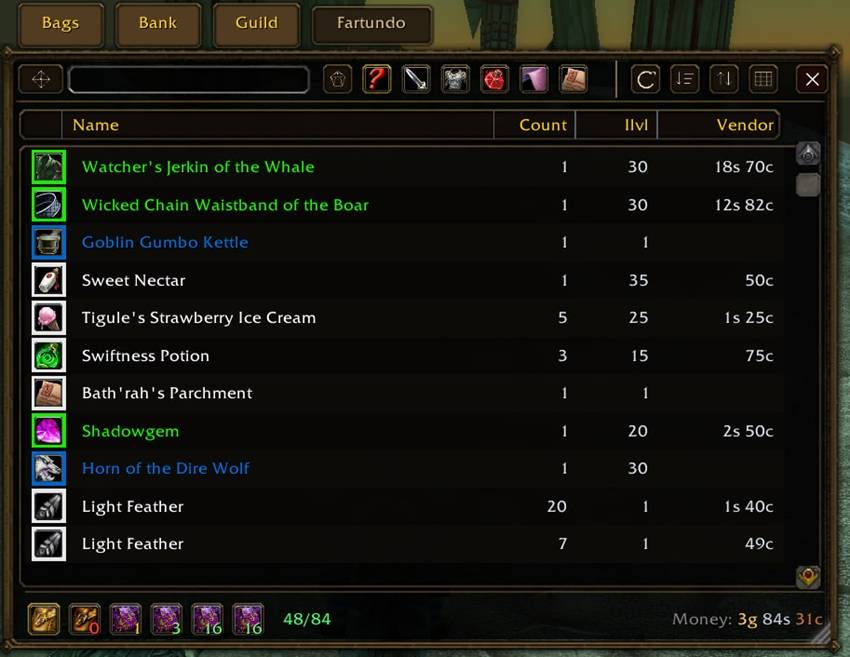
photo_2026-05-19_17-42-43.jpg
Description
Vaultline is a compact, Explorer-style inventory addon for World of Warcraft: Burning Crusade Anniversary.
It replaces the traditional bag grid with a sortable, searchable item list inspired by file managers: clear rows, configurable columns, item categories, bag space tracking, money display, and a separate bank view.
The goal is simple: make your inventory easier to scan, sort, filter, and use.
Main Features
• Explorer-style inventory window
View your items as a clean list with columns instead of a bag grid.
• Sortable item table
Sort items by type, rarity, item level, name, count, vendor price, and more.
• Smart default sorting
By default, items are ordered by type, rarity, item level, and vendor price.
• Configurable columns
Show, hide, resize, and reorder columns to make the inventory as compact or detailed as you want.
• Search with quick clear
Filter your inventory instantly and clear the search field with one click.
• Item categories
Use built-in categories such as All, Quest Items, Consumables, Crafting, Armor, Weapons, Miscellaneous, and Keys.
• Custom categories
Create your own categories, choose an icon, and define what item types or subtypes belong there.
• Bag filter bar
Filter items by bag using the real bag icons, with free slot counts shown directly on the bag buttons.
• Bank window
When interacting with the bank, Vaultline opens a dedicated bank list window so you can browse bank contents in the same clean style.
• Character inventory memory
Vaultline can show saved inventory information for your other characters.
• Money display
Gold, silver, and copper are shown in their familiar colors.
• Space indicator
Inventory space is shown as used/total, with color changing as your bags fill up.
• Item interaction
Use, sell, drag, equip, and disenchant supported items directly from the list where the WoW client allows it.
How to Use
• Open inventory
Press your normal bag key. Vaultline opens instead of the default bag window.
• Search items
Type in the search field at the top of the window. Click the small clear button to reset the search.
• Filter by category
Click a category tab to show matching items. Click All to return to the full inventory.
• Filter by bag
Click a bag icon at the bottom of the window to show items from that bag only.
• Sort items
Click a column header to sort by that column. Click it again to reverse the direction.
• Restore default sort
Use the default sort button near the table controls.
• Show or hide columns
Open the columns button near the table header and choose which columns should be visible.
• Resize columns
Drag the divider between column headers.
• Reorder columns
Drag a column header left or right.
• Move the window
Drag the square handle near the top-right side of the window.
• Resize the window
Drag the resize corner at the bottom-right.
• Use an item
Double-click or right-click supported usable items. Some actions may be limited by Blizzard’s secure UI rules.
• Sell an item
Right-click an item while a vendor window is open.
• Drag an item
Drag the item icon to move it, place it on an action bar, or interact with supported targets.
• Disenchant
Click your disenchant spell, then click a disenchantable item in Vaultline.
• Open bank
Talk to a banker. Vaultline opens a dedicated bank window next to your inventory.
• Create a custom category
Use the add category button in the category area. The editor opens after creation.
• Edit a custom category
Open the custom category, then click it again to open its settings.
• Add item types to a custom category
In the category editor, select item types or subtypes from the list.
• Choose a custom category icon
Use the icon picker in the category editor.
• Delete a custom category
Open the category editor and use the delete button.
Current Status
Vaultline is an early release and is still actively being improved.
The core inventory, sorting, categories, bank view, and interaction features are already usable, but UI polish and edge cases are still being worked on. Feedback and bug reports are very welcome.
Known Notes
Some item actions in WoW Classic are protected by Blizzard’s secure UI rules. Vaultline tries to support direct interaction where possible, but certain actions may depend on combat state, item type, or Blizzard restrictions.
Compatibility
Designed for World of Warcraft: Burning Crusade Anniversary / Burning Crusade Classic.
Why Vaultline?
Traditional bag grids are great for spatial memory, but they become hard to manage when bags are full. Vaultline focuses on clarity: searchable rows, useful columns, category filters, and quick access to the information you actually need.
Vaultline Team