VanguardMe
- By
Plays the voice lines from the Lightblinded Vanguard encounter whenever you press the matching Paladin ability
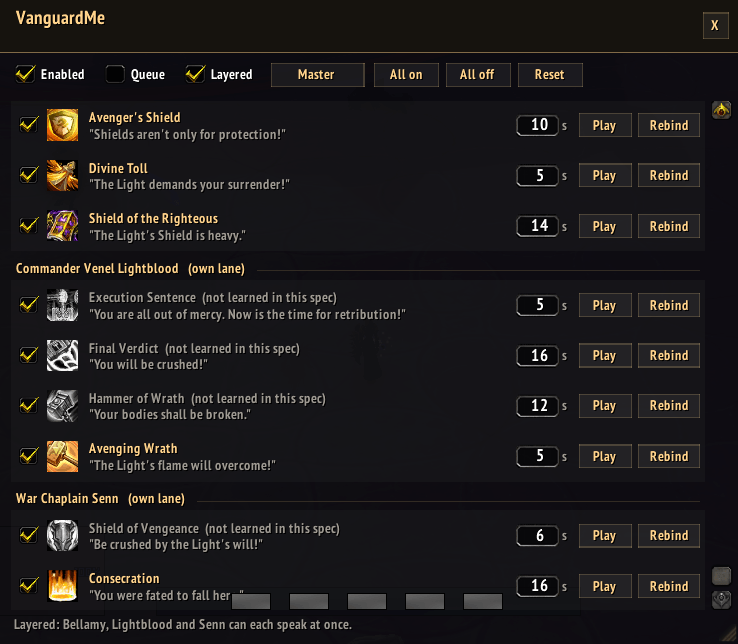
Wow_dzrPGgxLV4.png
Description
VanguardMe
The Lightblinded Vanguard spent an entire raid tier screaming at you about the Light. Now it is your turn.
VanguardMe plays boss the voice lines from the Lightblinded Vanguard encounter in the Voidspire whenever you press the matching Paladin ability.
Install
Drop the folder into:
Interface/AddOns/VanguardMe/
    VanguardMe.toc
    Data.lua
    Core.lua
    UI.lua
Use it
Type /vgm. A window appears. That is basically the whole tutorial.
Everything is pre-mapped, so you can close the window immediately and go be obnoxious in a dungeon. But if you want to fiddle:
| Thing | What it does |
|---|---|
| Checkbox | Mutes one line without deleting it |
| Seconds box | Deadzone. Minimum wait before that line repeats |
| Play | Preview the voice line |
| Rebind | Click, then cast any ability. It grabs the spell ID |
| All on / All off / Reset | Exactly what they say |
Other commands: /vgm on, /vgm off, /vgm reset.
Notes for the curious
Sounds default to the Dialog channel so they behave like boss yells instead of steamrolling your music. Switch to Master in the toolbar if you cannot hear them mid pull.
Rebinding uses learn mode rather than hardcoded spell IDs, so talent swaps and patch changes do not silently break your bindings. If a spell ID ever does go stale, the row turns red and tells you.
For the Light. Loudly.
VanguardMe Team