UpQuest
A WoW Classic Era addon that finds your gear and walks you to it.
Screenshot 2026-09-25 060103.png
Screenshot 2026-09-25 060241.png
Screenshot 2026-09-25 060549.png
Screenshot 2026-09-25 060421.png

Screenshot 2026-09-25 060933.png
Description
Keep dying at level 20? Maybe it's your gear. Buy the full version here! upquest.feebledgamer.workers.dev
UpQuest finds the gear upgrades your character is missing, then shows you exactly how to get each one. It covers the quest chain with waypoints, the dungeon or raid boss that drops it, the vendor that sells it, and the recipe that crafts it. Every result is graded for how hard it is to get and how much experience the journey is worth, so you can choose your next goal in seconds instead of alt-tabbing through databases.
Built for World of Warcraft Classic Era (1.15.9). The whole Finder is free for levels 1–20 , with no account or sign-up.
---
## What UpQuest does
### 🔎 Search the entire Classic item catalog
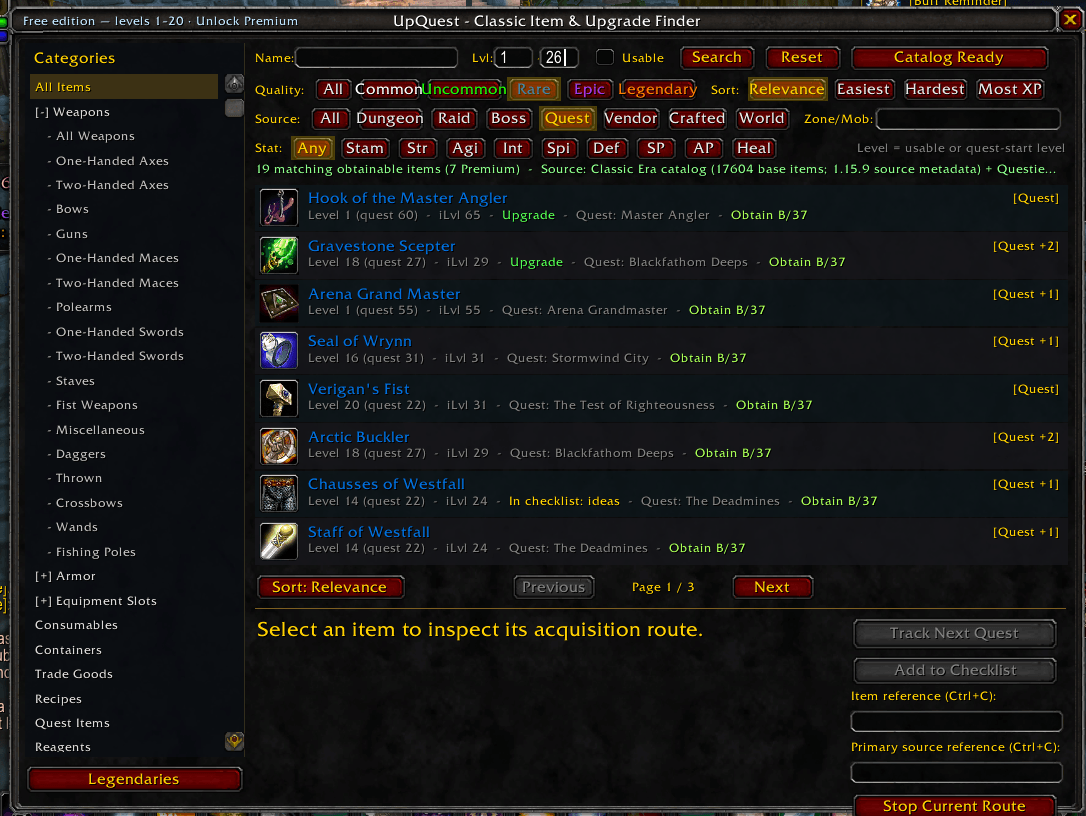
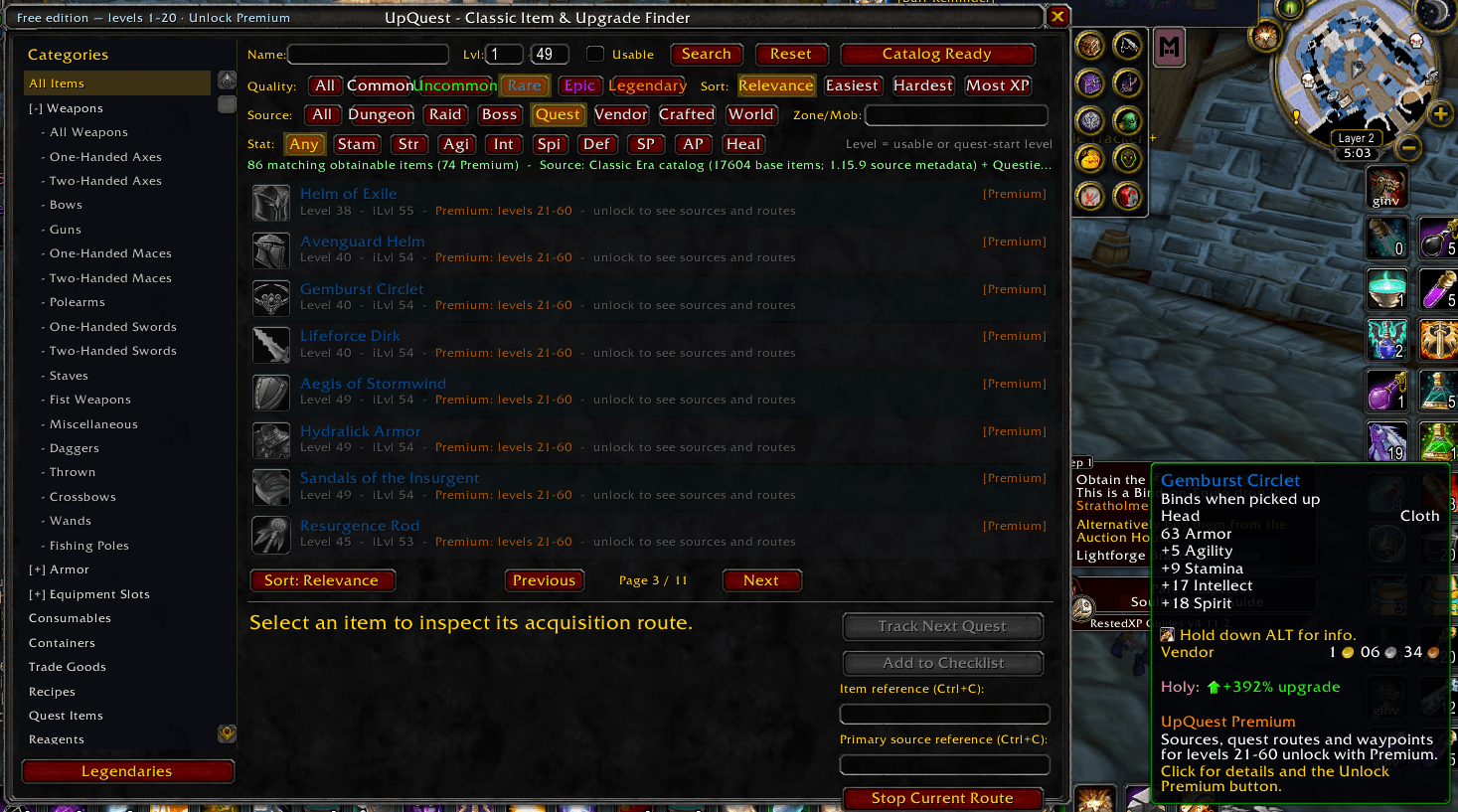
UpQuest ships its own offline catalog of every obtainable Classic Era item and searches it the way you'd browse the Auction House. You can combine all of these:
- Categories. Weapons and every weapon type, Armor by type, Equipment Slots, Consumables, Containers, Trade Goods, Recipes, Quest Items, Reagents, Ammo, Keys and Miscellaneous.
- Quality. Common, Uncommon, Rare, Epic, Legendary.
- Source. Dungeon, Raid, Boss, Quest, Vendor, Crafted, World.
- Stat. Stamina, Strength, Agility, Intellect, Spirit, Defense, Spell Power, Attack Power, Healing.
- Level range. For example, 10 to 25.
- Name search , plus a Zone/Mob search for a specific place or creature.
- Usable only. Hides anything your class or faction can't use.
Results come sorted, paged, and colored by quality, with the item icon, level, item level and where it comes from at a glance.
### ⚔️ Upgrades for 'your' character
- Compared with your gear. Every result is checked against what you have equipped. Real upgrades and empty slots are marked Upgrade .
- Class and faction aware. Items your class or faction can't use are never marked as upgrades.
- Alternatives for any item. Type `/uq ` and shift-click an item link. UpQuest opens set to that item's slot and level range and lists the alternatives, each with its item-level difference.
### 🗺️ Quest routes with waypoints
For quest rewards, UpQuest builds the whole prerequisite chain, not just the last quest.
- Knows where you are. It detects the step you're on: not started, accepted, or ready to turn in.
- Guides the step. It points you to the quest giver, the objective area or the turn-in NPC for the current step.
- Moves on by itself. It advances automatically as you complete quests.
- Route window. A small Upgrade Route window shows the current step, a direction arrow and the distance.
- TomTom. If TomTom is installed, waypoints also go to TomTom. Your own waypoint is restored when a route ends.
- Next step in one click. Press Track Next Quest , and Stop Current Route whenever you like.
### 🏰 Every kind of source
UpQuest knows where items really come from:
- quest rewards (including items inside reward containers)
- dungeon and raid bosses, by name and instance
- world drops and creature drops
- chests and objects
- vendors
- crafted items and their recipes
- PvP and reputation rewards
Items with several sources show them all (for example [Quest +2] ), and you can pick the source that suits you.
### 🏅 Obtainability grades
Every result gets a clear grade from A (easy) to F (very difficult), with the reasons behind it: source type, group size, known drop rates, quest-chain length and character restrictions. Legendaries get their own orange S grade.
Sort your results by:
- Relevance
- Easiest : quick wins first
- Hardest : the big goals
- Most XP : the chains worth the most experience
### ✨ Quest-chain experience tally
Quest-reward upgrades show the total experience of their whole quest chain (for example *XP 12.7k*).
- At your level. The total is counted for your current level and skips quests you've already finished.
- Two numbers. The details show both *XP at your level* and the full value.
- Countdown. The route window counts down the XP you still have left to earn.
- Pick for XP. Choose upgrades that level you up on the way. The Most XP sort puts the richest chains first.
*(Needs Questie for the XP data.)*
### 🔥 Legendary guides
Step-by-step guides for Classic Era's legendary weapons:
- Thunderfury, Blessed Blade of the Windseeker. Both Bindings (Garr and Baron Geddon in Molten Core), Highlord Demitrian in Silithus, the Elementium and Essence of the Firelord, and Prince Thunderaan.
- Sulfuras, Hand of Ragnaros. The Eye of Sulfuras, the Sulfuron Hammer, the Blacksmithing requirements and the ingots.
- Atiesh, Greatstaff of the Guardian. Every class version, the Splinters of Atiesh, and the full Naxxramas and Stratholme chain.
Each guide shows:
- the requirements: level, class, raids and professions
- every step in order, with a Waypoint button
- a materials checklist that counts what's already in your bags and bank
- live progress, read from your quest log
Open them from the Legendaries button, the minimap button or `/uq legendary`.
### 🔗 Works with the addons you already use
- Questie (optional, recommended). UpQuest uses Questie's exact quest, NPC, object, spawn and drop-rate data, and its quest XP data for the experience tally.
- TomTom (optional). Waypoints go to TomTom as well.
- Reverse Guild Tax (optional). Its Upgrade Finder buttons open UpQuest, and Add to Checklist sends an item to your RGT checklist.
- Minimap button collectors. UpQuest's minimap button uses LibDBIcon, so addons like MinimapButtonButton pick it up automatically.
### 📋 Handy extras
- Reference links. A copyable Wowhead link for every item and its main source (Ctrl+C).
- Minimap button. Left-click opens the Finder, right-click opens the Legendary guides and Unlock Premium. The tooltip shows your edition.
- Settings are remembered. Filters and sort order are saved, and each character keeps its own tracked route.
### 🚀 Light on your game
- Catalog on demand. The item catalog (`UpQuest_ItemDB`) only loads when you first search. Nothing scans at login.
- No frame drops. Searches run in small slices, pause in combat, and stop when you close the window.
- No chat spam, no internet. UpQuest never contacts the internet; WoW addons can't.
- Readable code. No obfuscation.
---
## Getting started
1. Install UpQuest (the CurseForge app installs both folders for you).
2. In game, type `/uq` or click the UpQuest minimap button .
3. Set your level range, click Search , and pick an upgrade.
4. Press Track Next Quest and follow the arrow.
## Slash commands
`/upquest` and `/uq` are the same command.
| Command | What it does |
|---|---|
| `/uq` | Open the Finder |
| `/uq <item name or link>` | Search for an item, or show alternatives for a linked item |
| `/uq legendary` | Open the Legendary guides |
| `/uq stop` | Stop the current route and remove its waypoint |
| `/uq status` | Show your edition, catalog state and tracked route |
| `/uq import` | Open the Unlock Premium window (also `/uq unlock` or `/uq premium`) |
| `/uq minimap` | Show the minimap button again (`/uq minimap reset` re-centers it) |
| `/uq help` | List all commands |
## Installation (manual)
Extract the download into `World of Warcraft\_classic_era_\Interface\AddOns\`. You should end up with two folders:
- `AddOns\UpQuest\`
- `AddOns\UpQuest_ItemDB\` (the item catalog, loaded on demand)
Then restart WoW or type `/reload`, and make sure UpQuest is enabled at character select.
---
## Free edition and UpQuest Premium
Everything is free for levels 1–20. Search, sources, grades, routes, waypoints and the XP tally all work, with no account or sign-up.
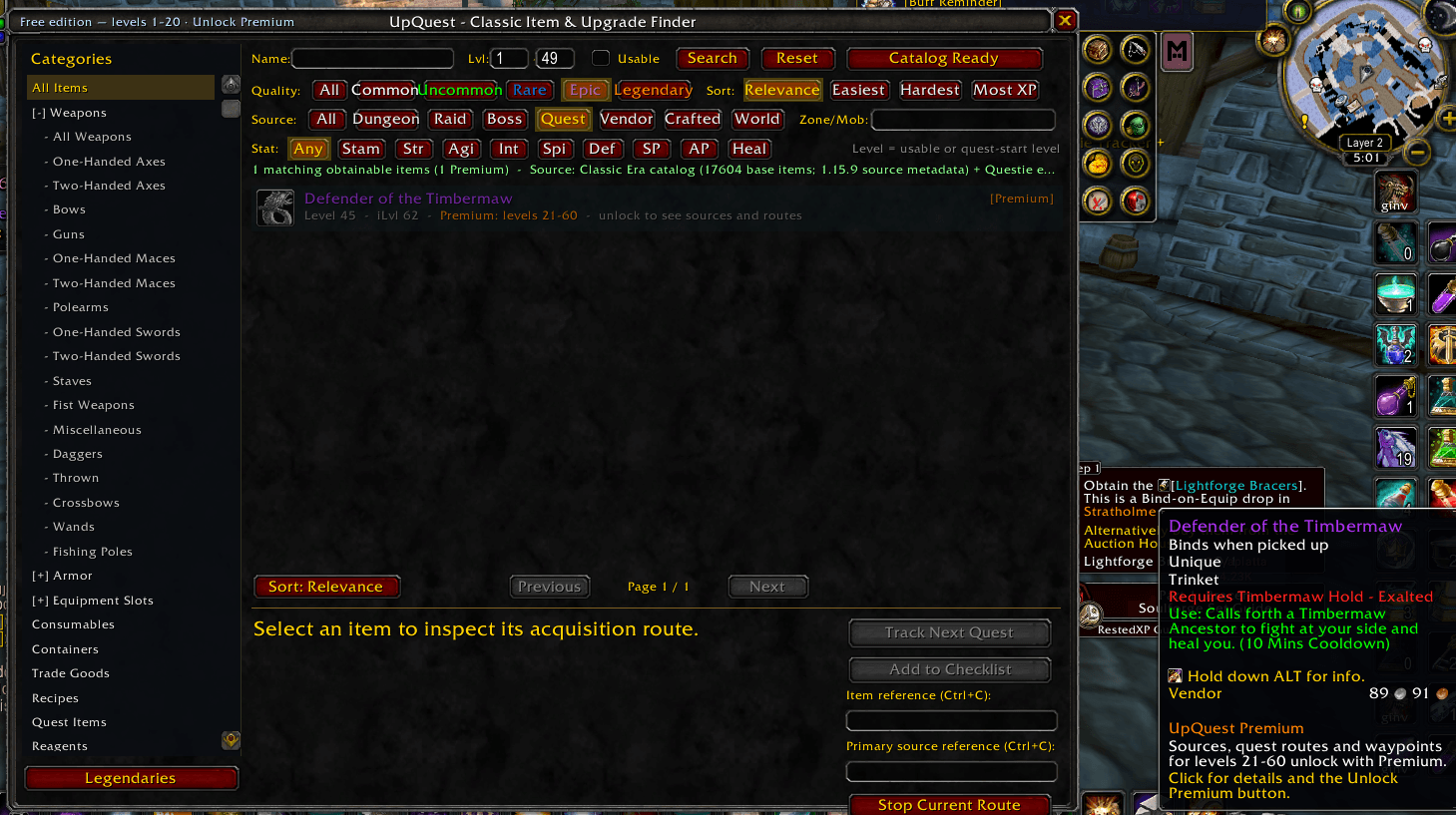
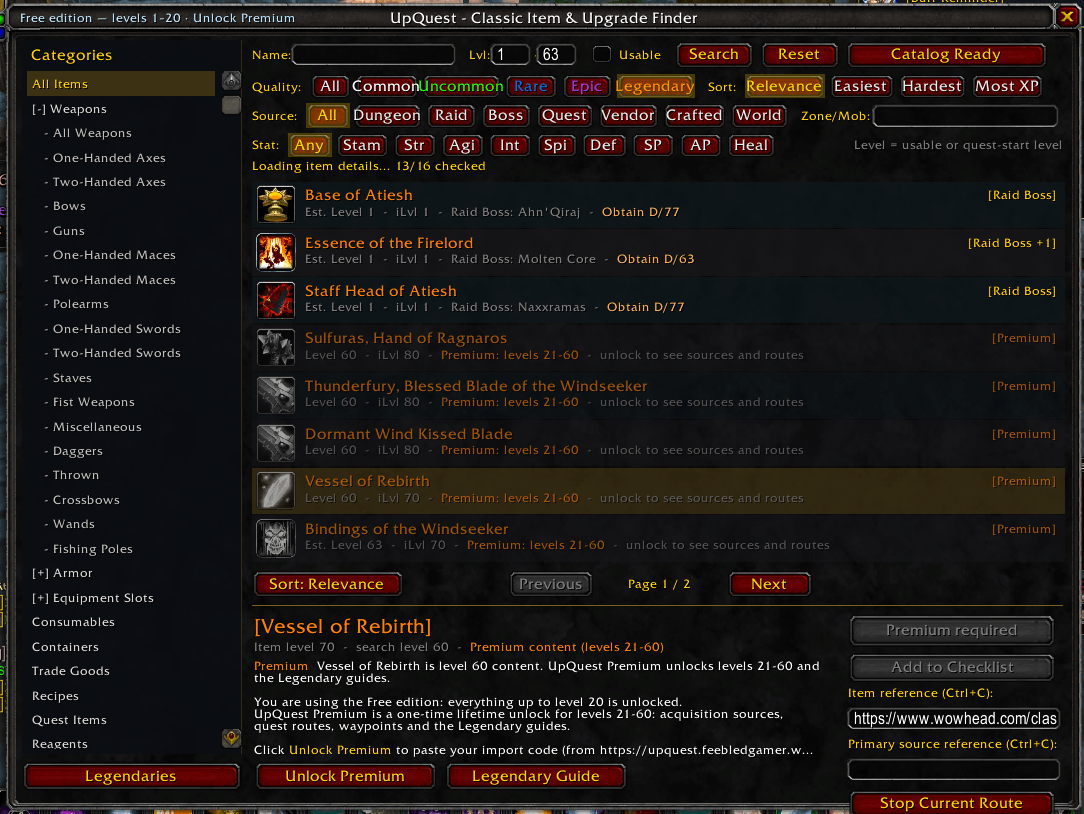
Content above level 20 still shows up in your results as dimmed Premium previews, so you can see what's waiting for you.
UpQuest Premium is an optional one-time purchase that's yours forever . It unlocks:
- routes, sources and waypoints for levels 21–60
- the full Legendary guides
- all future updates
How to unlock:
1. Buy Premium on the UpQuest website. Your license key comes with your order.
2. Paste your license key on the website's Activate page to get your import code.
3. In game, click Unlock Premium (or type `/uq import`), paste the code and press Import .
- Works offline. The code is checked inside the addon, so it works offline.
- Your whole account. It isn't tied to a Battle.net account or character, and it unlocks every character on your WoW account.
- Lost it? The same license key always gives you the same code again.
Website and activation: https://upquest.feebledgamer.workers.dev
---
## FAQ
Does UpQuest need an internet connection in game?
No. Everything runs from the addon's built-in catalog (and Questie's data, if installed). The Premium import code is checked offline.
Do I need Questie?
No, but it's recommended. With Questie, UpQuest gets exact quest, NPC and drop data plus the quest-chain XP tally.
Why does Thunderfury say "not Dire Maul"?
Many players mix it up with Quel'Serrar, the epic sword from Dire Maul. Thunderfury starts in Molten Core and ends in Silithus. The guide walks you through it.
Will it slow my game down?
No. The catalog loads only when you search, and searches pause in combat.
I used the Upgrade Finder in Reverse Guild Tax. Where did it go?
It lives in UpQuest now. Your old filters, sort order and tracked routes are copied over automatically the first time you log in.
The minimap button disappeared.
Type `/uq minimap`.
---
## Credits
Developed by the Silver Chain Gang.
- Item catalog: a snapshot of LibItemDB (MIT license).
- Minimap button: LibStub, CallbackHandler-1.0, LibDataBroker-1.1 and LibDBIcon-1.0.
- Optional addons: Questie and TomTom are not bundled. UpQuest reads their data only when you have them installed.
*UpQuest is not affiliated with or endorsed by Blizzard Entertainment. World of Warcraft is a trademark of Blizzard Entertainment, Inc.*
The UpQuest Team