


Unified Smart Bags
A unified and categorized bag addon with item level comparisons, search, sorting, quick-access utilities, and account-wide gold tracking.
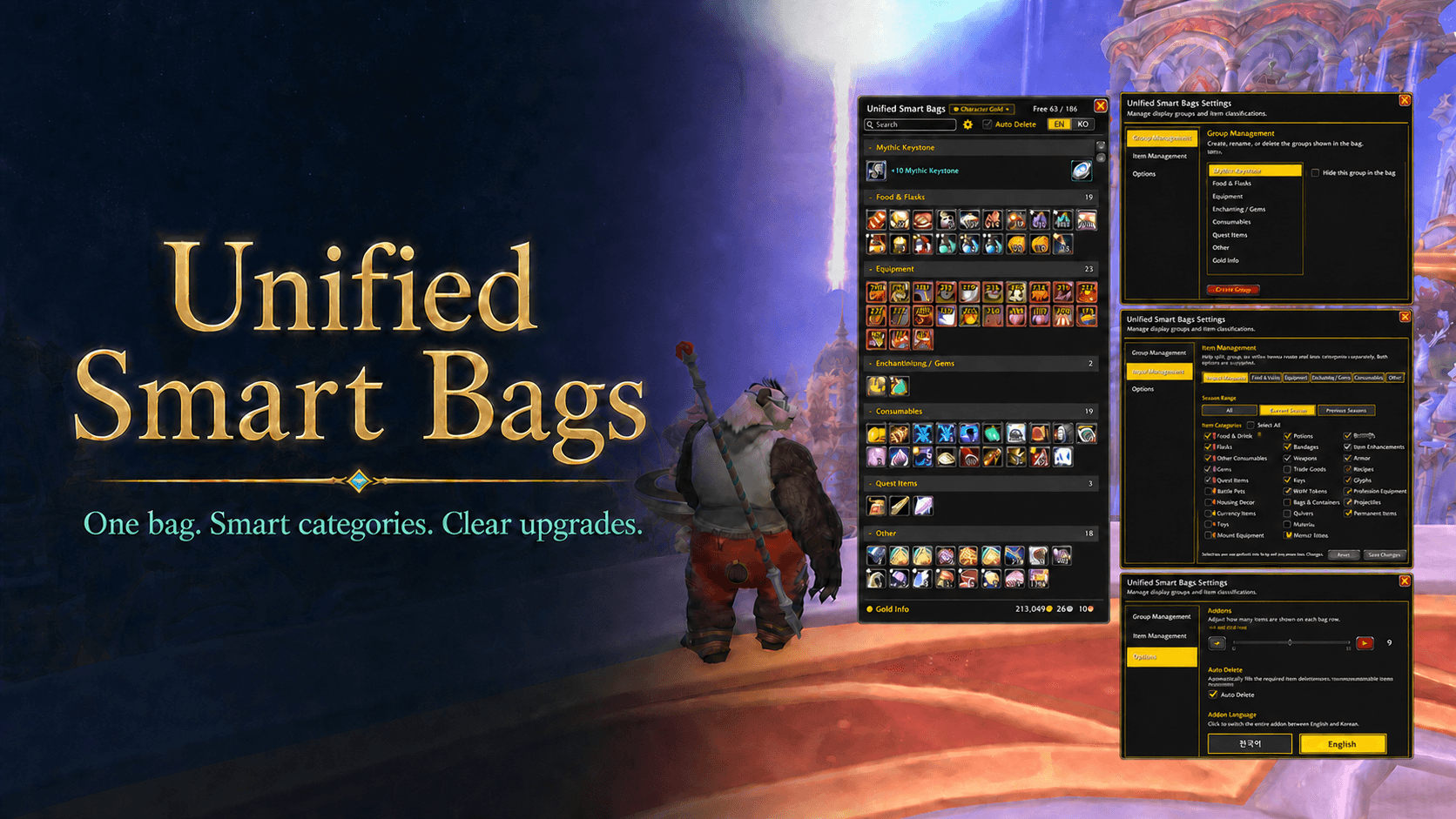
UnifiedSmartBags-v1.0.31-gallery.png
Description
Unified Smart Bags
한국어
Unified Smart Bags는 여러 가방을 하나의 창으로 통합하고, 아이템을 시즌 범위와 아이템 구분에 따라 원하는 그룹으로 정리할 수 있는 World of Warcraft Retail용 가방 애드온입니다.
주요 기능
- 기본 가방, 장착한 가방, 재료 가방을 하나의 창에 표시합니다.
- 쐐기돌, 영약·음식·물약, 장비, 마법부여·보석, 소모품, 퀘스트 아이템, 판매용 아이템 등을 자동으로 구분합니다.
- 그룹을 생성하고 이름 변경, 순서 이동, 숨김 및 삭제할 수 있습니다.
- 쐐기돌 그룹은 항상 최상단, 기타 그룹은 항상 최하단에 고정됩니다.
- 숨긴 그룹의 아이템은 사라지지 않고 기타 그룹으로 안전하게 이동합니다.
- 각 그룹을 접거나 펼칠 수 있으며, 아이템 레벨과 지원되는 제작 품질을 아이콘 위에 표시합니다.
- 그룹 안의 아이템을 아이템 레벨, 품질, 이름 순으로 정리합니다.
- 가방 검색을 지원하며, 검색 결과가 아닌 아이템은 흐리게 표시합니다.
- 한 줄에 표시할 아이템 수를 8~16칸 사이에서 조절할 수 있습니다.
원하는 방식으로 아이템 그룹 구성
설정 창의 아이템 관리에서 그룹별로 시즌 범위와 아이템 구분을 함께 지정할 수 있습니다.
- 시즌 범위: 현재 시즌 / 이전 시즌 / 전체
- 아이템 구분: 무기, 방어구, 보석, 재료, 제조법, 퀘스트, 열쇠, 장난감, 탈것, 소모품 등
- 두 조건은 AND 방식으로 함께 적용됩니다.
현재 시즌 + 무기·방어구와이전 시즌 + 무기·방어구를 서로 다른 그룹에 각각 지정할 수 있습니다.- 같은
시즌 범위 + 아이템 구분조합은 한 그룹에서만 사용할 수 있어 아이템이 중복 표시되지 않습니다. 전체 + 아이템 구분을 사용하면 같은 구분을 현재 시즌이나 이전 시즌 그룹에서 중복 선택할 수 없습니다.- 현재와 이전 시즌에 같은 구분이 각각 지정되어 있으면 전체 범위에서는 해당 구분을 선택할 수 없습니다.
- 충돌하는 항목은 회색으로 표시되며 선택할 수 없습니다.
- 아이템 관리 변경은
변경사항 저장을 눌러야 적용되며,리셋으로 저장 전 상태를 되돌릴 수 있습니다.
시즌 분류
- 한밤 시즌 2 장비는 현재 시즌으로 분류합니다.
- 한밤 시즌 1 장비와 강화가 종료된 구시즌 장비는 이전 시즌으로 유지합니다.
- 과거 확장팩 던전의 원본 장비가 한밤 시즌 2 보상으로 재사용된 경우에도 블리자드 업그레이드 정보와 툴팁 트랙을 확인해 현재 시즌으로 분류합니다.
- 한국어와 영어 티어 변환권을 방어구로 인식하고, 아이템 레벨과 시즌 테마를 이용해 현재·이전 시즌을 구분합니다.
한밤 시즌 2또는Midnight Season 2가 명시된 일반 아이템과 재료는 현재 시즌, 시즌 1 표기는 이전 시즌으로 분류합니다.- 시즌 번호가 없는 한밤 일반 아이템, 퀘스트 아이템, 소모품 및 재료는 확장팩 전체에서 현재 시즌 범위에 포함됩니다.
- 시즌 표기가 없는 한밤 제작 장비는 현재 시즌 범위에 포함됩니다.
- 과거 확장팩 아이템은 이전 시즌 범위로 유지합니다.
아이콘 표시
- 티어 변환권은 파란 테두리로 표시합니다.
- 제작 품질 또는 제작자 정보가 확인되는 착용 장비는 노란 테두리로 표시합니다.
- 전투부대 귀속 장비와 획득 시 귀속 장비는 각각 지정된 색상으로 구분합니다.
- 중요한 불꽃, 파편 및 보관함 계열 아이템을 색상 테두리로 빠르게 찾을 수 있습니다.
- 분류 테두리는 아이콘을 가리지 않도록 얇게 표시합니다.
드래그 앤 드롭
- 전투 금고, 캐릭터 은행 등 외부 창에서 아이템을 들고 가방 창 어디에 놓아도 됩니다.
- 애드온이 일반 가방을 우선 확인하고, 아이템과 호환되는 재료·전문 가방의 빈 슬롯을 이어서 확인합니다.
- 가방 안의 실제 아이템 클릭은 블리자드 기본 처리 방식을 유지하여 하우징 장식, 장비 사용, 판매, 우편, 거래 등의 동작과 호환됩니다.
편의 기능
- 쐐기돌 레벨과 던전 정보를 가방에서 바로 확인할 수 있습니다.
- 쐐기돌 줄 옆에 귀환석 계열 아이템을 빠르게 사용할 수 있는 버튼을 제공합니다.
- 현재 캐릭터, 다른 캐릭터 및 전투부대 은행의 골드를 한 화면에서 확인할 수 있습니다.
- 골드 목록에서 표시하지 않을 캐릭터를 숨기거나 다시 복구할 수 있습니다.
- 자동 지금파괴 옵션은 아이템 삭제 확인창에 필요한 문구만 자동으로 입력합니다. 최종 삭제 버튼은 사용자가 직접 눌러야 합니다.
- 가방 창과 설정에서 한국어와 영어 UI를 전환할 수 있습니다. 직접 변경한 그룹 이름은 번역되지 않습니다.
사용 방법
- 기본 가방 단축키나 가방 버튼으로 Unified Smart Bags를 열고 닫을 수 있습니다.
/usb: 가방 창 열기/닫기/usb reset: 가방 창 위치 초기화/통합가방: 가방 창 열기/닫기/통합가방 초기화: 가방 창 위치 초기화
호환성
- World of Warcraft Retail 12.1.x
- 별도의 외부 애드온 없이 사용할 수 있습니다.
English
Unified Smart Bags combines all character bags into one window and organizes items using customizable season ranges and item-category rules for World of Warcraft Retail.
Key Features
- Combines the backpack, equipped bags, and reagent bag into one window.
- Automatically recognizes Mythic Keystones, flasks, food, potions, equipment, enchantments, gems, consumables, quest items, vendor items, and more.
- Create, rename, reorder, hide, and delete display groups.
- Mythic Keystone is always pinned to the top, while Other is always pinned to the bottom.
- Items assigned to hidden groups safely fall back to Other instead of disappearing.
- Collapse or expand each group and display item levels and supported crafting quality directly on item icons.
- Sorts items within groups by item level, quality, and name.
- Includes inventory search with dimmed non-matching items.
- Adjust the number of items per row from 8 to 16.
Custom Item Group Rules
Item Management lets each group combine a Season Range with one or more Item Categories.
- Season ranges: Current Season / Previous Seasons / All
- Categories include weapons, armor, gems, trade goods, recipes, quest items, keys, toys, mounts, consumables, and more.
- Both conditions are applied together using AND matching.
- Current-season weapons and armor can be assigned separately from previous-season weapons and armor.
- Each
season range + item categorycombination can belong to only one group, preventing duplicate item display. - An
All Seasons + categoryassignment blocks the same category from current- and previous-season groups. - If the same category is assigned separately to Current and Previous, it cannot also be assigned to All Seasons.
- Conflicting categories and season ranges are shown as disabled.
- Item Management changes are staged until Save Changes is pressed; Reset discards pending changes.
Season Classification
- Midnight Season 2 equipment is classified as current-season gear.
- Midnight Season 1 and retired upgrade equipment remain previous-season gear.
- Reissued Midnight Season 2 rewards based on older-expansion dungeon items are recognized through Blizzard upgrade data and tooltip tracks.
- Korean and English tier-conversion tokens are recognized as armor and separated using item levels and season-theme information.
- Non-equipment items and materials explicitly labeled
Midnight Season 2are current-season; explicit Season 1 items are previous-season. - Midnight quest items, consumables, materials, and other non-equipment items without a season number remain current throughout the expansion.
- Midnight crafted equipment without an explicit season label remains current-season.
- Items from older expansions remain in the previous-season range.
Item Borders
- Tier-conversion tokens use a blue border.
- Equippable items with crafting-quality or crafter information use a yellow border.
- Warbound and bind-on-pickup equipment retain their distinct color indicators.
- Important sparks, shards, and cache-type items use colored borders for quick identification.
- Classification borders are thin so they do not obscure item icons.
Drag and Drop
- Drag an item from the Great Vault, character bank, or another external window and drop it anywhere on the bag window.
- General bags are checked first, followed by compatible reagent or specialty bags.
- Real bag-item clicks keep Blizzard's default handling for compatibility with player-housing decor, item use, vendors, mail, trade, and other interfaces.
Convenience Features
- View Mythic Keystone level and dungeon information directly in the bag.
- Quickly use Hearthstone-type items from buttons beside the Mythic Keystone row.
- View gold for the current character, cached characters, and the Warband bank in one panel.
- Hide characters from the gold list and restore them later.
- The optional Auto Delete helper only fills the required confirmation text. You must still click the final delete button yourself.
- Switch the entire addon between Korean and English. User-renamed groups keep their custom names.
Usage
- Open or close Unified Smart Bags with the normal bag key or bag button.
/usb: Toggle the bag window./usb reset: Reset the bag window position.- Korean commands
/통합가방and/통합가방 초기화are also supported.
Compatibility
- World of Warcraft Retail 12.1.x
- No third-party addon dependencies
Unified Smart Bags Team
