


UltimateGroup
- By
Screenshot_71.png
Screenshot_72.png
Screenshot_85.png
Description
Getting a Group together in WoW Forever is a race to invite first, and can be a true pain. I made this addon to make it a lot easier.
There is no dungeon finder queue in Forever. Players list themselves in the Group Finder and the leaders fight over them, and a tank is gone in seconds. UltimateGroup reads that list, puts the player you need on top, and invites them with one click or one key.
I use it myself every day. Open it, press the gold button, and you have your tank.
How it works
- Type
/ug(or click the minimap button). - Pick your dungeon and click your own seat to set your role.
- Press Refresh.
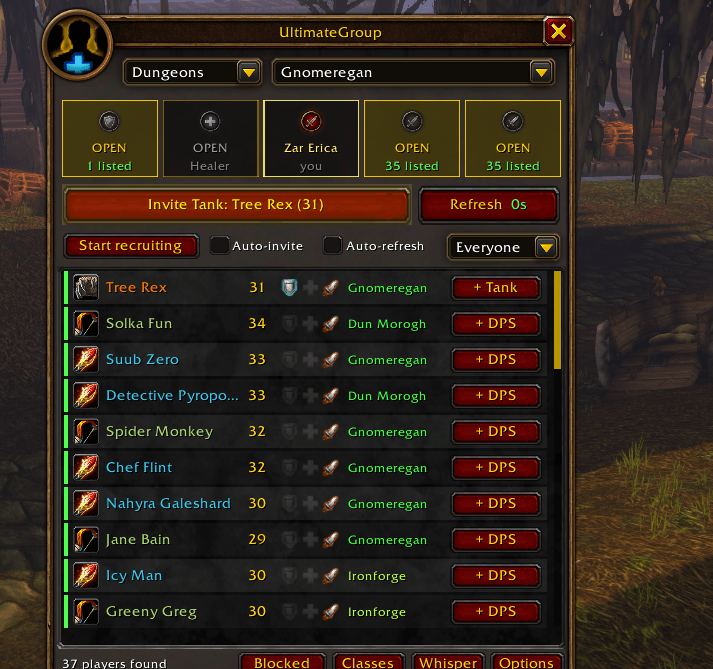
- Press the gold button. It invites the best tank first, then a healer, then DPS. Keep pressing until the group is full.
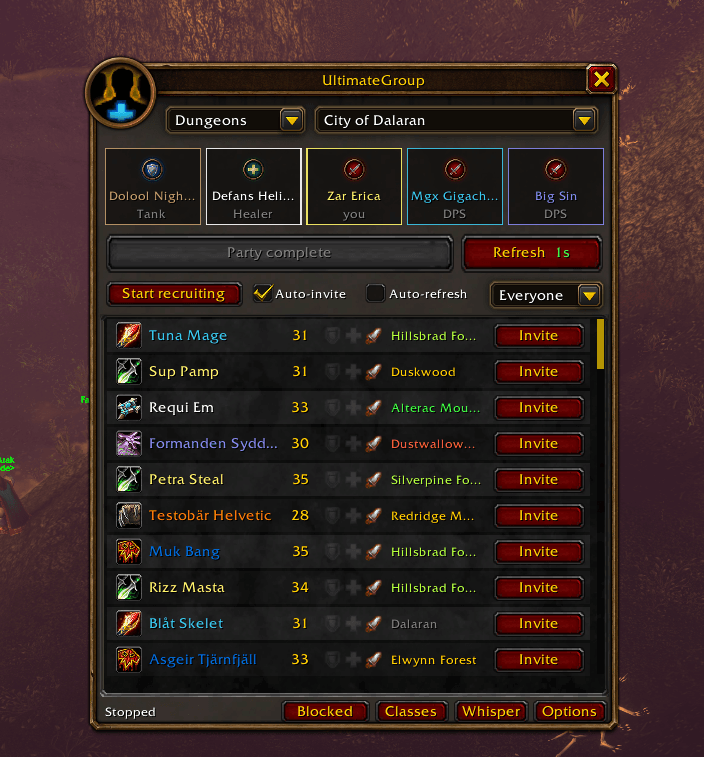
Don't want to click? Tick Auto-invite, press Start recruiting and go on playing. It fills the group by itself and tells you in chat who joined.
Everything it does
Finding players
- Five seats at the top, tank first. An open seat lights up when somebody on the list fits it. Click a seat to see only that role.
- The best match is always on top: players who fit an open seat first, then the closest ones.
- Every player shows their zone in a colour: green is at the dungeon, light green is next door, yellow is the same continent, red is the other one.
- A sound plays when a tank or healer you need shows up.
- Tooltip with level, class, spec, roles, zone, dungeons and their comment.
- Searches you make in Blizzard's own Group Finder window show up here too.
Inviting
- The gold button invites the best match and says who it is before you click. If nobody fits, the same button refreshes the list.
- Auto-invite invites the moment the list arrives, and the next player the moment somebody says no. Works with the window closed, and in combat.
- Right-click a player to invite them for another role, whisper them or block them.
- No stuck seats: an invite with no answer runs out after 90 seconds. A decline or "already in a group" frees the seat at once, and that player is left alone for 10 minutes.
- If you have your own listing, your applicants are on top with one-click invite.
- Whisper requests (off by default): someone whispers
inv tankor!healand gets invited for that role if the seat is open.
Picking who you want
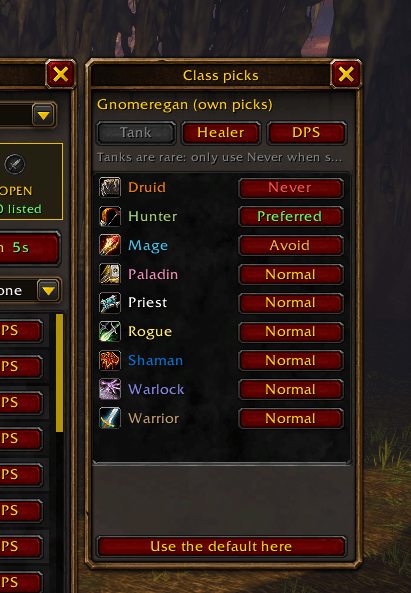
- Classes panel: for each role, set a class to Preferred, Normal, Avoid or Never. For all dungeons or just one.
- Loot rule for DPS: classes that don't want your gear move up. As a rogue you get mages, warlocks and priests first.
- Two more DPS rules: don't double a class the party has, and mix melee with ranged.
- Change the group setup, for example 2 tanks, 1 healer, 2 DPS.
- Level range, and players too low for the dungeon are left out.
The whisper
- Everyone you invite gets one whisper so they know what it is: "Hi! Inviting you as tank for Gnomeregan. We are 3/5 so far."
- With a warlock and two more of you standing together it adds "We can summon you."
- Own text for tanks, healers and DPS, with a live preview. Tags:
{name}{class}{role}{dungeon}{size}{summon}{addon}. Or turn it off.
Blocked players
- One panel with everyone the addon won't invite: the players you blocked (saved for all your characters) and the ones on a break because they declined.
- Unblock or Ask again with one button.
The rest
- Works with WoW Forever names (first name and surname, no realm ofc).
- Refresh can't jam. The game allows two searches and then makes you wait about five seconds, so the button counts down and shows how old the list is.
- Minimap button, addon compartment, options under Options > AddOns.
- Three key bindings: open, Search, Invite the best match. Bind the last two and recruiting is two keys.
- An error never breaks it. It goes to a log (
/ug debug) and the addon keeps running.
Commands
| Command | What it does |
|---|---|
/ug |
Open or close |
/ug start, /ug stop |
Start or stop recruiting |
/ug scan |
Search now |
/ug next |
Invite the best match now |
/ug role tank, healer, dps |
Set your role |
/ug msg [text] |
Change the whisper (on, off, default) |
/ug block [name] |
Block or unblock a player |
/ug options |
Options |
/ug minimap |
Show or hide the minimap button |
/ug debug |
Show the log |
/ug reset |
Reset everything |
Good to know ( If i still play in the future. )
- Made for WoW Forever. It loads on Retail too, but Retail hardly lists solo players, so there it only helps with applicants to your own listing.
- The game may want a click or key press for every search. If it does, Auto-refresh turns itself off and tells you. Use Refresh or the Search key.
- You have to be the party leader, or not in a group yet.
- It only sees players who listed themselves, and it trusts the role they picked.
- A dungeon added in a later patch has no distance colours until I update the addon.
- The addon is in English.
Something wrong?
Type /console scriptErrors 1, make it happen again, and post what /ug debug shows in the comments. (( I try to read them )) .
- Zareric
UltimateGroup Team
