UIFader
- By
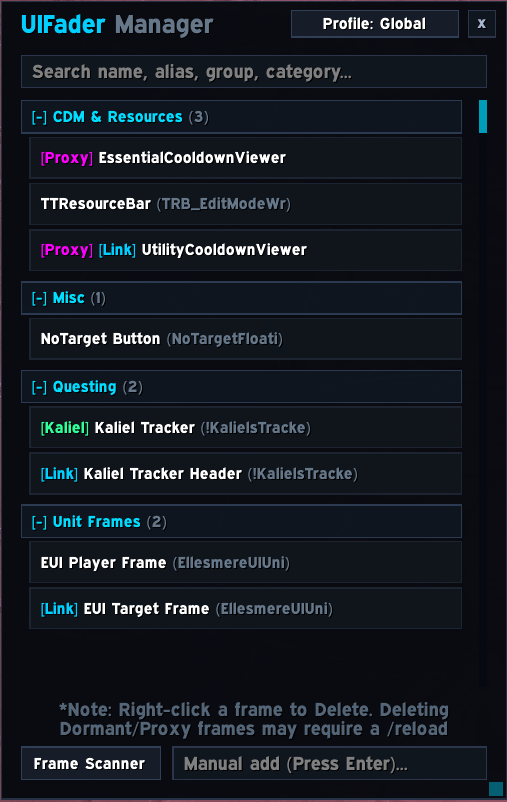
UIFader is a lightweight, high-performance UI fading engine designed to dynamically control the visibility and opacity of any interface element based on contextual gameplay states.
UIF1.png
UIF2.png
UIF3.png
UIF4.png
UIF5.png
Description
UIFader
UIFader is a lightweight, all-in-one contextual UI fading engine. Designed from the ground up to give you total command over the opacity, and visibility of any UI element—including default Blizzard frames and third-party addons alike—from a single unified manager.
Whether you want to glide rotational bars off-screen while mounted, fade action bars out of combat, hide damage meters during questing, or dynamically reveal defensive trackers as your health drops, UIFader handles it all with zero combat stutter.
⚡ Quick Start Guide
- Open the Interface: Type
/uifor/uifaderin chat, click the minimap icon, or select UIFader in the Blizzard Addon Compartment. - Select Any Frame:
- Live Reticle HUD (Recommended): Click Live Pick to bring up the full-screen targeting HUD. Hover over any element, press
[TAB]to cycle through stacked layers, and click + Add & Keep Picking to add multiple frames in seconds. - Deep Scanner: Click Scanner, hover your target, and press
[Shift]to review all overlapping frame layers and their parent hierarchies. - Manual Add: Type any global frame name into the input field at the bottom of the manager and press
Enter.
- Live Reticle HUD (Recommended): Click Live Pick to bring up the full-screen targeting HUD. Hover over any element, press
- Configure Visibility: Select your frame in the list, set your baseline Inactive Opacity (e.g.,
0%for hidden or20%for transparent), and check whichever conditions you want to trigger visibility.
✨ Core Features
🎯 Point-and-Click Live Reticle HUD
- Zero Frame-Name Guessing: Never inspect game files, type
/framestack, or guess obscure addon frame names again. - Visual Pulsing: Hovering an element pulses its opacity so you know exactly what is selected.
- Layer Cycling: Press
[TAB]to cycle up and down through overlapping parent frames and child elements on the fly. - Frame Family Tree: Open the interactive ancestry tree to inspect root wrappers and nested containers before applying rules.
🚀 Kinetic Shift (Hardware Gliding)
- Smoothly glide UI elements physically off-screen when inactive instead of using sudden alpha cutoffs.
- Powered by GPU translation animations with support for directional shifts: Left, Right, Up, or Down.
- Frames automatically return smoothly to their anchor points the instant trigger conditions are met.
🖱️ Click-Through at 0% Opacity (Opt-In Toggle)
- Opt-In Per Frame: Check Click-through when fully faded (0% Alpha) under Opacity, Motion & Rules to release mouse capture whenever an element fades down to 0% opacity.
- Unobstructed World Interaction: Completely invisible UI elements will never block you from clicking target reticles, ground markers, quest objects, or enemy nameplates in the 3D world.
- Full Mouseover Compatibility: Unlike standard WoW frames where disabling mouse clicks prevents hover detection, UIFader tracks cursor coordinates geometrically using screen boundary math.
- Instant Wake & Click Recovery: If Mouseover is enabled, hovering your cursor over an invisible click-through frame will still wake it up smoothly, immediately restoring full button clicking and interactivity while visible.
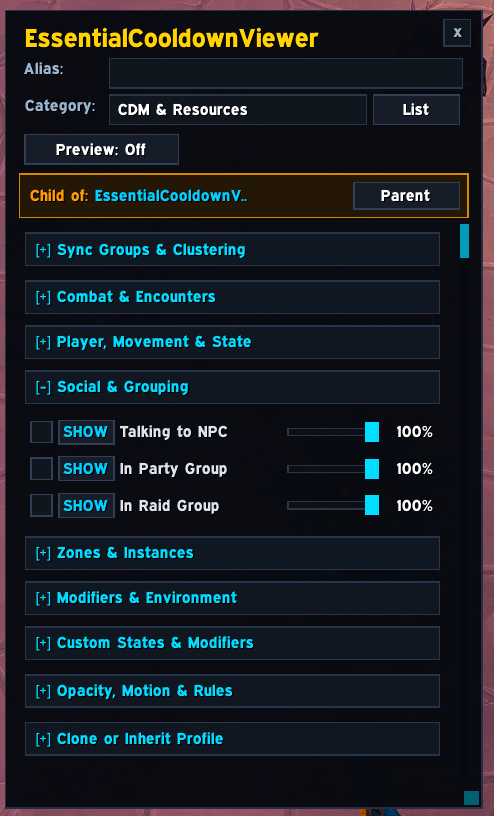
🔗 Sync Groups & Clustering
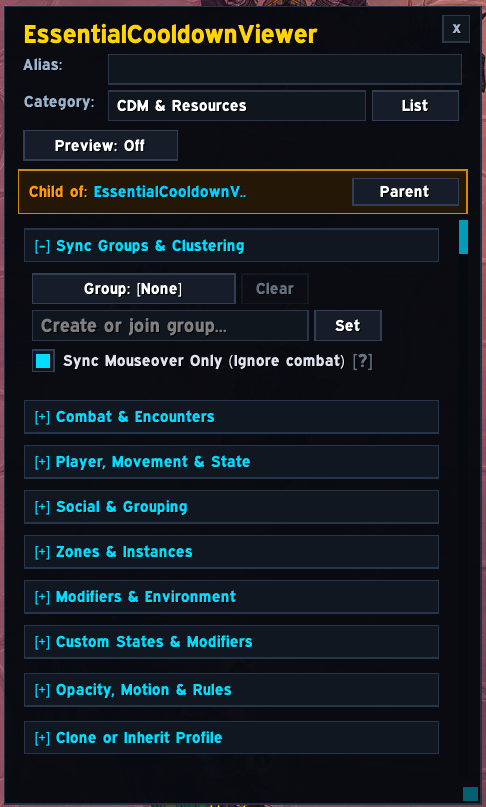
- Link related frames into synchronized clusters (e.g., group all your action bars or chat tabs together under
"ActionBars"). - Waking up one member (such as hovering over a single action button) smoothly brings the entire cluster to life.
- Includes an optional Sync Mouseover Only mode so clusters only wake on hover while leaving individual combat triggers isolated.
❤️ Dynamic Health Fading & Mathematical Curves
- Damage Trigger: Instantly snap or fade frames in the moment you take any damage (
< 100% HP). - Adjustable Cutoffs: Choose an exact health threshold (e.g., reveal defensive CDs below 50% HP).
- Non-Linear Gradients: Opacity scales dynamically as health drops toward 0% using Blizzard’s native Curve API.
- Curve Intensity: Fine-tune gradient acceleration—fade in immediately upon taking initial damage or hold off until critically low.
⌨️ Custom Keybind Overrides
- Assign any keyboard key or combination (e.g.,
CTRL-ALT-Gor single keys) to control a frame. - Hold Mode: Frame stays visible only while the key combination is held down (ideal for peeking at quest logs or maps).
- Toggle Mode: Pressing alternates frame visibility on and off.
- Set keybind behavior to either SHOW the frame or act as an instant HIDE override.
🛠️ Advanced Logic & Power-User Tools
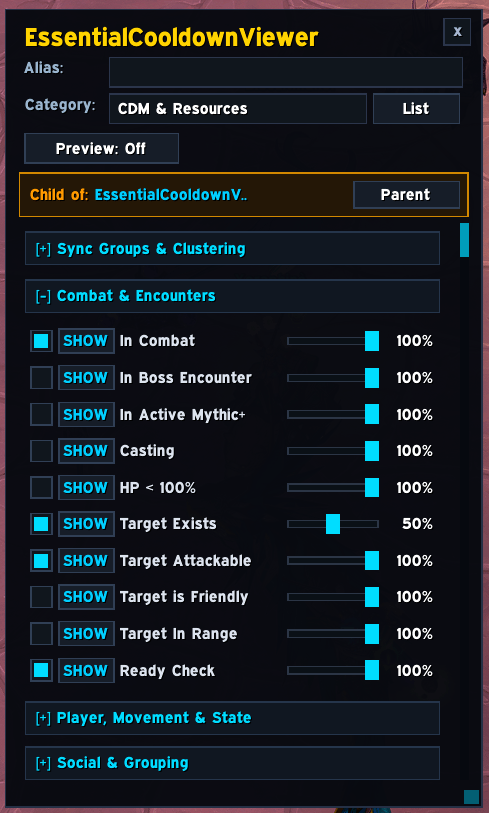
- SHOW vs. VETO Modes: Every condition can either reveal the frame to a specific opacity or act as a VETO (hard hide). Vetoes override all other active triggers—useful for keeping elements suppressed during cinematics, pet battles, or vehicle rides.
- Instant Snap vs. Smooth Fade: Choose whether veto conditions fade out smoothly or instantly Snap to zero opacity with no fade delay.
- Compound Boolean Logic: Construct complex conditional rules using
WHEN,AND,OR, andEXCEPTclauses.
Example:
WHENIn CombatANDTarget In RangeEXCEPTMounted
- Per-Rule Timing Overrides: Assign unique Fade-In, Fade-Out, and Linger grace periods to individual compound rules.
- Live Logic Inspector: A diagnostic window embedded inside the configuration panel that live-traces which conditions, vetoes, and sync groups are passing or failing at 10Hz.
- Proxy Canvas: Wraps stubborn, alpha-locked third-party addons inside a virtual parent canvas, overcoming hardcoded scripts that fight transparency.
- Dormant Mode: Unregisters events, unhooks scripts, and hides inactive frames into a dormant holding parent out of combat for total silence and zero CPU load.
- Profile Linking & Auto-Spec: Automatically swap profiles when switching specializations, or link secondary frames to inherit all rules from a master parent frame.
- Custom Categories & Aliases: Assign user-friendly aliases and organize frames into custom, collapsible folders with built-in search filtering.
📋 40+ Supported Contextual Triggers
UIFader evaluates game state events directly through bitwise masks for maximum performance:
| Category | Available Conditions |
|---|---|
| Combat & Encounters | In Combat, Boss Encounters, Active Mythic+, Player Casting, Player HP Threshold, Target Exists, Target is Attackable, Target is Hostile, Target is Neutral, Target is Friendly, Target In Range, Target is Casting, Ready Checks. |
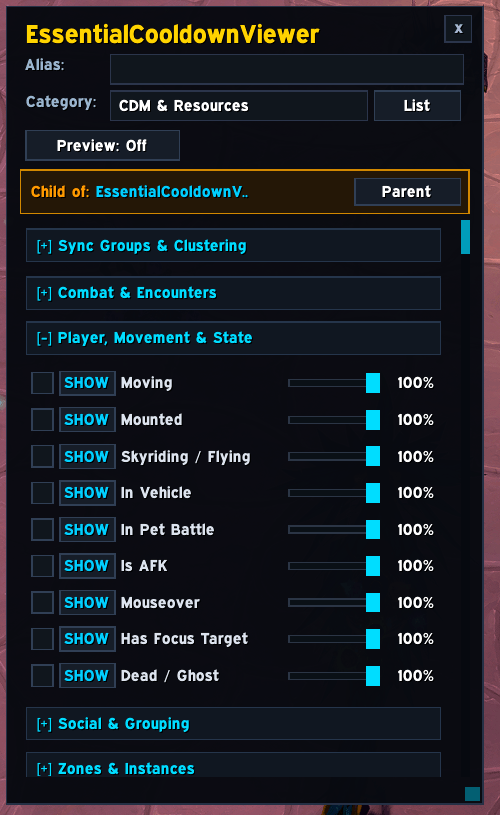
| Player & Movement | Moving, Mounted, Skyriding / Gliding, Stealthed / Prowling, In Vehicle, Player Has Pet, In Pet Battle, Is AFK, Has Focus Target, Dead / Ghost, Mouseover. |
| Social & Grouping | Talking to NPC (Quests, Merchants, Banks, Mail, AH), In Party Group, In Raid Group. |
| Zones & Instances | In Raid (Zone), In Dungeon, In Delve, In Battleground, In Arena, In Scenario, Open World, In Sanctuary. |
| Environment & Modifiers | Shift Key Held, Ctrl Key Held, Alt Key Held, Custom Keybinds, Indoors, Outdoors, Resting (Inn/City), Swimming. |
💡 Example Setup Recipes
- The Immersive Explorer:
- Frames: Action Bars, Minimap, Chat Frame.
- Settings: Inactive Opacity
0%, Click-ThroughEnabled, Kinetic ShiftDown. - Triggers:
SHOWon Combat, Target Exists, or Mouseover.VETOon Mounted or Skyriding.
- The Combat Damage Meter:
- Frames: Details! / Skada / Recount windows.
- Settings: Inactive Opacity
0%, Fade-In0.2s, Fade-Out1.5s, Linger Delay3.0s. - Triggers:
SHOWon In Combat, In Active Mythic+, or Boss Encounter.VETOon Talking to NPC.
- Defensive Cooldown Tracker:
- Frames: Personal resource bars or defensive cooldown trays.
- Settings: Inactive Opacity
0%, Dynamic Linear GradientEnabled. - Triggers: Player HP Threshold below 60% with Curve Intensity
1.5.
⚙️ Engine Architecture & Performance
- Zero Combat Stutter: UIFader caches condition bitmasks and avoids continuous frame-polling during encounters. State recalculations happen via event-driven bitwise evaluation.
- Hardware Animation Engine: All transitions use native Blizzard AnimationGroups for smooth, stutter-free alpha interpolation without manual script-lag.
- Protected Frame Isolation: Features built-in safeguards (
IsProtected,issecretvalue, and combat lockdown checks) to prevent UI taint on secure Blizzard elements. - Weak-Keyed Memory Safety: Frame references are held in weak-keyed registries to ensure proper garbage collection when third-party addons recreate elements.
⌨️ Slash Commands
| Command | Description |
|---|---|
/uif or /uifader |
Toggle the main UIFader Manager window. |
/uif reveal (or /uif showall) |
Global Reveal: Forces all managed frames to 100% opacity for quick positioning and setup. |
/uif toggle (or on / off) |
Globally enables or disables all fading logic. |
/uif reset |
Wipes the database and reloads the user interface. |
UIFader Team