


UI Fade
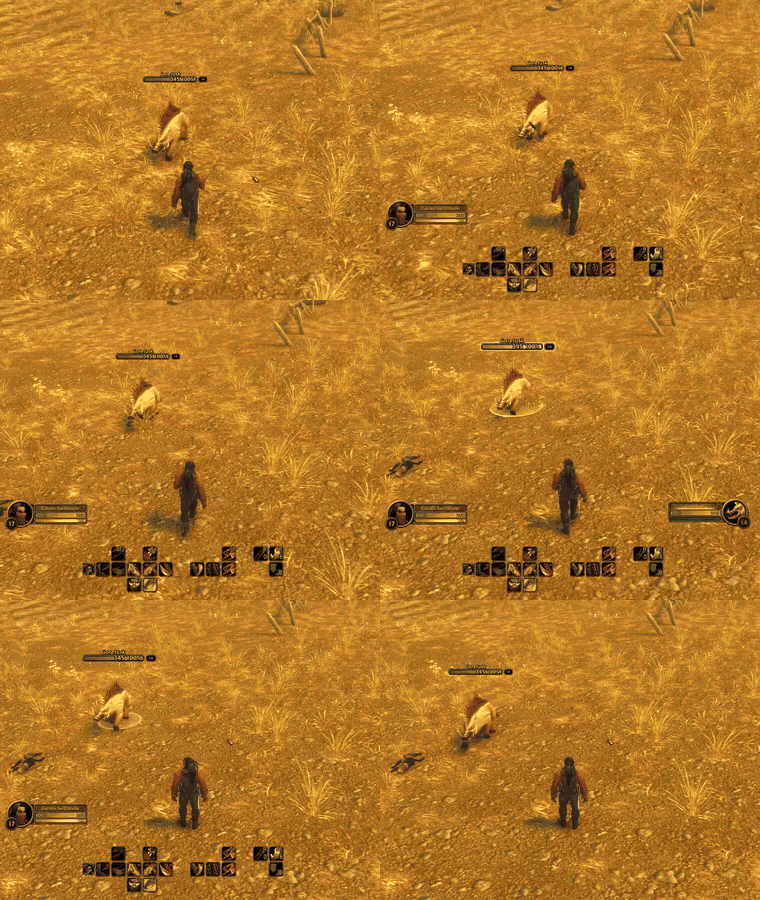
UIFade-demo-under-2MB.gif
Description
UI Fade - A Cleaner, More Immersive World of Warcraft Interface
Take control of your interface. Keep what matters visible, and let everything else fade away.
UI Fade is a lightweight, highly customizable World of Warcraft addon designed to reduce screen clutter by intelligently fading interface elements when they're not needed.
Whether you're exploring Azeroth, sneaking through enemy territory, or engaging in combat, UI Fade helps keep your screen clear while ensuring important information appears when you need it.
Built as a companion to Bartender4, UI Fade introduces smooth animations, customizable visibility conditions, and independent fading controls for different parts of your interface.
Features
Action Bar Fading
- Automatically hide action bars outside combat.
- Reveal bars when entering combat, targeting enemies, or hovering over relevant units.
- Configure visibility behaviour for friendly, hostile, and dead targets.
- Customize fade-in and fade-out speeds.
- Adjust idle opacity to your preference.
- Supports Rogue Stealth stance bar cooldown fading.
Player & Target Frames
- Independently configure Player Frame and Target Frame fading.
- Automatically reveal important information during combat.
- Keep your Player Frame visible when injured.
- Customize visibility based on targeting and mouseover conditions.
- Adjust animation speeds and idle opacity.
Experience Bar
- Hide the Experience Bar when not needed.
- Automatically reveal it during combat.
- Reveal it by hovering directly over the bar.
- Configure independent fade speeds and idle opacity.
Buffs & Minimap
- Independently control fading for buffs and the minimap.
- Reveal elements during combat or direct mouseover.
- Customize idle opacity and animation speeds.
- Keep your interface clean without permanently hiding useful information.
Smart Chat Fading
- Automatically fade chat when inactive.
- Reveal chat when hovering over it or typing.
- Automatically display incoming messages from selected channels.
- Configure notifications for whispers, party, guild, raid, officer, Battle.net, and system messages.
- Set how long chat remains visible after receiving a message.
Profiles
- Create individual configurations for different characters.
- Share settings between characters.
- Create named profiles for different playstyles.
- Switch configurations through the in-game settings window.
Classic WoW-Inspired Settings
UI Fade includes a custom settings interface designed to complement the classic World of Warcraft aesthetic.
Featuring leather-inspired textures, bronze borders, gold lettering, and organized configuration categories, the settings window provides intuitive control over your interface without requiring complicated commands.
Open settings: /uifade
Requirements
- Bartender4 - Required dependency.
- WoW Forever 1.60.1 - Current development and testing environment.
UI Fade has been developed and tested specifically for WoW Forever Beta. Compatibility with official World of Warcraft Retail or Classic clients has not been established.
Installation
-
Download UI Fade.
-
Extract the folder into your World of Warcraft
Interface/AddOnsdirectory. -
Ensure Bartender4 is installed and enabled.
-
Launch the game.
-
Type
/uifadeto open the configuration window.
Important: Allow Bartender4 to handle action-bar positioning, paging, and keybindings. Disable overlapping Bartender4 visibility conditionals when using UI Fade to control action-bar opacity.
Credits & Acknowledgements
UI Fade is an independent companion addon built to work alongside Bartender4, developed by Nevcairiel (Hendrik Leppkes).
Bartender4 handles action bar positioning, paging, and keybindings, while UI Fade provides additional visibility and fading customization.
UI Fade is not affiliated with or officially endorsed by the Bartender4 developer.
Bartender4 is required and must be installed separately.
Design Philosophy
UI Fade is built around one simple idea:
Your interface should appear when you need it and disappear when you don't.
Enjoy a cleaner view of Azeroth without sacrificing access to important combat information, abilities, or communication.
UI Fade v0.4.0
A customizable interface fading companion for Bartender4.
UI Fade Team
