Tylesser - Proc Glow
- By
Action buttons glow when an ability procs, with art beside your character and an optional sound. For WoW Forever.
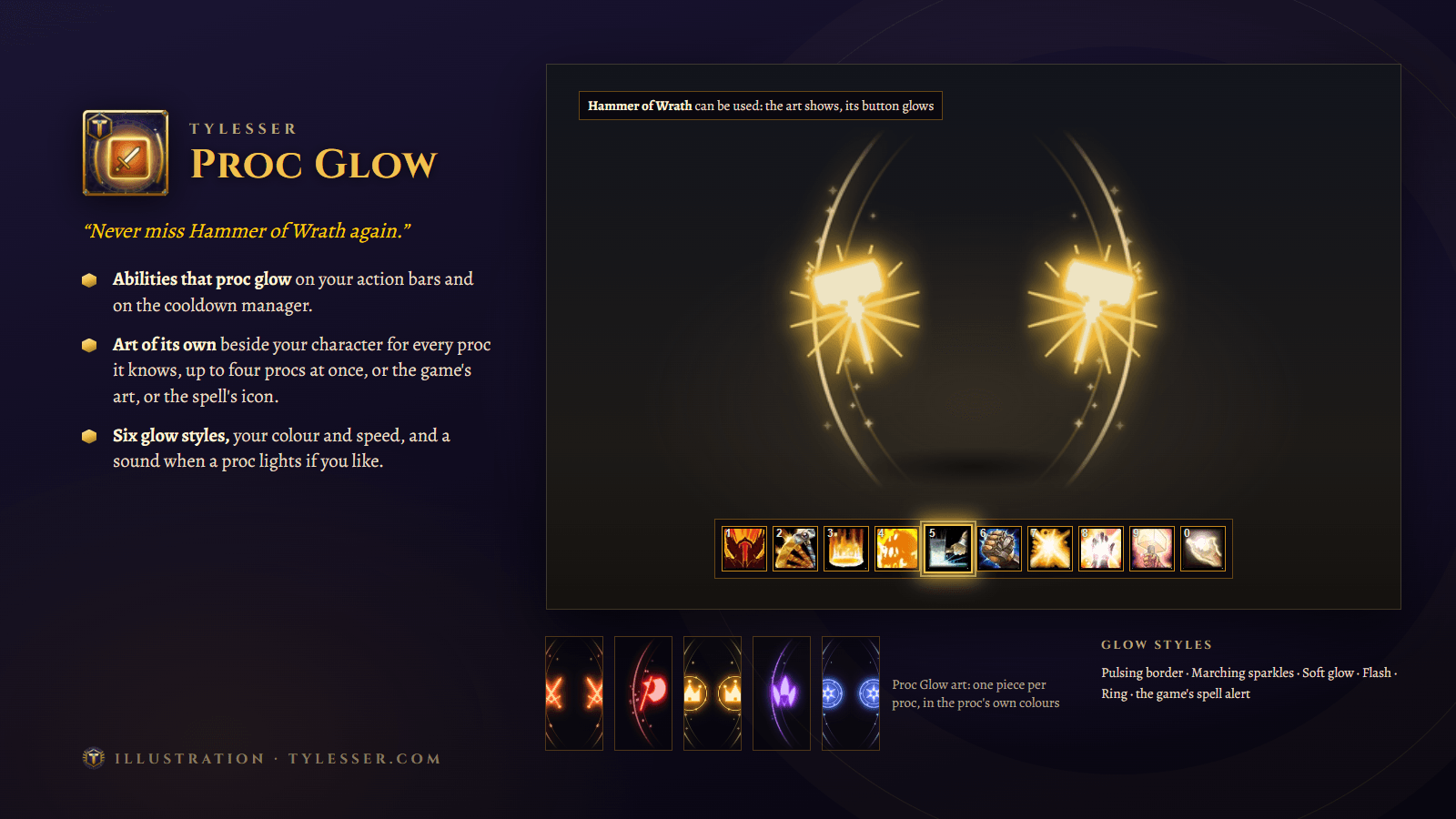
Illustration: Hammer of Wrath's art on both sides and its button glowing, with more art and the glow styles.
Description
Tylesser - Proc Glow
A World of Warcraft addon for WoW Forever that makes your action buttons glow when an ability procs, shows art beside your character like later expansions do, and can play a sound when a proc starts. It is the proc glow of Tylesser - Codex as an addon of its own, for players who don't use Codex.
Features
- Reactive abilities glow while they can be used: Overpower, Revenge, Execute, Riposte, Counterattack, Mongoose Bite, Hammer of Wrath (and Victory Rush where the game has it).
- Buff procs glow the spells they empower: Shadow Bolt with Shadow Trance (Nightfall), Arcane Missiles with Missile Barrage, Pyroblast at 3 stacks of Heating Up, the paladin's seals with Unsealed Wrath's echoes at 3 stacks. Clearcasting shows only its art, no glow on the buttons.
- What the game already lights itself keeps the game's glow.
- Glow styles: the game's spell alert, a pulsing border, marching sparkles, a soft glow, a flash or a ring. Colour (gold, class or a fixed colour), pulse speed and thickness.
- Cooldown manager: the glow on its icons too, and optionally in place of the game's square glow.
- Art beside your character: a piece drawn for each proc, sixteen styles for any proc (flames, runes, feathers, crescent moons, lightning, vines, crystal shards, stars, swords, daggers, arrows, claw marks, skulls, snowflakes, rays of light, arcane sigils), the spell's icon or a plain arc, for all procs or per ability. The art moves: swords clash, axes and hammers swing, flames flicker, lightning flashes, runes light up, feathers flutter, snowflakes drift, and sparkles drift along the arc. Each proc shows in its own colour, or in the glow colour or one you pick. Several procs show together: two left and right, a third on top, a fourth below; or all on one side you choose, left, right, top or bottom (Art side). Each ability can also get a side of its own. Size and opacity, with "Show the art" and "Show all arts".
- Sound when a proc starts (off until you switch it on): 14 sounds made for procs (or each proc its own: blades for Overpower, fire for Heating Up, …) and 14 of the game's, soft or loud, only in combat if you like, on the Master channel if you want, and a different sound per ability. The per-ability lists show your class's procs and fold up, and each ability can get its own art colour.
- Your own procs: a buff of yours lights a spell on your bars. Pick them from a window: your buffs, gear, consumables in your bags and your spells, by category. In a fight the game hides most buffs from addons, so track the buff in the cooldown manager.
- Profiles: keep several sets of settings (a glow and sound for each of your characters, a quiet one for levelling, …) and switch between them at the top of the options page or with
/procglow profile <name>, also from a macro. Each character remembers its own profile; a new one starts as a copy of the settings in use. - Warning before a proc ends (off until you switch it on): in a buff proc's last seconds (2 by default, 1 to 5) its glow pulses faster and its art flashes, with a sound if you pick one. Buff procs only (Shadow Trance, Clearcasting, Heating Up, Missile Barrage, the seal echoes, your own procs): Overpower and the other abilities that light up after a dodge or parry have no time the game gives. In a fight the game hides your buffs' times, so there it counts from when the proc lit, for buffs you track in the cooldown manager.
- More: a faint glow while you can't cast the spell yet, a glow style and colour per ability, stacking procs building up (one arc, two arcs, then the symbol), Move the art (also in Edit Mode), art only in combat, the time between sounds, and one preview on the options page that shows any ability's glow, art and side together (hover it in a list), with Play.
If you use Codex, its own proc glow does the same; while this addon is loaded, Codex leaves the job to it.
Usage
/procglow, or Esc > Options > AddOns > Tylesser > Open Tylesser settings. The options open in Tylesser's own settings window./procglow testshows the art for a few seconds,/procglow artsevery piece of art./procglow on//procglow offswitches it./procglow profilelists your profiles,/procglow profile <name>switches to one (not in a fight)./procglow reportprints what each glow is doing (handy in a bug report)./procglow recordrecords what Proc Glow sees for the next 10 minutes (/procglow record stopends it sooner). Then type/reloadand send the fileWTF\Account<account><realm><character>\SavedVariables\ProcGlow.lua: it shows the moment a glow goes wrong.
Why doesn't a proc glow?
- In a fight the game hides your buffs from addons. Buff procs (the paladin's echoes, Shadow Trance, Missile Barrage, your own procs) then light only while that buff is tracked in the game's cooldown manager, which Proc Glow can still read. Add the buff to its tracked buffs (icons or bars). Heating Up is the exception: its stacks show in Pyroblast's cast time, which stays readable.
- The paladin's echoes come from the Unsealed Wrath talent. At 3 stacks of an echo the seals you could switch to glow (not the one you have on), and the echo's art shows; one or two stacks only build up the glow. Seal of the Crusader has no echo. In a fight, track Unsealed Wrath in the cooldown manager.
- Reactive abilities (Overpower, Execute, Hammer of Wrath, …) need no setup: they glow whenever the game lets you use them.
- Still nothing? Type
/procglow reportwhile the proc is up and send what it prints with/procglow feedback. If it only goes wrong in a fight, use/procglow record(above) and send the file.
Languages: English, German, French, Spanish (Spain and Mexico), Russian and Brazilian Portuguese, following your game client.
Feedback
Found a bug or have an idea? Click Feedback on the options page or type /procglow feedback in game to get the link, or go straight to tylesser.com/feedback.
No GitHub account? Join the Tylesser Discord and post in #bug-reports or #ideas with the addon's tag; each post is copied to GitHub and the bot answers with the link.
Installation
Install from CurseForge or Wago, or download the latest zip from Releases and extract it to Interface/AddOns. The folder must be named ProcGlow.
More from Tylesser
Features, changelog and the other Tylesser addons are on tylesser.com.
Tylesser - Proc Glow Team