TwinkSupply
- By
Prepare alt mail in one click using profession rules, bank stock hints, and WoW Forever Mage Scroll support.
Description
English
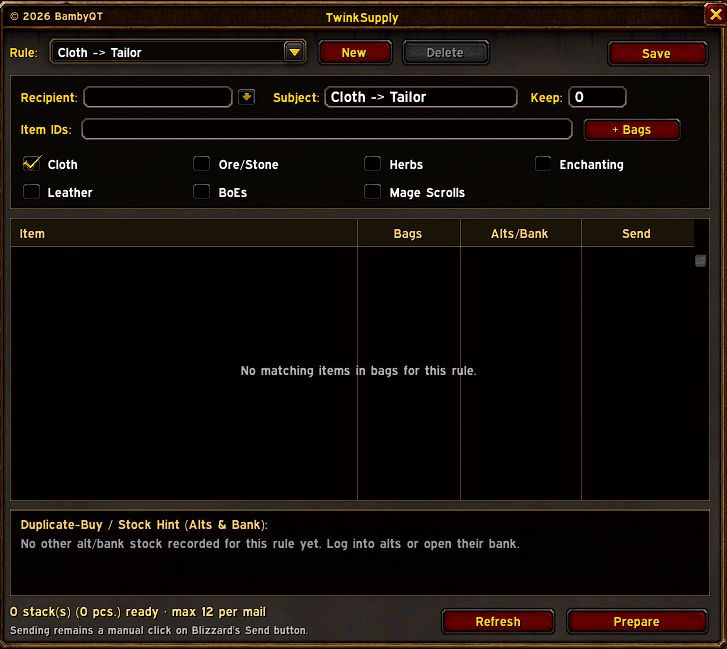
TwinkSupply is a standalone mailbox addon for World of Warcraft: Forever and Retail that prepares mail for your alts with one click. Pick a profession or character rule, click Prepare, and TwinkSupply fills in the recipient, subject, and up to 12 matching unbound stacks from your bags inside Blizzard's Send Mail tab.
Sending always stays a manual click on Blizzard's Send button, keeping the workflow safe and policy compliant.
Key Features
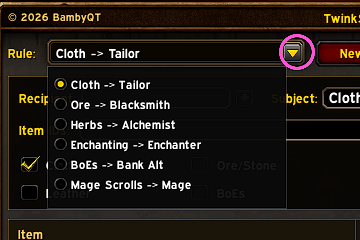
Ready to use rules: Includes six protected default rules for Cloth, Ore and Stone, Herbs, Enchanting materials, BoEs, and all 46 tradeable WoW Forever Mage Scrolls (both undeciphered Comprehension drops and deciphered scrolls, while leaving normal buff scrolls untouched). You can also create and manage your own custom rules at any time.
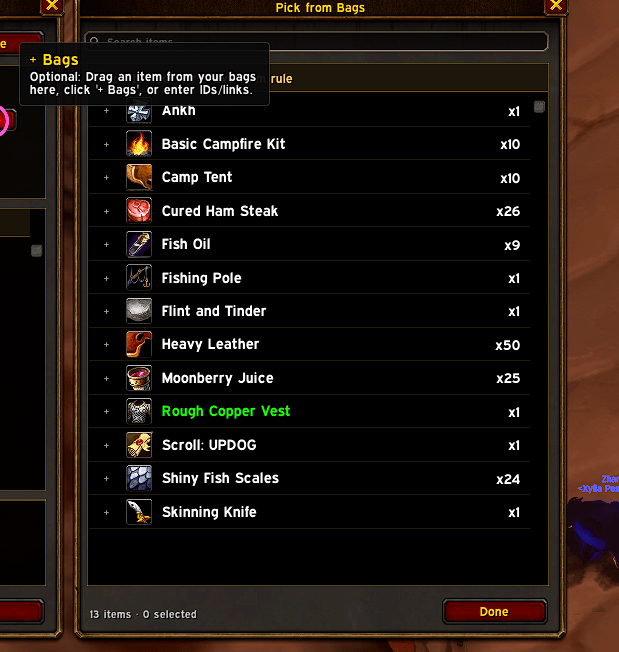
Easy item selection without item IDs: Drag items straight from your bags into the editor, or open the + Bags side window to pick unbound items with item quality colors and a quick search bar.
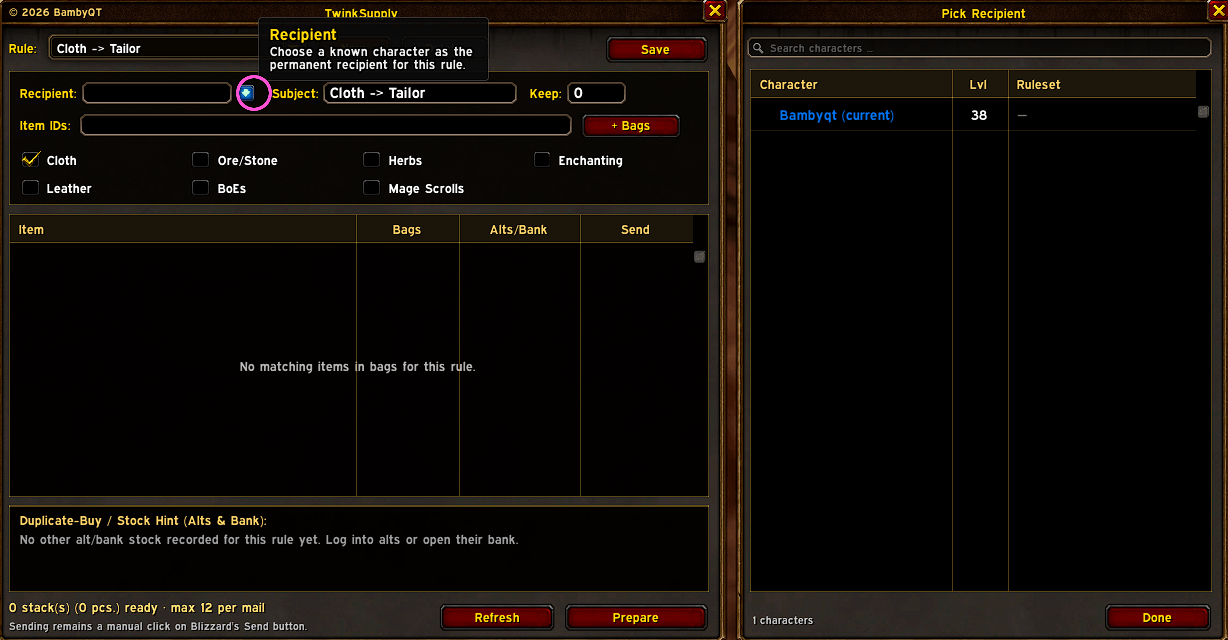
Character picker window: Click the arrow next to the recipient box to choose from your logged characters with class colors, level, and assigned rulesets. Characters with multiple rulesets list all of them on mouseover.
Duplicate purchase stock hint: TwinkSupply tracks bag and bank inventory across your characters locally and shows existing alt and bank stock at the bottom of the window so you do not buy materials twice on the auction house.
Standalone and Bambymail friendly: Works completely on its own with no other addons required. If Bambymail is installed, TwinkSupply automatically docks its own side tab right below the Bambymail tabs.
Quick Start
1. Open any mailbox and click the TwinkSupply letter tab on the right edge, or type /twinksupply while at the mailbox.
2. Choose a rule, select your recipient via the arrow button, and set an optional Keep amount to leave stacks in your bags.
3. Click Prepare to load up to 12 matching stacks into Blizzard's Send Mail tab, then review the draft and click Send manually.
4. Log into your alts and open their bank once so TwinkSupply can display their stock in the bottom hint box.
=====================================================================
Deutsch
TwinkSupply ist ein eigenständiges Addon für das Postfach in World of Warcraft: Forever und Retail, mit dem du Materialien und Gegenstände mit einem Klick für deine Twinks vorbereitest. Wähle eine passende Regel aus, klicke auf Vorbereiten, und TwinkSupply trägt Empfänger, Betreff sowie bis zu 12 passende ungebundene Stapel aus deinen Taschen in Blizzards Postfenster ein.
Das eigentliche Absenden bleibt immer ein manueller Klick auf Blizzards Schaltfläche zum Senden, damit alles sicher und regelkonform abläuft.
Wichtige Funktionen
Fertige Startregeln: Enthält sechs geschützte Standardregeln für Stoffe, Erze und Steine, Kräuter, Verzauberungsmaterialien, handelbare Ausrüstung (BoEs) sowie alle 46 handelbaren WoW Forever Magierrollen (sowohl unentzifferte Funde als auch entzifferte Schriftrollen, ohne normale Buffrollen mitzunehmen). Eigene Regeln lassen sich jederzeit zusätzlich anlegen.
Gegenstände ohne Nummernsuche hinzufügen: Ziehe Gegenstände einfach aus deinen Taschen in den Editor oder öffne das Seitenfenster + Tasche mit Suchfeld und echten Qualitätsfarben.
Übersichtliche Charakterauswahl: Ein Klick auf den Pfeil neben dem Empfängerfeld öffnet ein eigenes Seitenfenster mit deinen eingeloggten Charakteren samt Klassenfarbe, Level und zugewiesenen Rulesets. Bei mehreren Rulesets siehst du beim Drüberfahren mit der Maus alle Einträge auf einen Blick.
Bestandshinweis gegen Doppelkäufe: TwinkSupply speichert Taschenbestände und Bankbestände deiner Charaktere lokal und zeigt vorhandene Vorräte unten im Fenster an, damit du Materialien nicht unnötig doppelt im Auktionshaus kaufst.
Eigenständig und kompatibel mit Bambymail: Funktioniert komplett allein ohne weitere Addons. Wenn Bambymail aktiv ist, dockt TwinkSupply automatisch mit einem eigenen Seitenreiter direkt unterhalb der Reiter von Bambymail an.
Kurzanleitung
1. Öffne ein Postfach und klicke rechts auf den TwinkSupply Briefreiter, oder tippe am Postfach /twinksupply ein.
2. Wähle eine Regel aus, lege über den Pfeil deinen Empfänger fest und trage bei Bedarf unter Behalten eine Restmenge für deine Taschen ein.
3. Klicke auf Vorbereiten, um bis zu 12 passende Stapel in Blizzards Postfenster anzulegen, prüfe den Entwurf und klicke anschließend manuell auf Senden.
4. Logge dich einmal auf deinen Twinks ein und öffne kurz ihre Bank, damit TwinkSupply deine Bestände im unteren Hinweis anzeigen kann.
TwinkSupply Team