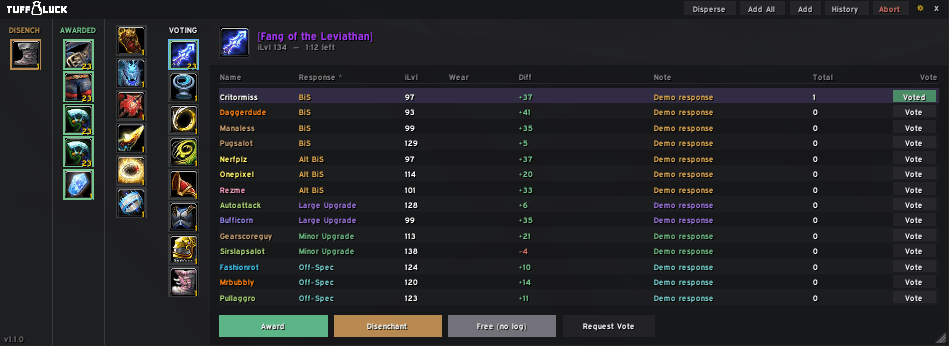
Voting_Panel.png
Description
Modern Loot Council Addon
A modern, streamlined Loot Council addon inspired by RCLC, designed to make loot distribution faster, easier, and more organized.
Features
- Works anywhere — Use Tuff Luck outside raids and across multiple zones and instances.
- Leader or Master Looter control — Both the raid leader and Master Looter are always trusted to run the council, making it useful when someone other than the ML handles loot decisions.
- Automatic awarding — Automatically awards items when all council members vote for the same player. Skipped automatically when the same item drops more than once in a session, since that always needs a manual call.
- Duplicate-item protection — If the same item drops twice, anyone who's already received one is flagged on the other roll so the council doesn't accidentally give it to them twice.
- Automatic disenchanting — When all raiders pass on an item, automatically awards it to the designated guild disenchanter.
- Automatic trading — Streamlines distributing awarded items through the trade window, with an auto-close when there's nothing left to hand over.
- Trade timers — An optional overlay showing a countdown for tradeable items still sitting in your bags, so nothing accidentally soulbinds before it's handed off.
- Voting categories — Organize and sort awarded items by voting category directly in the voting interface.
- Vote tracking — See at a glance which items you've already cast a vote on, right in the voting queue.
- Item Disperse — Quickly distribute tradeable items to multiple raiders.
- Complete loot history — Sort and filter loot history by player, date, or item.
- Easily add, edit, or delete history entries — individually, by player, by date, or all at once.
- Item comparison — Compare loot with equipped items directly from the voting interface.
- Item notes — Add notes to items to help the council make informed decisions.
- Vote requests — Request votes from council members to ensure everyone has reviewed an item.
- Quick item distribution — Add tradeable items directly from your bags or through the Add Items panel.
- Shift-click items into the panel for quick distribution.
- Auto Pass — Automatically passes on items your class can't or shouldn't use, with a chat confirmation for each one.
- Partner Sync — Pair with another officer or co-ML to keep your settings and loot history matching each other automatically.
- Customizable UI — Resize and rearrange the voting table's columns, resize the item response card, and customize sounds, response buttons, and tier token buttons.
- Quick item descriptions — Color-coded stat breakdowns (Strength, Agility, Stamina, Intellect, Spirit, Crit, Spell Power, Attack Power, procs) shown directly on the response card.
- RCLC history import — Import your existing RCLC loot history, including a file-based option for histories too large to paste directly.
- Version Check — Quickly check which raid members are running the current version of Tuff Luck.
Commands
/tl configor/tuffluck— Open the Options Panel/tlor/tl show— Open the Voting Panel/tl hide— Hide the Voting Panel/tl add <link(s)>— Manually add items/tl add all— Add all tradeable items from your bags/tl id— Open Item Disperse/tl history— Open the History Panel/tl disenchants— View disenchant history/tl trades— Open the Trade Queue/tl version— Open the Version Panel/tl sync— Request a council/settings sync from the raid leader or Master Looter/tl fixnames— Repair history affected by an older RCLC import bug/tl reset— Reset or abort the current session/tl test— Start a test round of items/tl council— View the current Loot Council members and Voting Panel access
Support
If you enjoy Tuff Luck and would like to support development:
Tuff Luck (Loot Council) Team