


Azeroth Tripview
- By
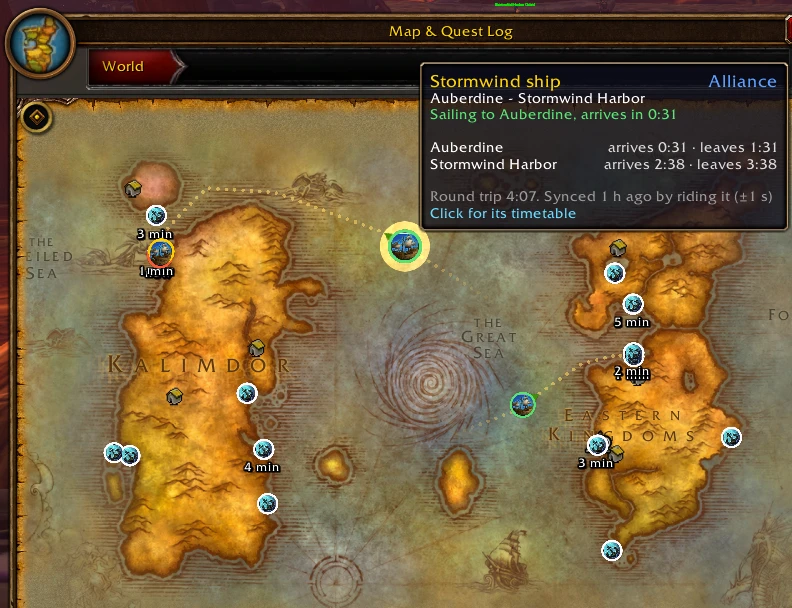
image-1792234170295.webp
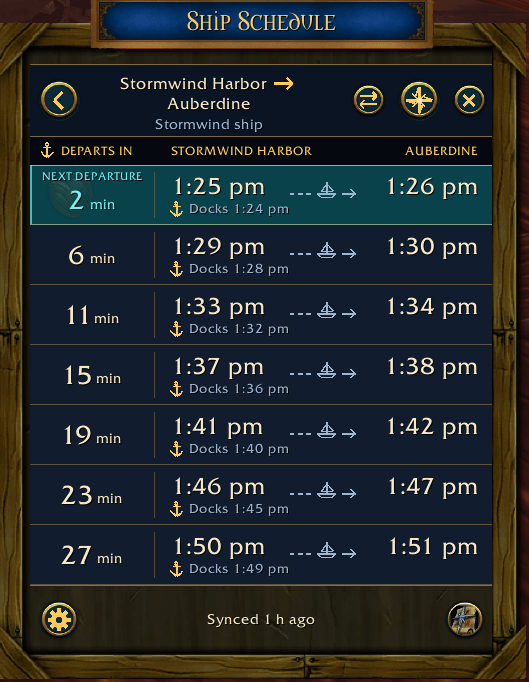
image-1792234176155.png
Description
Azeroth Tripview
Boat, zeppelin and Deeprun Tram timers for World of Warcraft: Forever, and a live map of where every transport is right now.
Every boat and zeppelin runs a fixed loop on the server. Azeroth Tripview knows each loop from Blizzard's own route data, so once a ship has been seen it can tell you where that ship is and when it next calls.
Compatible with OpenMap for a full, zoomable map view.
What it does
- Timers for every route on Forever, including the new ones: Stormwind Harbor, the Southshore stop on the Menethil boat, both Zephras Isle zeppelins and the Riverglades boat, plus both Deeprun Tram tracks.
- A Ship Schedule styled like the game, in an Alliance or Horde look: a countdown column, departure and arrival times in your own clock, and departures hours ahead. Walk up to a dock and its timetable opens by itself.
- Dock alerts 30 seconds before a ship arrives and 20 seconds before it leaves.
- World map: a live icon for every ship with its heading, and an anchor on every pier showing the next departure. Click either to open its timetable.
- Sea crossings: on the world map, a boat or zeppelin bound for the other continent sails across the sea instead of jumping there. While it sails, dots mark the way ahead and its wake fades behind it.
- Minimap: ships and docks within the minimap's range. Hover one for its times, click it for its timetable.
- Plays nicely with Leatrix Maps and MapUtils: their boat icons on the docks are hidden so Tripview's markers stay clear (a setting brings them back).
No clicks needed to sync
- Ride a ship and your position pins its clock to within about a second.
- When anyone in your party or raid rides a ship, it is timed from them too (they don't need the addon).
- Timings are shared automatically with your guild, your group, and anyone running the addon at your dock.
- Before anyone rides anything, every route is already estimated from the server's ship clock. Estimates say "Estimated"; a real timing always replaces them.
Usage
Type /trip or click the anchor on the minimap. Right-click a route to correct or forget a timing.
Credits
Route data from Blizzard's TaxiPathNode and TransportAnimation tables (via wago.tools); tram spawns from the CMaNGOS classic database (GPL-3.0). Licensed GPL-3.0.
Azeroth Tripview Team
