Discord_MkuYmaQZb9.png
Discord_ivhGcBCLg0.png
Description
Trinket Tracker Plus
A lightweight, alert-driven trinket cooldown tracker for World of Warcraft. Built on the foundation of Aurs' original Trinket Tracker, Trinket Tracker Plus adds a configurable ready-alert system, hover tooltips, combat-aware behavior, and quality-of-life improvements while keeping the original's clean, minimal footprint.
If you've ever popped a trinket the moment it lit up just to realize the other one came off cooldown three seconds ago, this addon is for you.
✨ What "Plus" Adds
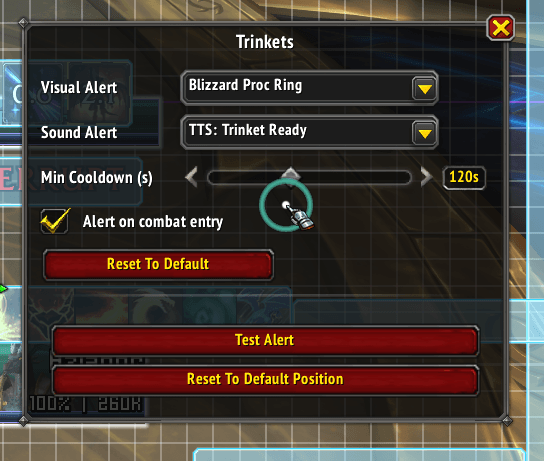
- Ready-Alert System — plays a sound and/or fires a visual glow the moment a trinket comes off cooldown.
- Multiple Visual Alert Styles — Blizzard Proc Ring, Pixel Glow, Autocast Shine (via LibCustomGlow when available), plus Gold / Blue / Red solid-color pulses as fallback.
- Multiple Sound Alerts — Text-to-Speech "Trinket Ready", Alarm, Raid Warning, Ready Check, Auction Open, or Map Ping.
- Combat-Entry Alerts — optional: when you enter combat with a ready trinket, the alert fires and a persistent glow stays on the icon until you actually press it. Re-arms every pull.
- Mid-Fight Re-Ready Glow — if a trinket comes back off cooldown during combat, it stays lit until used.
- Min-Cooldown Filter — slider to suppress alerts on short CDs (default 30s) so trinkets that are basically always up don't spam you.
- Hover Tooltips — point at any tracked trinket icon to see its full tooltip. Suppressed during combat, force-hidden if you enter combat while a tooltip is showing.
- Smart Auto-Clear — glow clears the instant you actually use the trinket (
UNIT_SPELLCAST_SUCCEEDED) and when
you unequip. - No First-Load False Fires — initial cooldown state seeds silently on login/reload.
📦 Core Features (from Aurs' original)
- Horizontal or vertical layout
- Blacklist trinkets by name or item ID — perfect for hiding profession trinkets, junk, or expansion-irrelevant items
- On-Use Only filter to hide passive trinkets
- Edit Mode integration — drag it where you want, just like Blizzard's frames
- Masque support for custom skinning
- Default blacklist pre-populated with current-expansion clutter
🎮 Slash Commands
| Command | Description |
|---|---|
/tt |
Opens the options panel |
/trt |
Opens the options panel |
/tto |
Opens the options panel |
/trinkettracker |
Opens the options panel |
Most settings live directly in Edit Mode — select the Trinkets frame and you'll see the alert configuration (sound dropdown, visual dropdown, min-cooldown slider, combat-entry toggle, and a Test Alert button).
📥 Installation
- Install via the CurseForge app, or download the latest release and extract
TrinketTrackerPlusinto:
World of Warcraft_retail_InterfaceAddOns - Launch WoW, enable Trinket Tracker Plus in your AddOns list.
- Open Edit Mode and drag the Trinkets frame to your preferred location, or type
/ttto configure.
Note: A trinket must have been in your bags at least once before it can be blacklisted by the addon.
🤝 Credits & License
- Original addon: Trinket Tracker by Aurs — the foundation this is built on. Massive thanks for the clean, hackable codebase.
- Plus features by: Miboi
- Released under: MIT License (matching the original)
This is a separate addon from Aurs' original — not a fork-merge. Run one or the other, not both.
🐛 Issues, Feedback, Feature Requests
Please open an issue on the project's issue tracker (link from the CurseForge sidebar) with as much detail as you can — WoW version, other addons running, and reproduction steps if it's a bug.
📜 Changelog
See the Changelog tab for the full release history.
The TrinketTrackerPlus+ Team