TrinketMenu - BCC Anniversary
- By
A lightweight addon that simplifies trinket management with an easy-to-use interface for quickly swapping and auto-rotating your trinkets.
trinketmenu-trinkets-from-bags-displayed-in-a-menu.jpg
trinketmenu-scalable.jpg
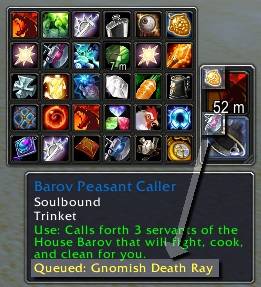
trinketmenu-quotqueuequot-trinkets-during-combat.jpg
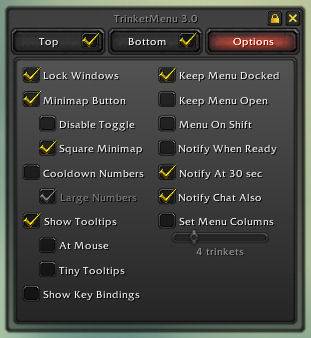
trinketmenu-.jpg
Description
TrinketMenu 11.1.9
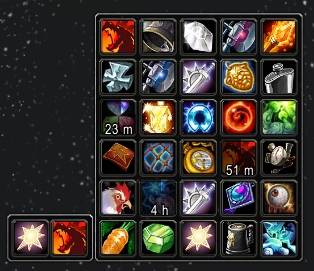
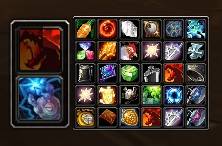
A World of Warcraft addon to make swapping trinkets easier. It displays your two equipped trinkets in a bar, with mouseover displaying a menu of up to 30 trinkets in your bags to swap.
🎉 What's New in 11.1.9 (BCC Anniversary 2.5.5)
Updated by: Icewitts (Spineshatter EU) Show your support: https://ko-fi.com/icewit
Original project by: Gello3 https://www.curseforge.com/members/gello3/projects
- ✅ Fixed
C_Item.IsEquippableItem()error that occurred when using trinkets - ✅ Added PreClick handlers to prevent secure action button validation errors
- ✅ Keybinds now work properly with the fix
- ✅ Maintained full compatibility with Retail, Classic, and Anniversary editions
Previous Major Updates
11.1.8 (Resike) - UI improvements and optimizations
5.0.x - Earlier versions with various fixes and WoW 5.x compatibility
📖 Table of Contents
- Swapping/Using Trinkets
- Auto Queue
- Customizing Display
- Docking
- Combat/Death Queued Trinkets
- Slash Commands
- FAQ
🔄 Swapping/Using Trinkets
- Left click a trinket in the menu to equip it to the top trinket slot
- Right click a trinket in the menu to equip it to the bottom trinket slot
- Left or Right click either equipped trinket to use them
- Create key bindings for either trinket slot
⚙️ Auto Queue
Version 3.0+ introduces automatic trinket queues. In options, you can:
- Sort a trinket slot in your preferred order
- Turn on Auto Queue for that slot (Alt+Click the trinket or check the tab in options)
- The mod will automatically swap trinkets as they're used and come off cooldown
Auto Queue Rules
- A trinket at 30 seconds or less cooldown is considered off cooldown
- If the currently equipped trinket is on cooldown, swap to the first available trinket not on cooldown
- If the currently equipped trinket cannot go on cooldown (passive trinkets), equip a higher ranking trinket when it comes off cooldown
- If the currently equipped trinket is ready for use, do nothing unless a higher-ranked trinket marked 'Priority' is waiting
- If a trinket has a 'Delay' defined, hold that trinket for its delay before swapping (e.g., Earthstrike for 20 seconds)
- If a trinket grants a buff and that buff is currently on you, hold that trinket until the buff fades
Auto Queue Icon Colors
- 🟡 Gold gear - Auto queue is active for that slot
- ⚪ Grey gear - Equipped trinket has a delay defined and is waiting to swap out
- 🔴 Red gear - Equipped trinket is flagged 'Pause Queue' and auto queue is suspended
Auto Queue Notes
- If you use a mod to automatically swap passive trinkets (Carrot on a Stick, Argent Dawn Commission), flag those trinkets 'Pause Queue'
- Swapping a passive trinket manually in TrinketMenu will stop auto queue for that slot (Alt+click to re-enable)
- A purely passive trinket marks the natural end of a queue
- Trinkets attempting to swap during combat or while dead will queue for when you drop out of combat or return to life
- To completely remove auto queue, delete
TrinketMenuQueue.xmlandTrinketMenuQueue.luawhile out of game
Auto Queue Shared Timers
Many trinkets trigger shared cooldown timers. Example:
- Trinket 0: Cannonball Runner (not on cooldown)
- Trinket 1: Diamond Flask (not on cooldown)
When you click Diamond Flask, it puts Cannonball Runner into a 60-second cooldown. TrinketMenu will look for something more available for Trinket 0, then swap it back in 30 seconds later as it comes off cooldown.
Tip: If this happens frequently, consider Auto Queue for only one trinket slot.
🎨 Customizing Display
The main and menu windows are independently scalable and rotatable. While windows are unlocked:
- Move either window by dragging its edge
- Rotate either window by right-clicking its edge
- Scale/resize either window with a slider in options
Tip: Hold Shift while the menu is open to prevent it from disappearing when moving/rotating.
Options Window
Right-click the gear icon around the minimap (or /trinket options) to open the options window where you can:
- Show cooldowns as numbers
- Keep the menu always open
- Lock/unlock windows
- And more!
Exact Scale Commands (Optional)
/trinket scale main n  - Scale the main window to n
/trinket scale menu n  - Scale the menu window to n
Example: /trinket scale menu 0.85
🔗 Docking
While 'Keep Menu Docked' is checked (default), the menu will always be docked to one corner of the main window.
To change the docking corner:
- Drag the menu window so that a corner of the main and menu windows meet
- White brackets will appear at the corners that will dock as you drag
Tip: Temporarily resize either window to make docking easier if you have few trinkets.
If you uncheck 'Keep Menu Docked', remember the menu goes away when the mouse leaves your trinkets. You can hold Shift to keep it open or enable 'Keep Menu Open' in options.
⚔️ Combat/Death Queued Trinkets
You cannot swap trinkets during combat or when dead. Attempting to do so will queue the trinket for automatic swap:
- The queued trinket appears as a small icon inset into the destination slot
- Unqueue by reselecting the same trinket for that slot
- Change queue slot by reselecting for the other slot
- The combat queue is one-trinket deep per slot
- For ordered auto-swapping, use the Auto Queue feature in options
💬 Slash Commands
/trinket or /trinketmenu  - Toggle the window
/trinket reset            - Reset window positions
/trinket opt              - Summon options window
/trinket lock|unlock      - Toggle window lock
/trinket scale main|menu n - Scale windows to exact scale
/trinket help             - List available commands
📝 Miscellaneous Features
- Hold Shift while moving trinkets up/down the sort list to keep the list in place
- Drag the minimap icon around the minimap directly
- Shift+click trinkets to link them to chat (like items in bags)
- Characters with no trinkets won't display the trinket window
- Hold Shift while swapping trinkets to prevent the menu from disappearing
- Set up key bindings to use whatever trinket is in the top or bottom slot
- If you have Scrolling Combat Text and 'Notify When Ready' checked, it will send a message via SCT when a trinket is ready
🔧 Advanced: TrinketMenu.SetQueue
For advanced users who want to script different sort orders or integrate with other gear-swapping mods.
Syntax
TrinketMenu.SetQueue(0 or 1, "ON" or "OFF" or "PAUSE" or "RESUME" or list)- "ON" - Turn queue on regardless of previous state
- "OFF" - Turn queue off regardless of previous state
- "PAUSE" - Suspend queue if it was on
- "RESUME" - Return queue to normal operation if it was paused
Examples
-- Pause queue
/script TrinketMenu.SetQueue(1,"PAUSE")

-- Resume queue
/script TrinketMenu.SetQueue(1,"RESUME")

-- Set sort order
/script TrinketMenu.SetQueue(1,"SORT","Earthstrike","Insignia of the Alliance","Diamond Flask")

-- Set to named profile
/script TrinketMenu.SetQueue(1,"SORT","PVP Profile")
Integration Example (ItemRack)
name: In Raid
trigger: RAID_ROSTER_UPDATE
delay: 0.5
script:
if GetNumRaidMembers()>0 and not IR_INRAID then
  IR_INRAID = 1
  TrinketMenu.SetQueue(1,"SORT","Zandalarian Hero Badge","Force of Will")
elseif IR_INRAID and GetNumRaidMembers()==0 then
  IR_INRAID = nil
  TrinketMenu.SetQueue(1,"SORT","Earthstrike","Diamond Flask","Defender of the Timbermaw")
end
❓ FAQ
General Questions
Q: How do I equip a trinket to the "off" trinket slot?
A: Left click goes to main trinket slot, right click goes to off slot.
Q: Can you add items other than trinkets to the menu?
A: See ItemRack, which is the big brother to this mod. It handles all inventory slots as well as item sets.
Q: What does ItemRack mean for TrinketMenu's future?
A: TrinketMenu will stay focused on trinkets and be maintained alongside ItemRack. It will remain small and focused.
Q: Does this work on all WoW clients?
A: Yes! This mod works on Retail, Classic, and Anniversary editions.
Q: Why do settings like notify appear on all my characters?
A: Everything in the options window saves for all characters. Only position, orientation, docking, and scaling are saved per-character.
Auto Queue Questions
Q: I made Trinket A higher priority than Trinket B, but when Trinket A comes off cooldown it's not equipping.
A: The default behavior doesn't swap if the currently-equipped trinket is clickable and not on cooldown. This prevents excessive swapping. If you want a trinket equipped ASAP when ready, select it and check 'Priority'.
Q: Can you let auto queue remain enabled when I swap in passive trinkets?
A: You need to tell the mod when you no longer want the passive trinket. Alt+clicking the slot is the simplest method, or flag passive trinkets as 'Pause Queue'.
Q: Can you make auto queue stop/start with my trinket-swapping mod/macro?
A: Check 'Pause Queue' on trinkets your mod/macro equips, or use TrinketMenu.SetQueue() in your macro/event.
Display Questions
Q: How do I move the minimap icon?
A: Drag it like a normal window. Left click and drag it around the minimap edge.
Q: I can't rotate, move or do anything with the windows.
A: The windows are locked. Enter: /trinket unlock
Q: I set menu columns to X, but it's doing X rows instead.
A: Rotate the menu by right-clicking its unlocked edge. Then rows will become columns and vice versa.
Troubleshooting
Q: I'm trying to swap trinkets, but instead of swapping it put a tiny trinket icon over my equipped one.
A: You're in combat mode. You can't swap trinkets until you leave combat. The tiny trinket will swap in once combat ends.
Q: What if I don't have Scrolling Combat Text, will it still notify me?
A: Without SCT, notifications appear in the "errors" overhead (where you get "Insufficient mana", "Out of range", etc).
Q: It's not showing all my trinkets, I have over 30 of them.
A: The mod can handle up to 32 trinkets (2 equipped + 30 in bags). If you exceed this, the mod lifts trinkets from right bag to left.
📜 Version History
11.1.9 (January 18, 2026)
- Fixed C_Item.IsEquippableItem() error in BCC Anniversary 2.5.5
- Added PreClick handlers to prevent validation errors
- Maintained compatibility across all WoW versions
11.1.8 (April 27, 2025)
- UI improvements and optimizations
5.0.0 - 5.0.3
- Updated for WoW 5.2 and 5.3
- Code cleanup and optimizations
- Added notification support for MSBT, Parrot, xCT, xCT+
3.0 - 3.81
- Introduced auto trinket queues
- New timer and cooldown/notification system
- Added: set menu columns, tiny tooltips, large cooldowns, show key bindings
- Engineering bag support
- Key bindings system
- Red out of range feature
- Trinket profiles and much more
2.0 - 2.7
- Major rewrite
- Added support for up to 30+2 trinkets
- Menu grows outward
- Cooldown numbers
- Minimap icon and scaling
- Notification system
1.0 - 1.1 (2005)
- Initial release and early improvements
👥 Credits
Original Author: Gello
Maintainer: Resike
BCC Anniversary 2.5.5 Update: Icewitts (Spineshatter EU)
📄 License
TrinketMenu is distributed under standard WoW addon terms.
Enjoy easier trinket management! 🎮
TrinketMenu - BCC Anniversary Team