


Screenshot 2026-04-06 155830.png
Description
TrinketCD
Lightweight addon that tracks your on-use trinket cooldowns with draggable icons on screen.
FEATURES
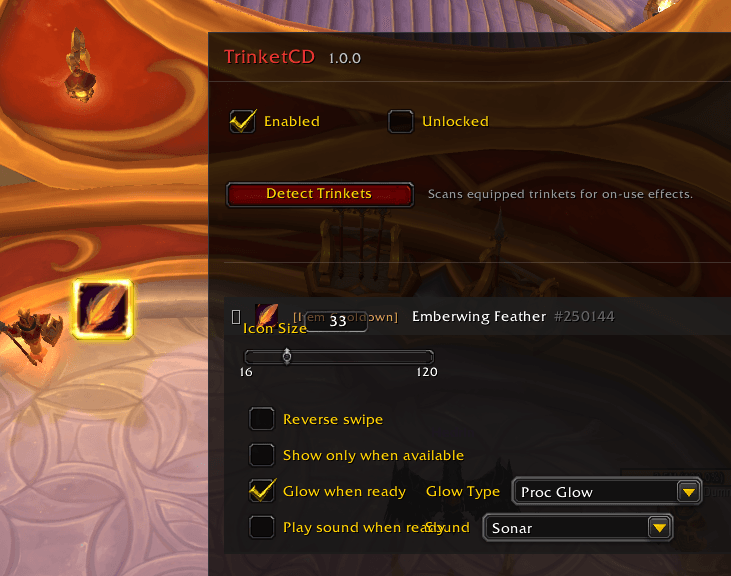
- Auto-detect trinkets: One click scans your equipped trinkets and adds any with on-use effects.
- Draggable icons: Position each cooldown icon anywhere on screen.
- Cooldown swipe: Standard cooldown sweep animation with countdown timer. Reverse swipe option available.
- Glow effects: Four glow styles when a trinket comes off cooldown — Proc Glow, Pixel Glow, Autocast Shine, and Rotation Assist.
- Sound alerts: Optional sound notification when a trinket becomes ready. Multiple sounds to choose from.
- Show only when available: Optionally hide the icon while the trinket is on cooldown, so it only appears when ready to use.
- Per-icon settings: Every tracked item has its own size, glow, sound, and visibility options.
- Combat safe: Icons update in real time during combat.
- Test mode: Preview icons with sample cooldowns without needing to use a trinket.
SLASH COMMANDS
/trinketcd or /tcd — Toggle the settings window
/trinketcd test — Toggle test mode
HOW TO USE
1. Type /tcd in chat to open settings.
2. Click "Detect Trinkets" to automatically add your equipped on-use trinkets.
3. Check "Unlocked" and drag each icon to where you want it on screen. Uncheck when done.
4. Expand any tracked item to adjust icon size, glow type, sound alerts, and visibility.
5. Click "Remove" on any entry you no longer want to track.
TrinketCD Team
