Triage - Aegis & Beacon
- By
Two addons in one. Click-cast learned abilities on party and raid bars, search spells and talents, and show up to eight spell icons. Place world markers and apply raid icons to yourself, party members, or your target. Set optional range and buff reminders
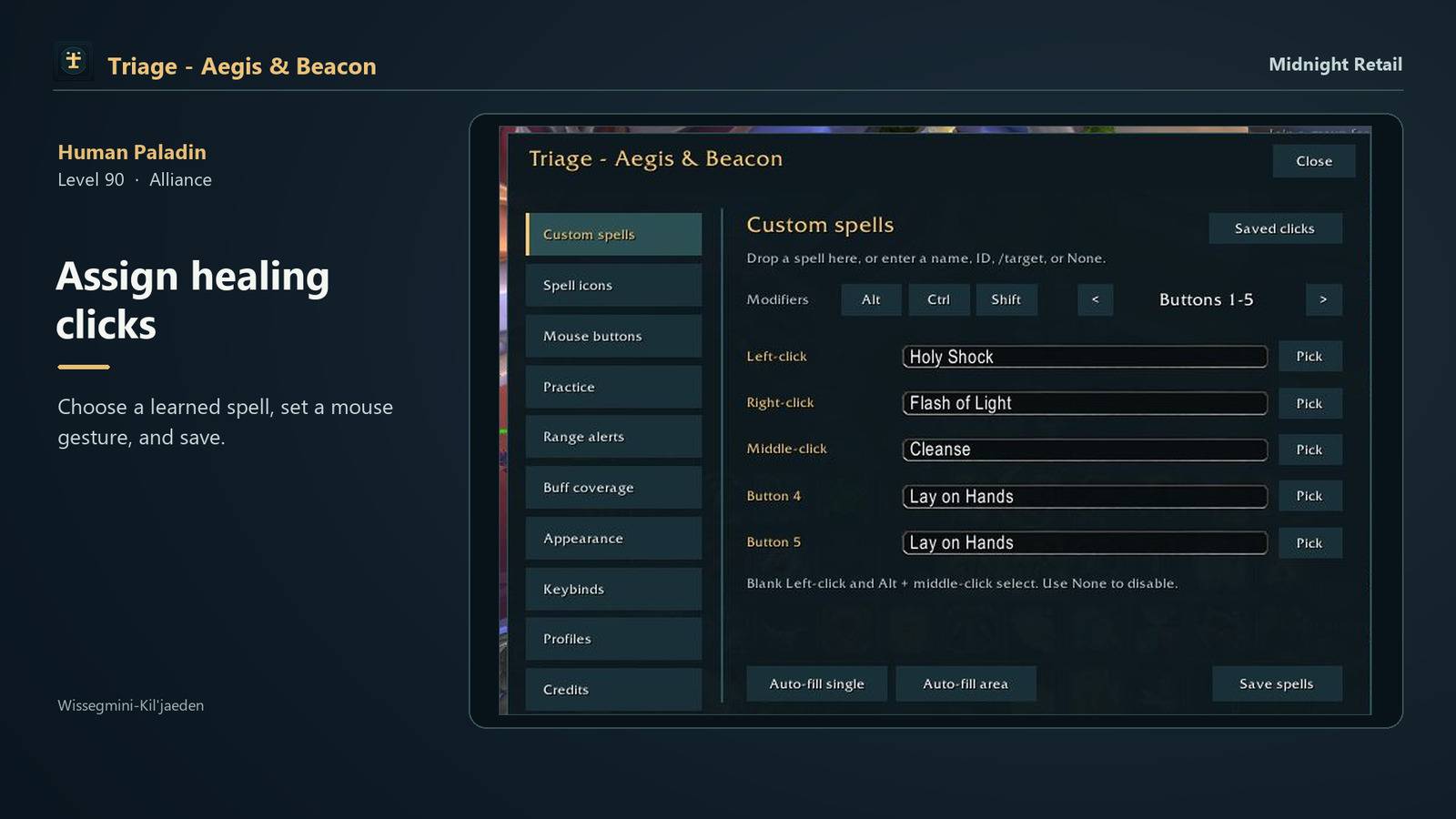
01-Paladin-Click-Casting.jpg
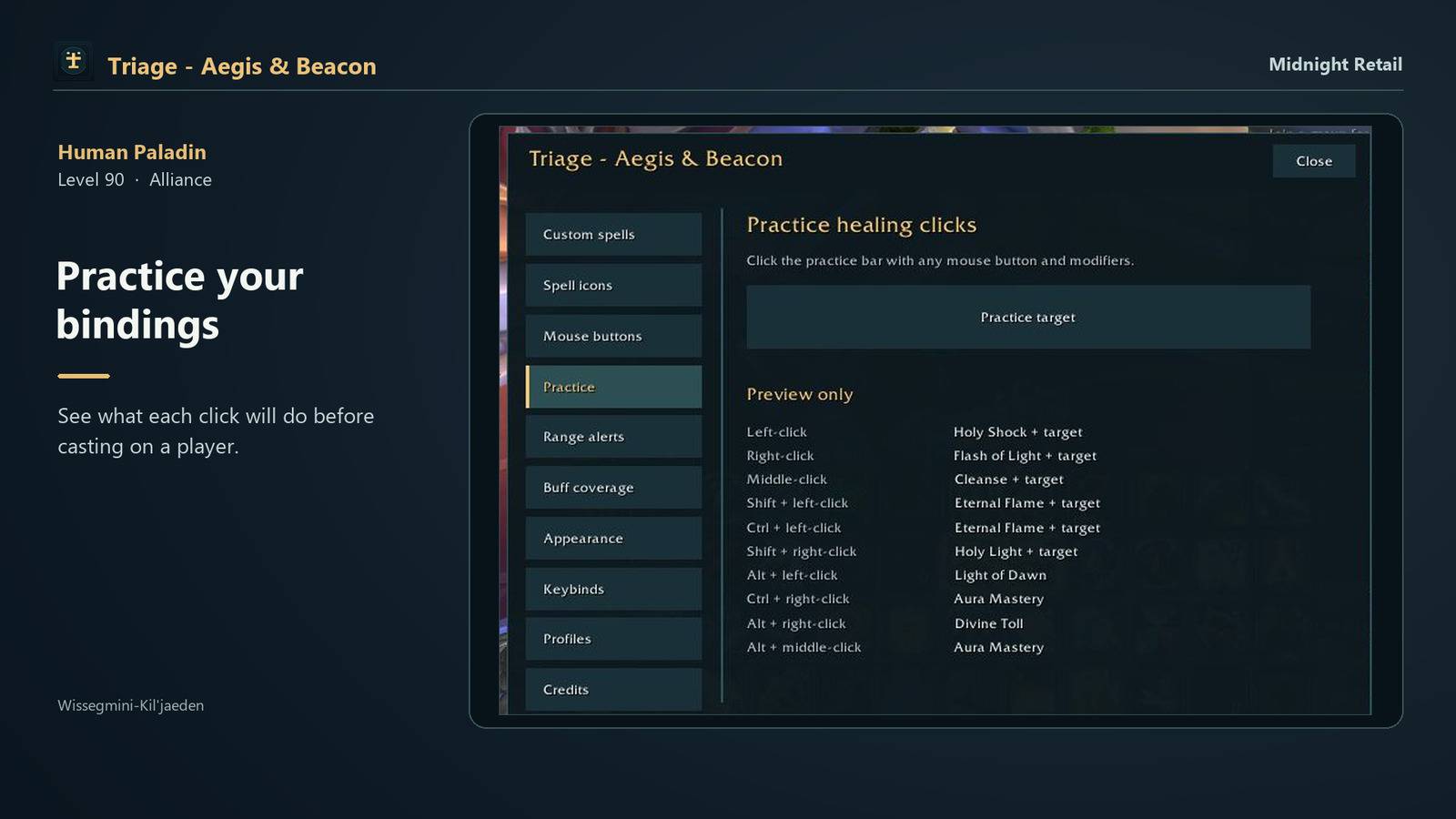
02-Paladin-Practice.jpg
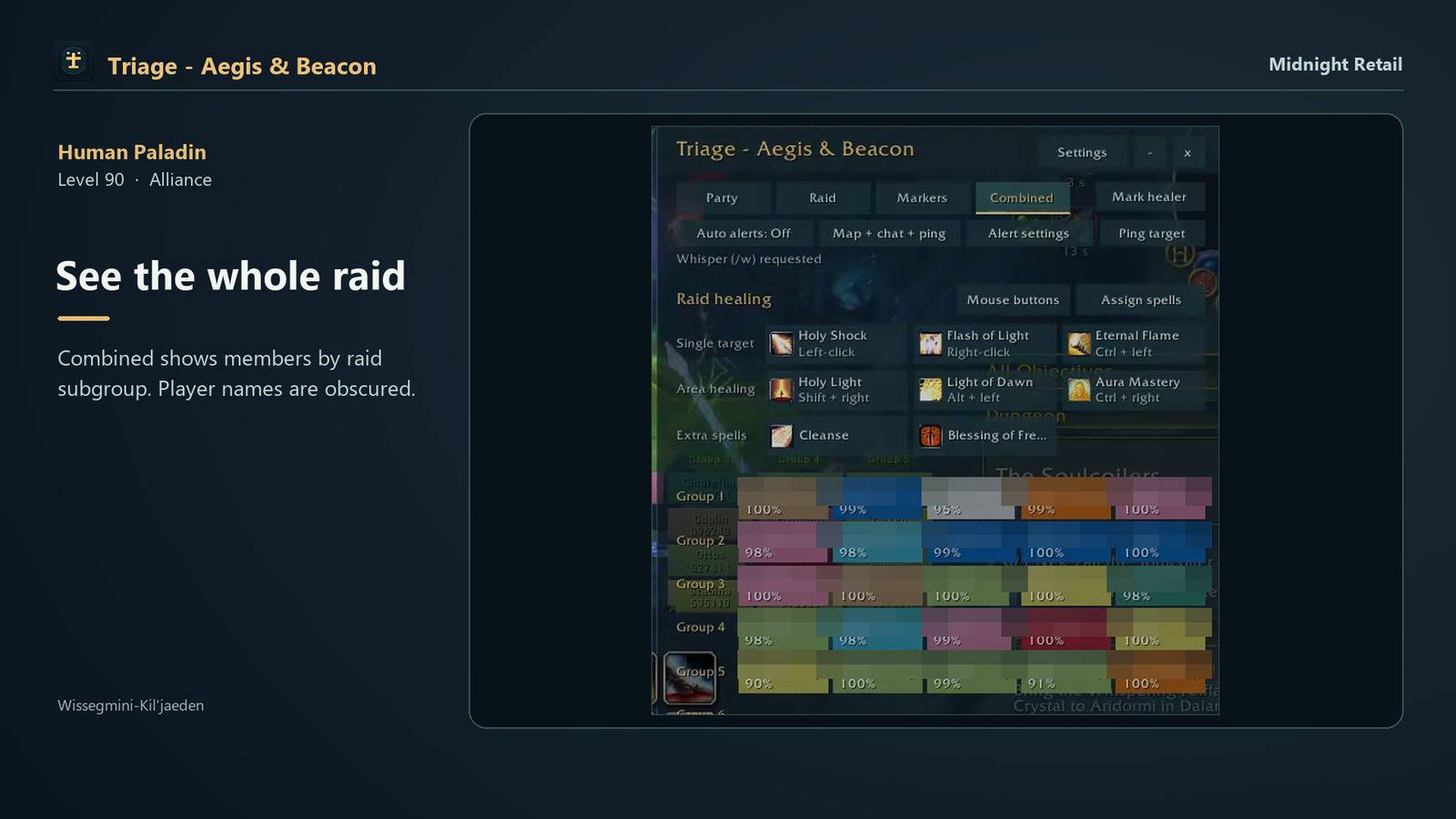
03-Paladin-Raid-Groups.jpg
04-Shaman-Learned-Spells.jpg
05-Shaman-Spell-Icons.jpg
Description
Triage - Aegis & Beacon 0.1.1
Update release | Build 24
What's New in 0.1.1 / Build 24
- New 28x28 Square Radiant Blue & Gold Minimap Icon:
- Restored the minimap button to a crisp 28x28 square shape (between the original 30x30 and Build 23's 26x26) with a clean gold border and square hover highlight (
Interface\Buttons\ButtonHilight-Square). - Updated
Media\MinimapIcon.tgaandMedia\AddonIcon.tgawith the new all-blue radiant shield, glowing four-point beacon star, inlaid gems, crescent pulse, and royal blue radar rings (TRIAGEAEGISANDBEACONGEMINIAI-011.png). - Reminder: Close and restart World of Warcraft completely (not just
/reload) the first time you install this update so WoW loads the updated.tgatextures.
- Restored the minimap button to a crisp 28x28 square shape (between the original 30x30 and Build 23's 26x26) with a clean gold border and square hover highlight (
- Continuous Panel Scale Slider (50%–150%):
- Replaced the 3-button scale row in Settings > Appearance with a smooth 50%–150% horizontal slider in 5% steps (matching Panel opacity), while keeping the Settings window at 100% scale so controls always stay readable.
- Clearer Keyboard Shortcut Labels (
Alt-,Ctrl-,Shift-):- Replaced abbreviated single-letter modifier prefixes (
A-1,A-7,A-8,C-,S-) on spell tiles, hover tooltips, Healing loadout, and Settings > Keybinds with explicitAlt-,Ctrl-, andShift-labels (such asAlt-1,Alt-7,Alt-8) so players immediately know which modifier key to press.
- Replaced abbreviated single-letter modifier prefixes (
Previous Release Notes Preserved Verbatim (0.1.1 / Build 23 & 0.1.0 / Build 22)
Triage - Aegis & Beacon 0.1.1
Update release | Build 23
What's New in 0.1.1 / Build 23
- Tank, Healer & DPS Roles Above Every Player's Name (All Group Modes):
- Displays color-coded
Tank(blue),Healer(mint), andDPS(coral) labels paired with Blizzard role icons on a high-contrast dark badge directly above every player's name, with clean top clearance below the blue/amber/green absorb and incoming-heal strips so roles stay sharp even on bright class-colored bars. - Works across 40-Man Raids, Raid Finder (LFR), Timewalking Raids & Dungeons, Dungeon Party Finder, Premade Parties/Raids, and Solo (
Selfbar). - Updates live on
GROUP_ROSTER_UPDATE,PLAYER_ENTERING_WORLD,PLAYER_ROLES_ASSIGNED,ROLE_CHANGED_INFORM,LFG_ROLE_UPDATE,INSTANCE_GROUP_SIZE_CHANGED, andRAID_ROSTER_UPDATEplus a 1.2-second post-zone safety refresh.
- Displays color-coded
- Dedicated
SelfBar Always Visible in Raid View:- Adds a dedicated
Selfbar pinned at the top of Raid format (above Group 1) displaying your role, full character name in bright gold, health/%, absorbs, cleanse cue, and full click-casting, plus bright gold highlighting on your own subgroup bar inside Groups 1–8.
- Adds a dedicated
Ping targetNow Works on Bosses, Trash Mobs, Any Enemy & Teammates:- Left-click
Ping target: Sends an Attack ping on bosses, trash mobs, or any enemy; an Assist ping on teammates; or a standard Ping on neutral targets. - Right-click
Ping target: Sends a Warning ping on your current target.
- Left-click
- Fixed
"Please come closer to the healer"In Combat & Out of Combat:- Eliminates Midnight
12.0+Interface action failed because of an AddOnerrors during boss encounters, Raid Finder, Mythic+, and PvP Chat Messaging Lockdown by auto-maintaining one untainted Blizzard macro (TriageAlert) out of combat and pre-armingMap + chat, PartyNotify, and Raid!asSecureActionButtonTemplatebuttons. - Separates manual alert cooldowns (2-second per-target guard recorded only after a successful send) from automatic 30s/15s timers, auto-routes Raid/Party to
/i(INSTANCE_CHAT) in matchmade groups, adds a high-contrast dark backing pill behindOut of range/Far, and makes right-click channel menus and unit checks secret-value safe.
- Eliminates Midnight
- Compact
26x26Custom Minimap Beacon, AddOn Icon & UI Polish:- Upgraded to a compact
26x26circular Tactical Beacon minimap icon (Media\MinimapIcon.tga), addedMedia\AddonIcon.tgaacross all three.tocfiles, made minimized-/+/xtitle buttons bolder, added hover tooltips across Appearance and Range Alerts, and guardedLE_PARTY_CATEGORY_INSTANCEinBuffs.luafor Classic clients.
- Upgraded to a compact
0.1.1 / Build 23 Release Assets
- Triage-Aegis-and-Beacon-0.1.1.zip — 187.8 KB
sha256:7c6a2bb1daceeff48cb080af0a2d9189476d985e64c0485ac107612c5fa6dfa4 - Triage-Aegis-and-Beacon-User-Manual-0.1.1.pdf — 38.8 KB
sha256:409c66cc5f1ac3e8172a0f03d86fcf00044df9e1174961668d2380044a698c9e
Triage - Aegis & Beacon 0.1.0
Initial public release | Build 22
Triage brings click casting, range alerts, group buff checks, and markers into one panel. Open the bundled User-Manual.txt for setup and testing. The PDF edition is a separate download.
Triage gives you a single panel for healing clicks, raid groups, and markers. Assign learned spells by name or ID, or pick them from your character's spell and talent list. Use Party for a small group or Raid and Combined for the full raid grouped by subgroup.
- Assign mouse buttons with Alt, Ctrl, or Shift. Preview a binding in Practice and review saved gestures in Custom spells.
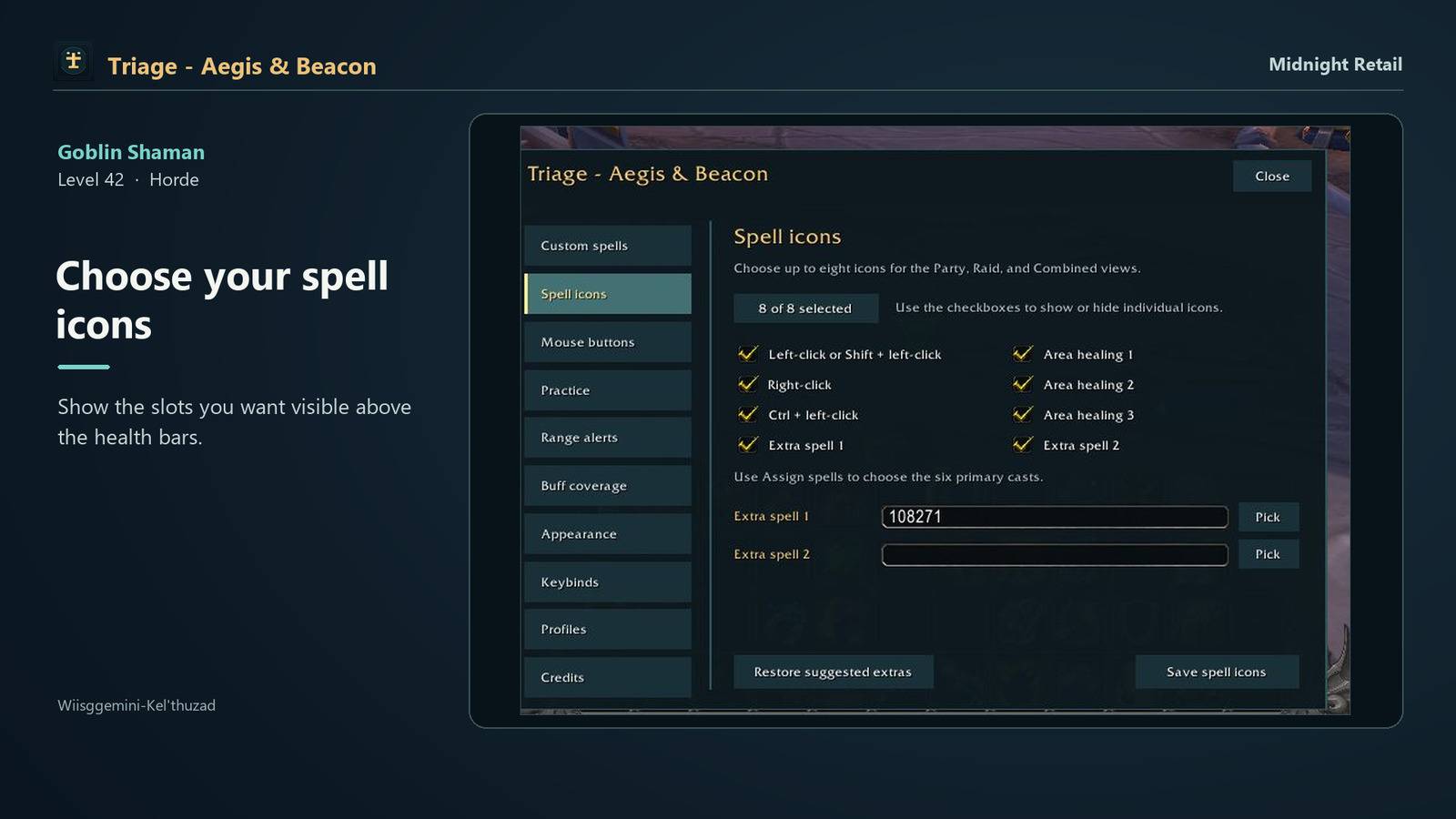
- Show up to eight spell icons. Set panel opacity, size, health readouts, party roles, and an optional hover edge.
- Choose separate manual and automatic chat channels, with optional minimap pings and buff announcements. Automatic alerts start off.
- Use world markers, raid target icons, ready checks, and a pull timer where the client and group permissions allow them.
Game versions
Release game versions
Triage - Aegis & Beacon 0.1.0
Initial public release | Build 22 includes Midnight Retail 12.1.7 and the versions below. The install ZIP includes User-Manual.txt.
Install
- Close World of Warcraft and extract the ZIP.
- Copy the TriageAegisBeacon folder into the
Interface\AddOnsfolder for your edition.- Retail uses
_retail_\Interface\AddOns. - Forever uses
_forever_\Interface\AddOns. - Expansion Classic and Classic Era typically use
_classic_and_classic_era_. Use your launcher's game folder for your edition.
- Retail uses
- Check for
Interface\AddOns\TriageAegisBeacon\TriageAegisBeacon.toc. Enable Triage - Aegis & Beacon on the character screen. - Log in and type
/triage versionto verify 0.1.0 / Build 22, then type/triage showto open the panel. Use Party, Raid, Markers, or Combined to switch views. Use - to minimize, + to expand, and X to hide it. Left-click the gold minimap button to toggle the panel, right-click it for Settings, or drag it along the map rim outside combat.
For an update from an older Triage build, copy the new addon files over the existing TriageAegisBeacon folder with WOW closed. Character data lives in WTF.
Release game versions
| Client | Game versions |
|---|---|
| Midnight Retail | 12.0.0, 12.0.1, 12.0.5, 12.0.7, 12.1.0, 12.1.5, 12.1.7 |
| The War Within Retail | 11.2.0, 11.2.5, 11.2.7 |
| Dragonflight Retail | 10.2.7 |
| WOW Forever | 1.60.1 |
| Mists of Pandaria Classic | 5.5.0, 5.5.1, 5.5.2, 5.5.3, 5.5.4 |
| Cataclysm Classic | 4.4.0, 4.4.1, 4.4.2 |
| Wrath of the Lich King Classic | 3.4.3, 3.4.4, 3.4.5 |
| Wrath Titan Reforged | 3.80.0, 3.80.1, 3.80.2 |
| Burning Crusade Classic / Anniversary | 2.5.4, 2.5.5, 2.5.6 |
| WOW Classic Era / Hardcore / Season of Discovery | 1.15.3, 1.15.4, 1.15.5, 1.15.6, 1.15.7, 1.15.8, 1.15.9 |
The spell and talent picker adapts to the installed client. WOW controls the availability of world markers, Assist pings, pull countdowns, cleanse cues, Blizzard Click Casting, and group roles.
Automated checks used simulated client APIs. Live testing is ongoing.
To install manually, copy the inner TriageAegisBeacon folder into the AddOns folder for your edition. Enable Triage and type /triage show. Open Settings > Custom spells to set up your first click.
Heal and mark
- Choose All heals or type
/triage healsto see the learned healing spells, health-bar clicks, and keyboard shortcuts for your build. Select Show all clicks to search every active or disabled assignment by spell name, ID, or gesture. Select a row to edit its click. Auto clicks and Auto keys refresh as you learn abilities or change your build. Saved clicks and existing WOW keybinds take priority. - Emergency on the healing panel and Alt + right-click on a health bar use the same spec-appropriate emergency spell. The icon shows the cooldown where the client supports it. The first keyboard choice is Alt + E when available. In combat, click the bar directly, select a living ally before clicking Emergency, or hover their bar and press the emergency shortcut.
- Auto target starts on. A friendly mouseover takes priority. Outside combat, pressing Emergency can then choose the lowest-health eligible group member in confirmed range. Healing loadout has separate switches for Auto clicks, Auto keys, and Auto target.
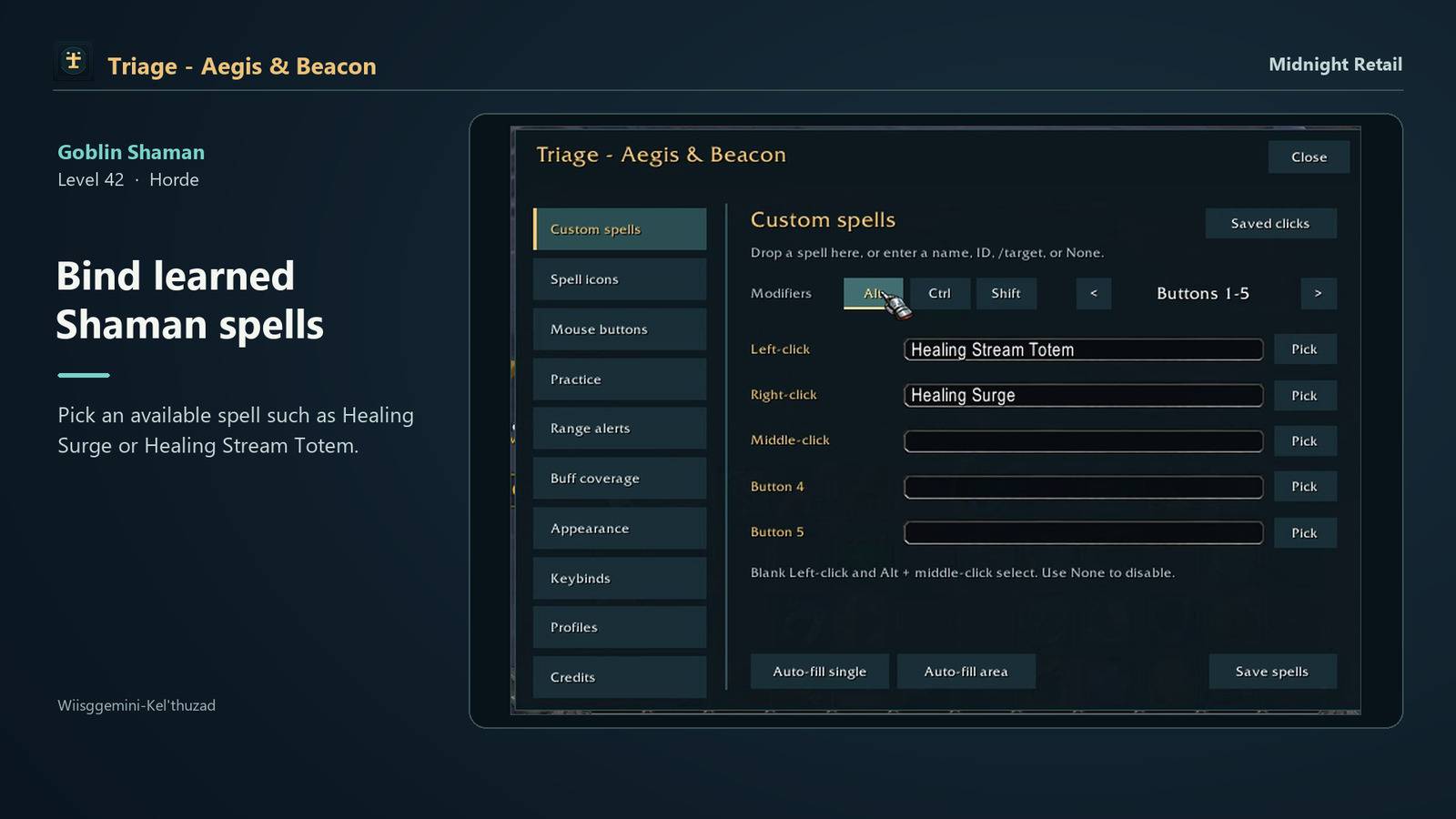
- Assign spells starts with plain Left-click, Middle-click, and Right-click. Toggle Alt, Ctrl, and Shift to edit any combination. Page through Button 31 with the arrows. Pick a learned spell, type its name or ID, or drag it from the spellbook or action bar onto the field or Pick. Return the cursor icon or cancel the drag, then save.
- Settings > Custom spells > Saved clicks lists your active profile's saved gestures and their availability. Select a row to open its assignment field.
- Pick → Browse spells and talents searches the current character's healing, damage, tank, utility, racial, and pet abilities. View active or passive talents and inactive choices. Select an Assignable result, then save the original field. Availability follows WOW's active specialization and talent build.
- Type
/targetin any health-bar click field to select that unit. UseNoneto disable a click, including the default Left-click and Alt + middle-click selection. Try any gesture in Settings > Practice. - Supported friendly spells on health bars select the clicked unit by default. To keep your current target while healing, clear Target player on healing clicks in Mouse buttons. The checkbox saves right away.
- Settings > Spell icons controls ten tiles across Party, Raid, and Combined. Plain Left, Middle, and Right are separate from modifier clicks. Tiles show the name, spell ID, gesture, and any assigned Triage keyboard shortcut. Hover for the full text.
- The Target (/target) tile shows which gesture selects a unit. None removes that gesture's tile and the row closes the gap. The two extra spell tiles and Emergency stay in the Extras row.
- Combined follows WOW's party or full raid roster and shows markers below it. Raid bars populate when Triage opens in an existing raid, including after a UI reload. Party displays your subgroup and shows a hint to reach the full raid.
- Use the view tabs, title controls, and gold minimap button during combat. Settings stays separate from the combat panel. Spell reassignments, scale, and protected layout changes apply after combat.
- Appearance has independent current health and percentage switches, panel opacity, priority players, party roles, combat tooltips, a thin hover outline, and a cleanse cue for readable dispel data.
- A red underline shows critical health. Blue, amber, and green strips show damage absorption, healing absorption, and incoming heals when the game supplies them. Offline, Dead, and Ghost labels appear when WOW exposes the state.
- Classic and Forever can show personal mana and threat plus colored threat edges on group bars. Forever and older Classic clients can also show the approximate five-second regeneration window. Appearance offers a game-managed Private Aura slot on supported Midnight and Forever clients.
- Practice > Sample cues lets you preview health and shield displays while checking your clicks.
- Hover over a healing bar to see the player's name when available and up to three plain mouse assignments. Open Saved clicks for all assignments.
- Alert settings > Channels displays separate automatic and manual buttons for Current group, Whisper, Raid, Party, Instance, Say, and Battleground. Enable the alerts you want and choose Save alerts. Automatic Say prepares a draft. Battleground uses instance chat. Optional native minimap pings, timing, and ping audio are in Behavior.
- Use a party member's Notify or a raid teammate's ! for a manual alert. Right-click or middle-click it to choose a channel, including Whisper this player. The raid ! brightens gently on hover. Ping target is the separate WOW Assist action.
- Buff coverage can announce every verified missing buff count once when a group or instance starts. Healer reminders and buff summaries begin with [Triage - Aegis & Beacon]. Profiles saves Dungeon and Raid presets and transfers your spell, mouse, and icon choices.
- Quiet Group in All heals pauses automatic chat, whispers, pings, and buff notices while keeping manual controls available. Automatic range and buff group chat share a 30-second delay.
- Markers places unit icons or aims ground markers with your click or keypress. The marker section fits in 24 fewer UI pixels of height. Right-click a world marker to clear it. Ready check and 10s pull follow WOW's group permissions.
Quick commands
/triage helplists the slash commands. Use/triage iconsfor spell icons,/triage practicefor click previews, and/triage resetto restore the initial panel position
| Command | What it does |
|---|---|
/triage |
Toggles the panel. |
/triage show |
Shows the panel. |
/triage hide |
Hides the panel. |
/triage minimize |
Collapses the panel to its title bar. |
/triage expand |
Expands the minimized panel. |
/triage reset |
Restores the default panel position and shows the panel outside combat. |
/triage settings |
Opens Triage Settings. |
/triage heals |
Opens the healing loadout. |
/triage spells |
Opens the custom spell assignments. |
/triage icons |
Opens spell icon settings. |
/triage mouse |
Opens mouse button settings. |
/triage practice |
Opens click-casting practice. |
/triage alerts |
Opens range alert settings. |
/triage keys |
Opens the WoW Key Bindings menu. |
/triage markers |
Toggles the Markers view. |
/triage credits |
Opens the creator credits in Settings. |
/triage version |
Prints the addon version and build in chat. |
/triage help |
Prints the slash-command list in chat. |
/triage minimap |
Toggles visibility of the gold minimap button. |
/triage minimap show |
Shows the minimap button. |
/triage minimap hide |
Hides the minimap button. |
/triage minimap reset |
Shows the minimap button and restores its default position. |
License
The addon and its accompanying documentation are licensed under the MIT License. All rights reserved for creator-owned branding and promotional media.
Creator Credits
- Created by iintellectualgamer. Contact iintellectualgamer@gmail.com. The creator uses iintellectualgamer on Twitch and YouTube
- Contact Email: iintellectualgamer@gmail.com
Featured test characters
- Wissegmini-Kil'jaeden — Human Paladin, Alliance, Midnight Season 2 Retail
- Wissegmini-Kil'jaeden — Draenei Paladin, Alliance, Midnight Season 2 Retail (no footage used)
- Wiisggemini-Kel'thuzad — Goblin Shaman, Horde, Midnight Season 2 Retail
- Wiiseegemini-Wiiseegemini — Troll Priest, Horde, WOW Forever
- Wwiisegemini-Wwiisegemini — Horde, WOW Forever
Footage from Mulgore
Wiisggemini Wiisggemini - Level 1 Tauren Shaman, Horde, WOW Forever
Use /triage credits to copy credit details or turn the local login message off for this character
Creator profiles
Triage - Aegis & Beacon v0.1.0
NoHatersBullyElitists v1.0.0
Optional creator support
Triage - Aegis & Beacon is free. Your support helps fund development, testing, and public guides.
- Support the creator on Patreon
- NoHatersBullyElitists welcome post on Patreon
- Support via PayPal
- Patreon post for NoHatersBullyElitists
- Support NoHatersBullyElitists
- Download Triage - Aegis & Beacon 0.1.0 on CurseForge
- Open the GitHub release for 0.1.0 / Build 22
Open Assets on the GitHub release page to choose a file.
- Triage-Aegis-and-Beacon-0.1.0-Source.zip — 99.9 KB
sha256:ff5d8caf626eb6a83e04f206234d26757f829706c8512cfcb3b27d07ff1e40af - NoHatersBullyElitists-v1.0.0-Source.tar.gz — 90.4 KB
sha256:620a6ea9b2a3ce01ddfa6e23b64e676483c8a5ab5ee56e3fec8cb8ee93839a4d - Triage-Aegis-and-Beacon-0.1.0.zip — 104 KB
sha256:38a54d2b496ddbb53e0812ee87dec27ff6fa93acb6dcf3e33d6611f8d6eadd62 - Triage-Aegis-and-Beacon-User-Manual.pdf — 120 KB
sha256:f4595a5f2731c2c4753dcc0525a564703fa5dd22373b28d5cf7f17a1e096e3e1 - Triage-Aegis-and-Beacon-User-Manual.txt — 34.3 KB
sha256:4b758ff75983d8a1bd057be2b69332a79529f2621bc688af170168451d1d70da - README-Triage-Aegis-and-Beacon.txt — 13.7 KB
sha256:72c6c31cdf1c3ce51b876c3fc36443a88086edc1ac05647c909b9ca96439dfc8 - README.txt — 13.7 KB
sha256:72c6c31cdf1c3ce51b876c3fc36443a88086edc1ac05647c909b9ca96439dfc8
Triage - Aegis & Beacon Team
Triage - Aegis & Beacon Team