
Travelogue
- By
Travelogue
Watch your whole adventure play back on the world map.
From your first steps out of the starting zone to the moment you hit 60, Travelogue records where you went and what happened along the way. Then it replays your journey at your speed on the world map: your path draws itself across Azeroth, while your level-ups, deaths, loot, quests, flights and dungeon runs pop up right where they happened, along with the people you grouped up with.
▶ Replay Your Journey
Replay of my Orc Warrior on the Beta from level 1 to 14:
Right-click the pocket watch on your minimap button, or type /chron replay, to replay your journey.
- Your path draws itself across the world map, coloured by how you travelled (on foot, mounted, swimming, flying, by boat, or as a ghost on a corpse run) or by your level
- The big moments appear where they happened: level-ups, deaths, dungeons, notable loot, new gear you put on, Need rolls won and lost, quests picked up and completed, flights, hearthstones, teleports, summons, dungeon runs, new records and the screenshots you took
- Your friends come along: group members move beside you as dots, you see when groups form and break up
- Your professions grow along: skill-ups count up as you gather, each crafting session shows what you made
- XP gains, quests accepted and turned in popup as it happened, where and how you teleported
- Only the interesting parts: idle, AFK and offline time is skipped automatically, so a week of play is over in minutes or seconds, depending on what you filter and speed you set
Options for the Replay
- Speeds from 1x to 2048x: a slow walk through one evening, or your whole journey in a blink
- Drag the timeline to any moment, with every event marked on it and shown on hover
- Skip to the next event, pause whenever you want, and let the camera follow you or look around yourself
- Pick what you see: tick only the moments you care about (level-ups, deaths, quests, loot, travel, people, professions...)
- Replay everything, just today (
/chron replay today), or a single session from its postcard
What you'll see
Above your arrow:
 |
A quest picked up |
 |
A quest handed in, followed by its XP |
 |
Hearthstone |
|
|
Portals, teleport spells, summons and releasing your spirit to the graveyard |
|
|
Something crafted, with its profession's icon |
   |
Something gathered, with its profession's icon |
| A catch: the fish you landed pops up | |
 |
Inside a dungeon or raid |
 |
XP gained |
 |
Gold earned and spent |


On the cards beside the map:
 |
A flight, from where to where |
 |
A dungeon entered or left, and how long you were inside |
|
|
Quests picked up, abandoned and completed |
         |
Someone you met again on a new day |
 |
A group formed, changed or broke up |
 |
Recipes learned |
 |
A new personal record |
 |
A screenshot you took, with its note |
 |
A session's postcard |
 |
A new day of your journey |
Loot, Need rolls, new gear and crafted items show the item's own icon, in its quality colour.
Your Path on the World Map
Even when you're not watching a replay, your journey stays on the map.
- Your whole path
- Colour it by travel mode, by level (green at level 1, red at 60) or by age. Flights are drawn dashed.
- Hover anywhere on your path to see your level, travel mode and gold at that moment
- Death markers: a skull everywhere you died, your level and the date
- Hearthstone markers: every inn you've been bound to
- Explored area: the ground you've actually walked, shaded on each zone
- Switch each layer on or off, or start a replay, from a button on the map
Postcards
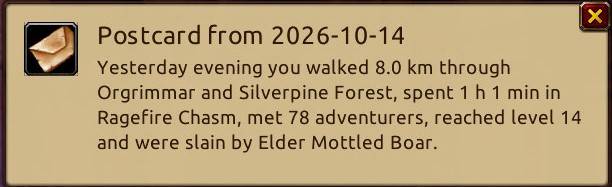
Every time you log out, Travelogue writes your session up as a postcard and hands it to you at your next login:
Yesterday evening you walked 4.2 km through Duskwood, met 37 adventurers, caught 12 fish and were slain by Stitches.
A postcard picks the highlights of your session: how far you went and through which zones, the time spent in dungeons, the players you met, the level you reached, fish caught, skills raised, items crafted, herbs and ore gathered, flights taken, gold earned, and how you died, if you did.
Every postcard has a Replay button that plays back just that session. A session also ends after you've been away from the keyboard for a while (15 minutes, 30 minutes or an hour, adjustable in the settings), and all your postcards are kept in the journal.
The Journal
Everything the replay shows, in numbers. Open it with /chron or with the minimap button.
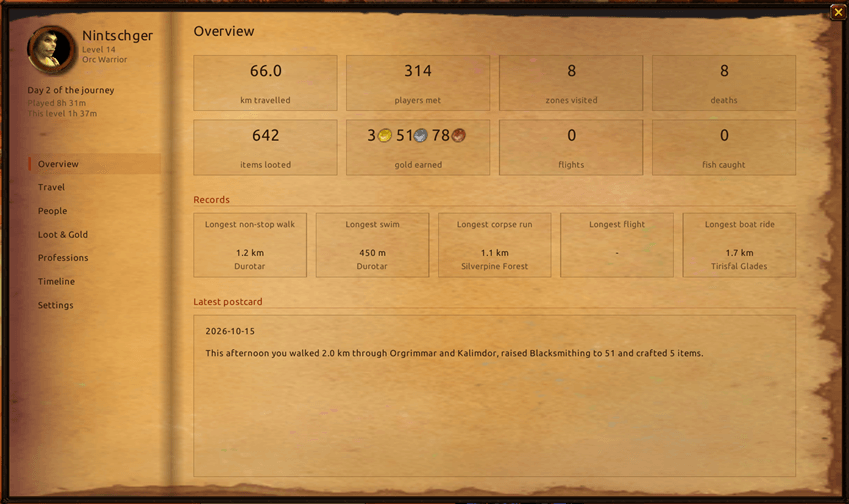
Overview
- Players met, deaths, items looted, gold earned, flights taken, fish caught etc.
- Total distance travelled
- Your latest postcard, the day of your journey and your time played
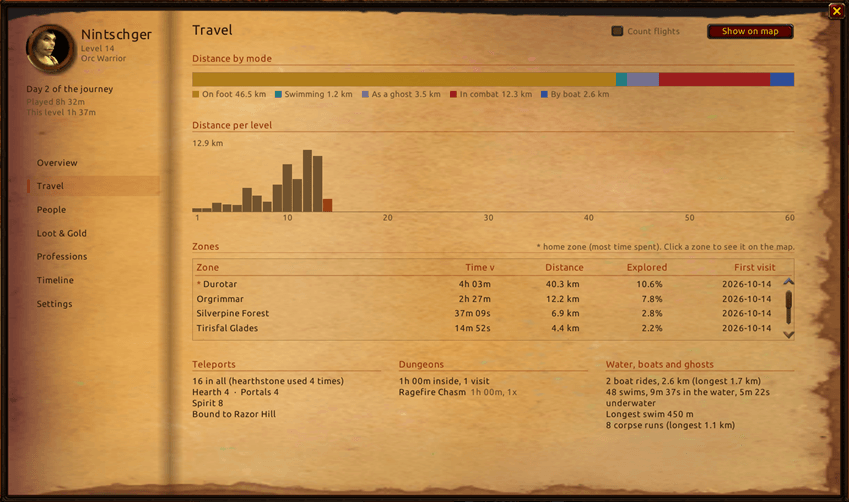
Travel
- Distance by travel mode: on foot, mounted, swimming, as a ghost, in combat, on flight paths and by boat
- Distance per level: how far you went at each level
- Zones: time spent, distance, how much of each zone you've explored, and when you first set foot there
- Teleports: hearthstone, teleport spells, portals, summons and spirit releases
- Dungeons and raids: time inside, visits, and your first time through
- Choose whether flight-path distance counts toward your totals
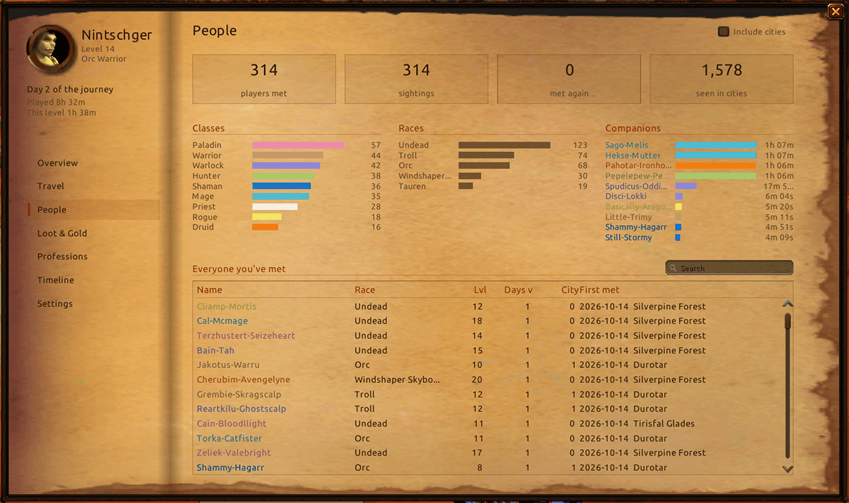
People
- Everyone you've crossed paths with
- Met again: the familiar faces you keep running into on different days
- Companions: the players you've grouped with, and for how long
- Class and race breakdowns of the people around you
- Include the six capital cities, or count only the players you meet out in the world
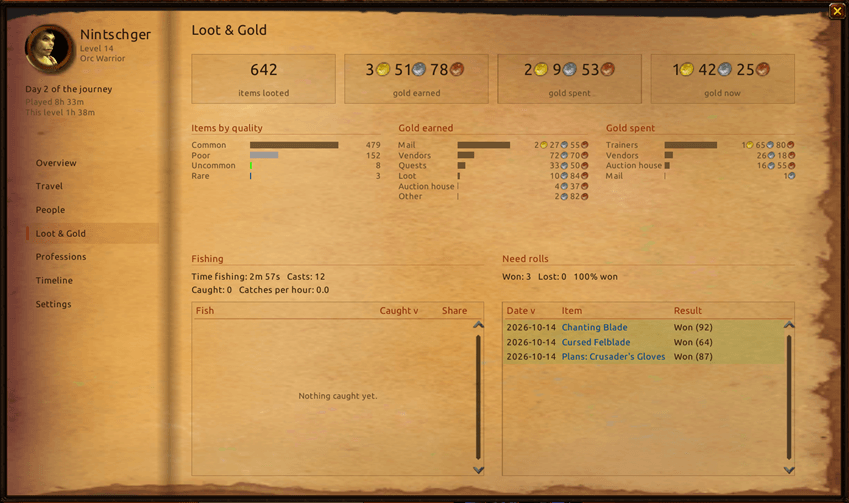
Loot & Gold
- Items looted, by quality
- Gold earned and spent, broken down by source: loot, quests, vendors, auction house, mail, trades, trainers and flights
- Fishing: time spent, casts, catches per hour, and every fish you've landed
- Need rolls: every item you rolled Need on, whether you won it, and who beat you and by how much
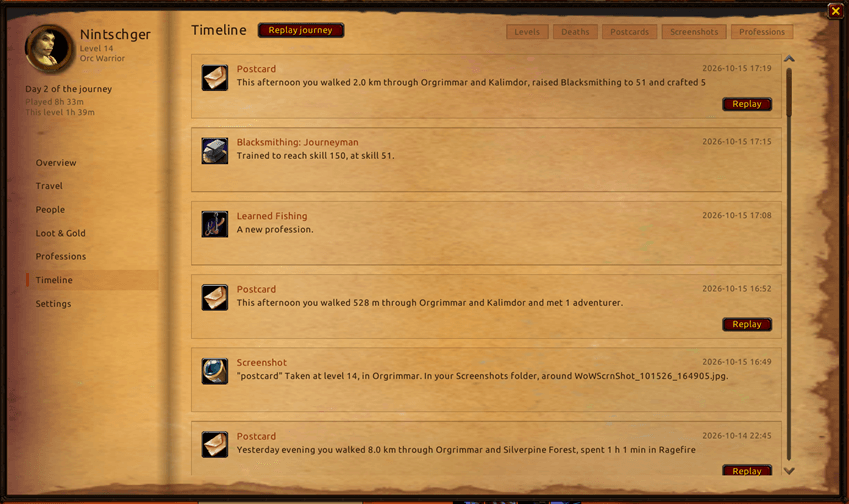
Timeline
- Every level-up, with where you were and how long it took
- Every death
- Profession milestones: each one you learn, each new rank you train and the day you reach the top
- Your postcards and screenshots, in order, each one ready to replay
Popups
- Level-up: how far you travelled during the level you just finished
- New records: every one, only the big ones, or none
- Close popups with their X or with any click, or let them fade on their own
- Drag popups wherever you want them on your screen
Screenshots
- Take a screenshot automatically at every level-up, with or without the interface
/chron snap What a view!or a key binding takes a screenshot and adds a note- Every screenshot shows up in your replay and Timeline, with its note, its place and the file name to look for in your screenshots folder
Commands
| Command | What it does |
|---|---|
/tlogreplay |
Replay your journey (today for today only, stop to end) |
/tlog |
Open the journal |
/tlogsettings |
Open the settings |
/tlog snap [note] |
Take a screenshot for your travel, with an optional note |
/tlog postcard |
Preview this session's postcard |
/tlog map |
Show or hide your path on the world map |
/tlog minimap |
Show or hide the minimap button |
/tlog toasts |
Turn popups on or off |
/tlog scale 1.2 |
Zoom the journal (0.8 to 1.6) |
/tlog welcome |
Show the welcome screen again |
/tlog reset |
Wipe this character's data (asks first) |
/tlog debug, /tlog memory |
Live counters and memory use |
/tlog help lists every command.
Limitations
- Your replay starts when you install Travelogue. Anything that happened before then can't be recorded, so start a new character with it if you want to replay the whole story from level 1.
- Killers are a best guess. WoW: Forever doesn't give addons the combat log, so Travelogue works out what killed you from the creatures around you, or from a fall or drowning just before you died.
- Screenshots stay in your Screenshots folder. The game can't show image files inside the interface, so Travelogue records the note and the file name for each one instead.
Coming up
- Dedicated journey once you reach level 60
- Tracking and replaying of PvP including duels
- Show struggles with full bags :D
- Tweaks in visual improvements
- Your suggestions, let me know!
Data is saved per character and stored compactly, so even months of travel and thousands of players stay light.
Found a bug or have an idea? Leave a comment :)
Travelogue Team
