


TransmuteReminder
- By
Screenshot 2026-11-21 174652.png

Screenshot 2026-11-21 174747.png
Screenshot 2026-11-21 174601.png
Description
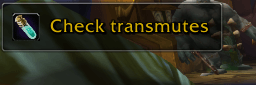
Never miss a cooldown. TransmuteReminder pops up a small "Check transmutes" reminder the moment a transmute or other profession cooldown is ready, then stays out of your way. No countdown bars, no timers cluttering your screen.
Built for WoW: Forever.
Features
- Reminder only when ready. A small frame appears when a cooldown ends and lists what is ready.
- Knows which transmutes share a cooldown. The Arcanite group is one timer, while Iron to Gold and Mithril to Truesilver each have their own. Each gets its own reminder.
- Works for cooldowns started before install. Open your Alchemy window once and the addon reads every cooldown from the game.
- Other profession cooldowns too. Any recipe on cooldown, such as Mooncloth, is tracked when you open that profession.
- Alts. Cooldowns are saved account-wide, so any character, even one without Alchemy, reminds you when an alt has something ready.
- Click actions. Left-click opens the recipe, right-click snoozes, middle-click dismisses. Drag to move.
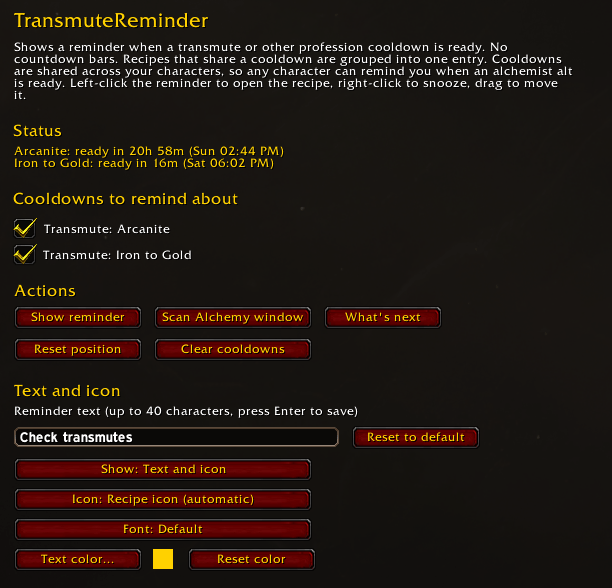
- Customizable. Reminder text, color, font, size, icon, background, border, and a pulse or glow animation.
- Alerts. Optional sound, repeat reminder, snooze length and chat message.
- Stays out of the way. Never reads or shows anything in combat. Optional hiding in instances or groups.
- Choose what to track. Turn off any cooldown in the options, for example Iron to Gold if you only care about Arcanite.
- Minimap button and AddOn Compartment entry.
Getting started
- Install the addon and log in.
- Open your Alchemy window once on each alchemist.
- Play as normal on any character. The reminder appears when a cooldown ends.
Settings: Options > AddOns > TransmuteReminder, or type /tmr options.
Commands
/tmrshows every tracked cooldown, including your other characters/tmr optionsopens the options panel/tmr testpreviews the reminder/tmr scanlists each transmute with its time left/tmr whatsnextshows the next cooldown to finish/tmr altslists cooldowns on your other characters/tmr resetresets the reminder position/tmr lock//tmr unlocklocks or unlocks dragging
FAQ
Do I need the addon installed when I cast the transmute? No. Open your Alchemy window and it picks up any cooldown already running.
Why does Arcanite show as one reminder when I know several transmutes? Many transmutes share one cooldown. The addon groups them so you get one reminder per timer, not one per recipe.
Will I get reminders on characters that aren't alchemists? Yes. Any character shows the reminder when an alt's cooldown is ready. You can turn this off in the options.
Will viewing a guildmate's profession mess up my timers? No. Other players' professions are never read.
Feedback
Found a bug or have an idea? Leave a comment here or open an issue on GitHub.
TransmuteReminder Team
