


Transmute Tracker

C0A228CC-825C-42E0-A7F1-E12ECCAA1501.png
1AF4F065-E45E-472B-94A2-B9E2EEDFF9F4.png
Description
Transmute and long cooldown tracker
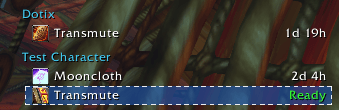
Never miss a transmute again. Transmute Tracker keeps track of the profession cooldowns of every character on your account, so you can see at a glance which alt is ready to craft and which one is still waiting. It's built for World of Warcraft: Forever.
When a cooldown comes up, a goblin will let you know.
Features
- Account-wide tracking: every character you log into saves its cooldowns. You can see all your alts' timers from any character.
- Tracks automatically:
- All Alchemy transmutes (Arcanite, Iron to Gold, Mithril to Truesilver, elemental transmutes, and so on)
- Mooncloth (Tailoring)
- Salt Shaker / Refined Deeprock Salt (Leatherworking)
- Snowmaster 9000
- Dedicated Study(legacy tree) and the Mage's Study (WoW Forever)
- Any other recipe with a cooldown. Open your profession window once and the addon picks it up, including cooldowns added in WoW Forever.
- Any bag item with a long cooldown (20 hours or more)
- Clear "Ready" display: when a cooldown is up, its row is highlighted and the timer changes to a green Ready.
- Ready alerts: a chat message plus the goblin's "Time is money, friend!" voice line. Alerts fire when a cooldown comes up while you're playing, and at login if something is already waiting.
- Clean, minimal window:
- Class-colored character names (first name and surname), recipe icons and live countdowns
- The lock, settings and close buttons only appear when you hover over the window
- Lock the window in place so it can't be dragged by accident
- The Settings window (cog) has opacity (down to fully transparent) and scale sliders
- Minimap button: click it to open the window, hover for a quick summary, and drag it around the minimap.
- Lightweight: no libraries and no dependencies.
Getting started
- Install the addon and log into a character.
- Open your profession window once on each crafter. Transmute Tracker records their cooldowns from then on.
- Type /tt or click the minimap button to see every character's cooldowns.
Cooldowns update whenever you log into that character, and the countdowns keep running for all characters in between.
Commands
| Command | What it does |
|---|---|
/tt |
Open or close the tracker window |
/tt list |
Print every cooldown in chat |
/tt test |
Add fake rows to preview the window (type again to remove) |
/tt lock |
Lock or unlock the window position |
/tt opacity 0-100 |
Window background opacity |
/tt scale 50-200 |
Window size |
/tt alerts |
Turn "cooldown ready" alerts on or off |
/tt sound |
Play the ready sound (/tt sound off / on / help) |
/tt hide <cooldown> |
Hide or show a cooldown, e.g. /tt hide Mooncloth |
/tt remove <name> |
Forget a character |
/tt minimap |
Show or hide the minimap button |
/transmute also works in place of /tt.
FAQ
A character's cooldowns aren't showing. Log into that character and open the profession window once. For the Salt Shaker, make sure it's in your bags, not your bank.
Can I change the ready sound? Yes. /tt sound id <number> uses any game sound by its file ID. You can also put your own TimeIsMoney.ogg in the addon folder, and it plays that instead. /tt sound off mutes it.
I see a cooldown I don't care about. Type /tt hide <cooldown name> and it's gone. Type the same command again to show it.
Found a bug or have a suggestion? Leave a comment and let me know which profession and recipe it's about.
Made by Dotix.
Like my work? Donate here: https://ko-fi.com/dotix
Transmute Tracker Team
