


TransmogTracker
- By
frame.png
Description
TransmogTracker
Track missing pieces of an official transmog set, anchored to your Objective Tracker.
Ever open the Wardrobe, see "7/10" on a set you've been farming for weeks, and have no idea which piece you're actually missing — or whether you can even wear it? TransmogTracker fixes that.
What it does
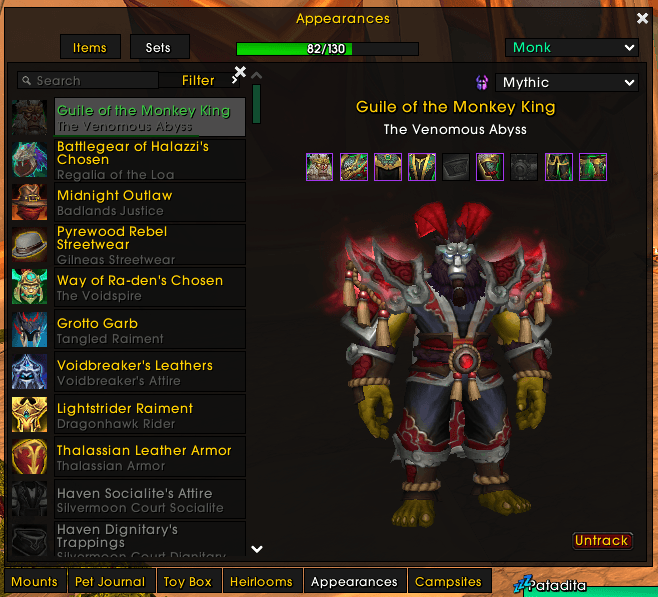
- One click and you're tracking it. A Track button sits right next to the difficulty selector when you preview a set — pick LFR, Normal, Heroic or Mythic, hit Track, done.
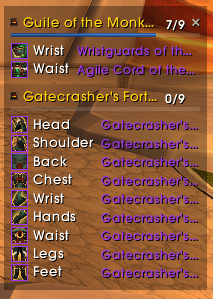
- Always know what's left, without leaving your quest tracker. A small window anchored right below your Objective Tracker shows exactly which pieces you still need — nothing more.
- Updates itself. Loot a piece, learn an appearance — the list shrinks on its own. No reopening the Wardrobe to check.
- Honest about what you can wear. If a piece isn't equippable on this character, it tells you — but it still counts toward your account-wide collection, so you're not left guessing.
- Stays out of the way. Collapsible, draggable, remembers where you left it, and tracks separately per character.
- Speaks your language. English and Spanish out of the box.
Install
Drop the TransmogTracker folder into:
World of Warcraft/_retail_/Interface/AddOns/
Or grab it from CurseForge / Wago once it's up there.
How to use it
Open Collections → Appearances → Sets, click into any set, pick your difficulty, click Track. That's it — the tracker appears anchored to your Objective Tracker and updates as you go.
Done tracking something? /tt stop clears it.
Support
If this saved you some Wardrobe-alt-tabbing, you can throw a few bucks my way on Patreon — totally optional, the addon stays free either way.
License
MIT — see LICENSE.
TransmogTracker Team
