


Transmog Priority
- By
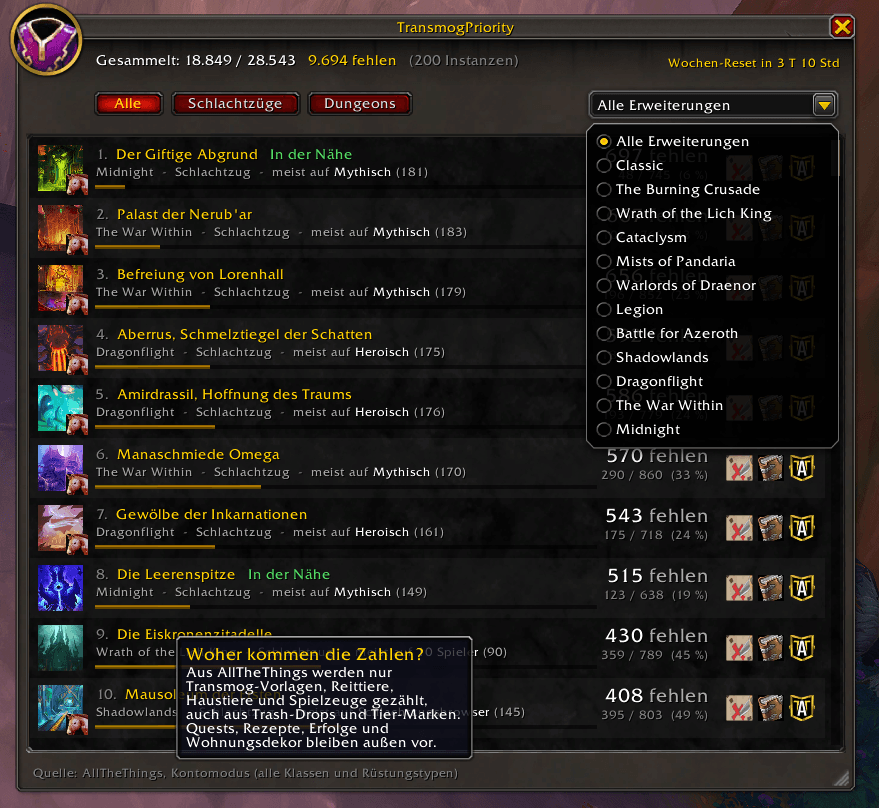
Transmog Priority Selection
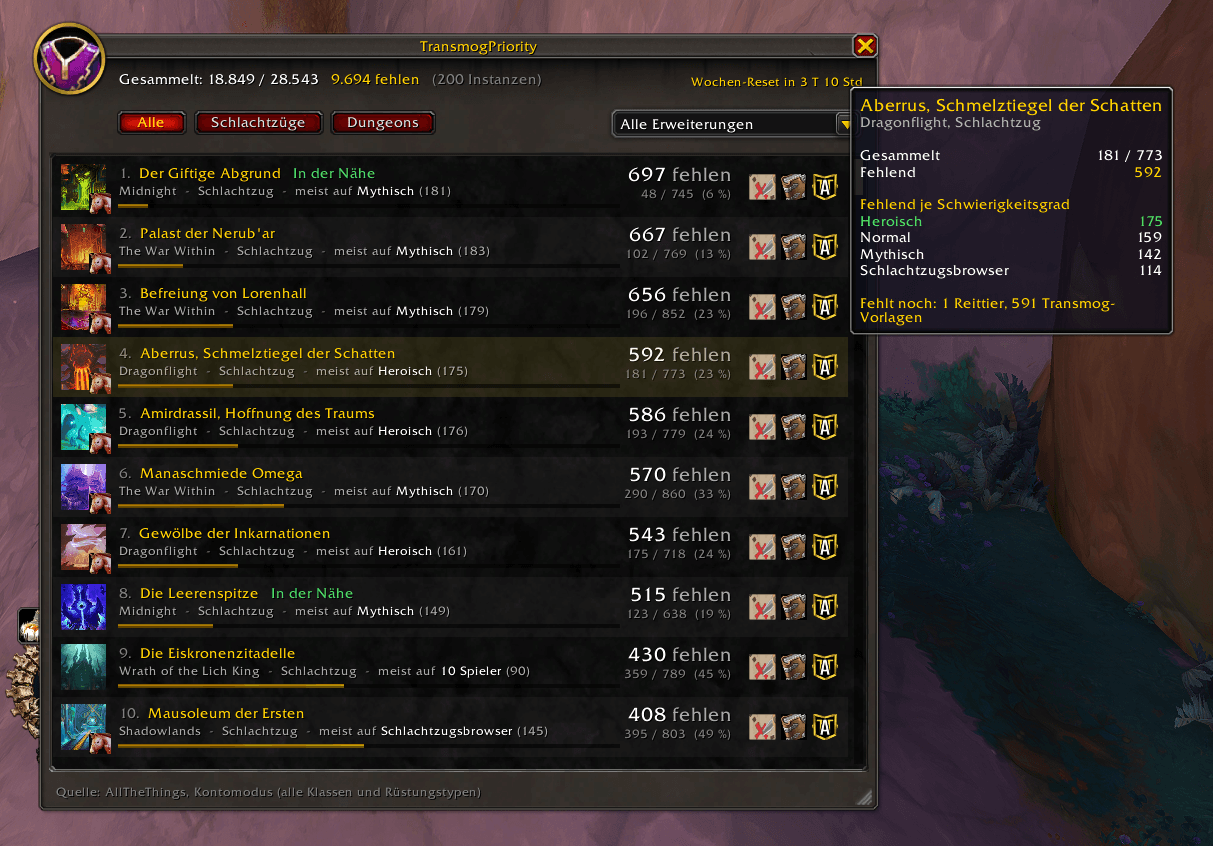
Transmog Priority Selection
Description
Transmog Priority
Find out which dungeon or raid you should run next to maximize your collection progress!
TransmogPriority analyzes World of Warcraft dungeons and raids and ranks them based on how many missing collectibles you can still obtain from each instance. Whether you are hunting for transmogs, mounts, pets, or toys, this addon removes the guesswork and shows you where your time is best spent.
Designed for World of Warcraft Retail (Midnight Patch 12.1.5 ready).
Key Features
-
Laser-Focused Collecting: Unlike other broad collection tools, TransmogPriority focuses exclusively on four collectible types:
-
Transmog Appearances (weapons, armor)
-
Mounts
-
Battle Pets
-
Toys(Quests, recipes, achievements, and housing decor are completely ignored).
-
-
Dual Data Sources (ATT Support & Standalone):
-
With AllTheThings (ATT): Automatically integrates with ATT to pull detailed collection data while remaining fast and lightweight. Includes a button to toggle ATT's Account Mode (Midnight feature) so you can track loot across all classes and armor types.
-
Without ATT (Standalone): Scans the Encounter Journal in the background on your first login per patch. No secondary addons required!
-
-
Smart Sorting & Filtering: Dungeons and raids are ranked by the total number of missing collectibles. Finished or currently locked instances automatically drop to the bottom.
-
Filter by All, Raids, or Dungeons.
-
Filter by specific Expansions.
-
-
Quick Navigation & Quality-of-Life:
-
Waypoints: One-click map waypoint generation directly to the entrance of any instance (supports built-in Blizzard waypoints and TomTom).
-
Encounter Journal: Direct button to open the instance page in the Encounter Journal.
-
ATT Integration: Open mini-lists directly in AllTheThings to see exact missing items.
-
Mount Indicator: An icon highlights instances where missing mounts are still up for grabs.
-
-
Detailed Tooltips:
-
Displays missing items broken down by difficulty (Heroic, Mythic, LFR, etc.).
-
Item type breakdown (how many mounts/pets/toys/transmogs remain).
-
Lists eligible alts that are not currently saved to the instance lockouts (requires ATT).
-
Event & location badges: Locked, Timewalking Active, and Nearby (same continent).
-
UI & Customization
-
Modern Blizzard Frame Design: Clean interface matching current WoW UI panels.
-
Resizable Frame: Easily resize the window height—snaps perfectly to whole item rows.
-
Minimap Button: Click to toggle the UI, drag to move around the minimap, or right-click to hide.
Commands
-
/tpor/transmogprio– Toggle the main addon window. -
/tp neu– Force a complete fresh re-scan of the database. -
/tp minimap– Toggle the minimap icon visibility. -
/tp debug– Display current data source and diagnostic info.
Installation
-
Download the ZIP file.
-
Extract the
TransmogPriorityfolder into your WoW AddOns directory:World of Warcraft\_retail_\Interface\AddOns\ -
Restart or reload your game (
/reload).
Transmog Priority
Finde sofort heraus, welche Instanz oder welchen Schlachtzug du als Nächstes besuchen solltest, um deinen Sammelfortschritt zu maximieren!
TransmogPriority analysiert Dungeons und Schlachtzüge in World of Warcraft und sortiert sie danach, wie viele fehlende Sammelobjekte du dort noch ergattern kannst. Egal ob du nach Transmog-Vorlagen, Reittieren, Haustieren oder Spielzeugen jgst – dieses Addon nimmt dir das Rätselraten ab und zeigt dir, wo sich deine Zeit am meisten lohnt.
Bereit für World of Warcraft Retail (Midnight Patch 12.1.5).
Hauptmerkmale
-
Volle Fokussierung auf das Wesentliche: Im Gegensatz zu anderen breit gefächerten Tools konzentriert sich TransmogPriority ausschließlich auf vier Sammelarten:
-
Transmog-Vorlagen (Rüstungen und Waffen)
-
Reittiere (Mounts)
-
Kampfhaustiere
-
Spielzeuge(Quests, Rezepte, Erfolge und Wohndeko werden komplett ignoriert).
-
-
Zwei Datenquellen (AllTheThings-Unterstützung & Standalone):
-
Mit AllTheThings (ATT): Integriert sich nahtlos in ATT, um hochpräzise Sammeldaten abzurufen. Beinhaltet einen praktischen Button zum Umschalten des ATT-Kontomodus (Midnight-Funktion), damit Beute über alle Klassen und Rüstungstypen hinweg gezählt wird.
-
Ohne ATT (Standalone): Scannt den Abenteuerführer beim ersten Login nach einem Patch vollautomatisch im Hintergrund. Es werden keine weiteren Addons benötigt!
-
-
Intelligente Sortierung & Filter: Dungeons und Raids werden nach der Anzahl der noch fehlenden Gegenstände sortiert. Bereits abgeschlossene oder für die Woche gesperrte Instanzen rutschen automatisch nach unten.
-
Filtere nach Alle, Schlachtzüge oder Dungeons.
-
Filtere nach spezifischen Erweiterungen.
-
-
Schnelle Navigation & Komfort (QoL):
-
Wegpunkte: Setzt mit nur einem Klick einen Wegpunkt direkt zum Instanzeingang (unterstützt sowohl das Blizzard-Wegpunktsystem als auch TomTom).
-
Abenteuerführer: Direkter Schnellzugriff, um die Instanz im offiziellen Abenteuerführer zu öffnen.
-
ATT-Integration: Öffne direkt Mini-Listen in AllTheThings, um exakt zu sehen, welche Gegenstände fehlen.
-
Reittier-Symbol: Ein kleines Icon zeigt dir sofort an, in welchen Instanzen noch Reittiere auf dich warten.
-
-
Detaillierte Tooltips:
-
Zeigt fehlende Gegenstände aufgeschlüsselt nach Schwierigkeitsgrad (Heroisch, Mythisch, LFR usw.).
-
Übersicht über die verbleibenden Sammeltypen (Anzahl offener Mounts/Pets/Toys/Transmogs).
-
Listet verfügbare Twinks auf, die für die jeweilige Instanz diese Woche noch ID-frei sind (benötigt ATT).
-
Event- & Positions-Badges: Gesperrt, Zeitwanderung aktiv und In der Nähe (gleicher Kontinent).
-
UI & Anpassbarkeit
-
Modernes Blizzard-Design: Fügt sich nahtlos in den Look aktueller WoW-Benutzeroberflächen ein.
-
Größenanpassbares Fenster: Ändere die Höhe des Fensters ganz bequem per Zieh-Grip – es rastet automatisch sauber an vollen Zeilen ein.
-
Minimap-Symbol: Ein Klick öffnet das UI, per Drag-and-Drop lässt sich das Symbol frei um die Minimap verschieben, und mit einem Rechtsklick blendest du es aus.
Befehle (Slash Commands)
-
/tpoder/transmogprio– Hauptfenster öffnen oder schließen. -
/tp neu– Erzwingt ein komplettes, neues Einlesen der Datenbank. -
/tp minimap– Schaltet die Sichtbarkeit des Minimap-Symbols um. -
/tp debug– Zeigt Diagnoseinformationen und die aktive Datenquelle an.
Installation
-
Lade die ZIP-Datei herunter.
-
Entpacke den Ordner
TransmogPriorityin dein WoW-Addon-Verzeichnis:World of Warcraft\_retail_\Interface\AddOns\ -
Starte das Spiel neu oder lade dein UI neu (
/reload).
Transmog Priority Team
