


Trainer Compare
- By
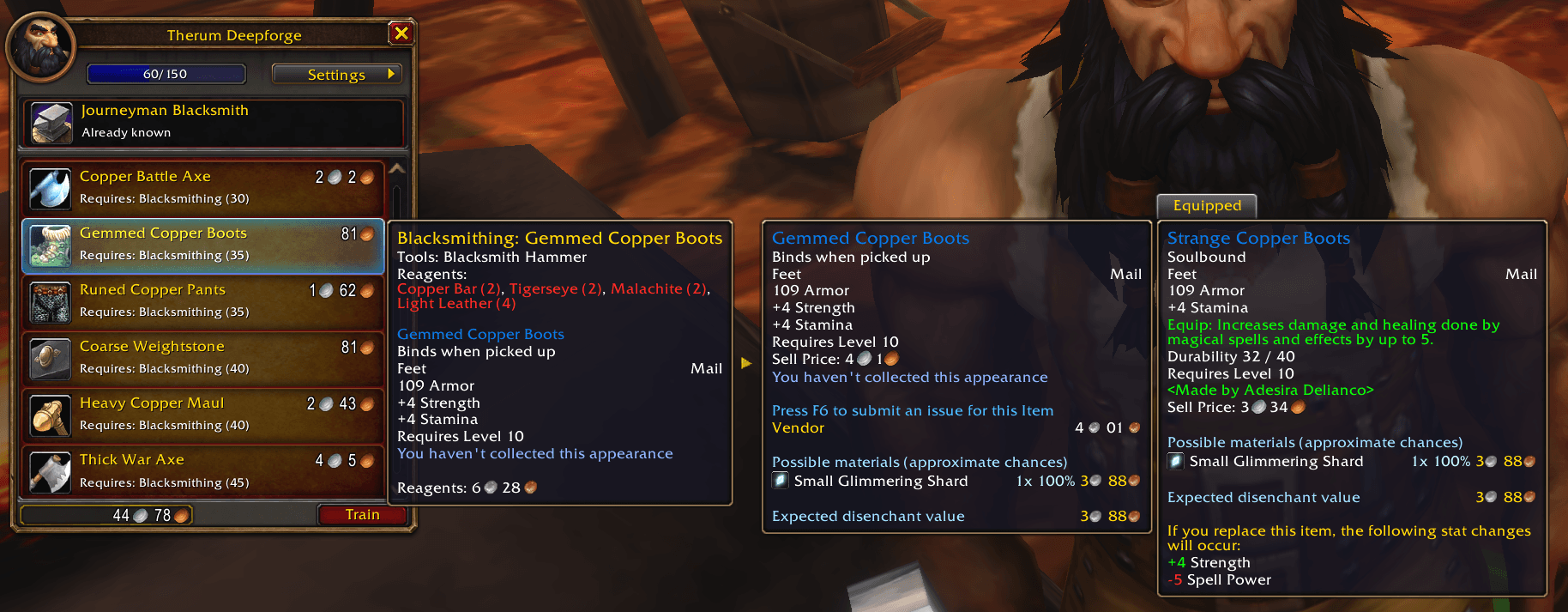
Hovering over a trainer's recipe displays the item yielded by the recipe compared to your equipment.
Description
Trainer Compare
Before you buy a recipe, see how its gear compares to what you wear.
In WoW Forever, crafted gear can help at every stage of leveling. Every trainer visit is a choice: which recipes make gear worth wearing? Trainer Compare shows the item level and stat changes right in the trainer window. You decide what each recipe is worth to you.
Hover a recipe. See the item it makes next to what you have on. No key to hold.
- Side-by-side compare. The recipe, the item it makes, and your equipped item, in a row beside the trainer's list.
- Item level and stat changes at a glance. The game's own compare, with a green number for a gain and a red number for a loss.
- Fade what's not for you. One checkbox in the trainer's Settings menu fades gear you can't use yet, so the rest stands out.
- Reagent cost and profit. With Auctionator, the recipe tooltip shows what one craft's reagents cost, and the profit after the auction house cut.
- No scores, no "upgrade" labels. Just the numbers. You decide.
Nothing to install alongside it (Auctionator is optional, for prices), and nothing to type. Made for WoW Forever.
How it works
The tooltips. Hover a recipe that makes an item. Left to right, next to the trainer's list:
- the normal recipe tooltip, with reagent cost and profit at the bottom when Auctionator is loaded
- a gold arrow
- the item it makes, as a normal item tooltip
- for gear, your equipped item, marked Equipped, with the game's own item level and stat changes
Their tops line up, and nothing covers the recipe list. If there's no room on the right of your screen, the equipped item goes on the left instead. If nothing is equipped in that slot, there's nothing to compare against, so no compare shows. Recipes that don't make an item keep the game's normal tooltip.
What it compares against.
- Rings and trinkets: both of yours.
- One-hand weapons: your main hand. If you can dual wield, both hands.
- Main-hand weapons: your main hand.
- Off-hand weapons, shields and held items: your off hand.
- Two-handers: your main hand and off hand together.
- Anything else in your hands while you wield a two-hander: the two-hander.
- Shirts, tabards, bags, ammo and fishing poles aren't compared.
Plan ahead. Gear above your level, or for a weapon skill you haven't learned, still gets the compare.
Reagent cost and profit. Needs Auctionator. At the bottom of the recipe tooltip, for any recipe that makes an item:
- Reagents: what one craft's reagents cost. Each reagent is priced the way Auctionator prices it: the vendor price if Auctionator has seen one, else the auction price.
- Profit: the item's auction price, times how many one craft makes, minus the 5% auction house cut and the reagent cost.
- There's no profit line when a price is missing, or for items that bind on pickup. Profit doesn't count the auction deposit or the cost to learn.
Only show usable gear. A checkbox in the trainer's Settings dropdown. It's off until you tick it, and it's saved for your account. When it's on, it fades:
- armor types you haven't learned to wear
- weapon types you haven't learned
- gear above your level, even by one level
- relics for another class
- gear with only stats your class doesn't use (like Spirit-only gear on a Paladin). This one is a judgment call: you might still want the item.
Faded rows stay in the list and you can still click them. Enchants and other non-gear recipes are never faded. If your game client can't add to the Settings dropdown, a small "Usable" checkbox shows next to the Train button instead.
Good to know
- Apart from the filter checkbox, the trainer window isn't changed. Recipe rows get no marks.
- Only the default Blizzard trainer window is supported.
Feedback and source
Trainer Compare is open source under the MIT license. It's written in TypeScript and compiled to plain, readable Lua.
- Source, issues and bug reports: https://github.com/postazure/wow-addon-trainer-gear-compare
- For a bug report, turn on debug messages with
/run TrainerCompareDB.debug = true, reproduce the problem, and include a screenshot of what it prints./run TrainerCompareDB.debug = falseturns them off.
Trainer Compare Team
