


Trailkit
- By
Снимок ÑкÑана â 2026-10-30 в 21.39.56.png
Description
Trailkit
Compact hunter bars for World of Warcraft: Midnight. One panel for your aspects, one for your traps, right above the main action bar.
Trailkit uses the same look, cooldowns and proc glow as the default action buttons. It does not read the combat log or use external libraries.
Supported clients
- Midnight (retail): supported now. Aspect of the Cheetah, Turtle and Eagle; Freezing, Tar, High Explosive, Implosive and Steel Trap.
- WoW Forever: coming at launch. All aspects and traps, with spell ranks.
Only spells you have learned are shown, so talents of other specializations stay hidden. The panels update automatically when you learn a spell or change specialization.
Features
- Aspects and Traps panels: two independent, movable panels.
- Cooldowns on every icon: swipe and countdown numbers that keep working in combat.
- Proc glow: the same animated golden border as on the default action bars, for example when Time Spiral lights up Aspect of the Cheetah.
- Active aspect highlight: the current aspect is marked with the standard action button border.
- Shift + drag to reorder icons. Shift-click never casts, and reordering can be turned off.
- Panel lock: panels are locked by default; unlock them to move.
- Two styles:
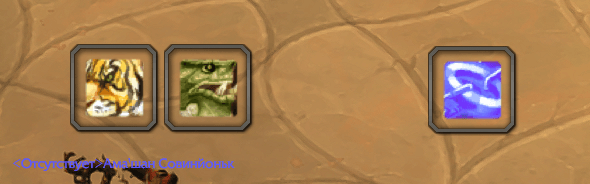
- Blizzard: matches the standard action buttons.
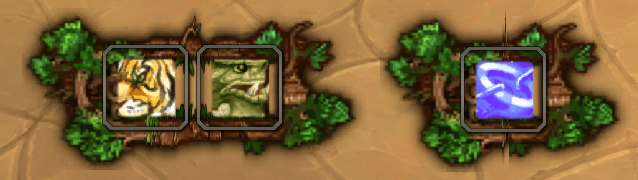
- Night Elf: the same buttons inside a leafy branch frame.
- Right-click menu: Lock, Prevent icon reordering, Style, Scale, Hide panel, Reset position.
- Localized for all WoW client languages: English, Russian, German, French, Spanish (EU and LatAm), Italian, Portuguese (BR), Korean, Simplified and Traditional Chinese.
Commands
/trailkit or /tk:
| Command | Description |
|---|---|
/tk lock |
Lock panels in place |
/tk unlock |
Unlock panels for moving |
/tk scale <0.5–2> |
Set the scale of both panels |
/tk reset |
Reset positions and show hidden panels |
/tk test |
Toggle test mode with placeholder icons (works on any class) |
/tk help |
Show the command list |
Notes
- Blizzard does not allow addons to change action buttons in combat. Moving, reordering, scaling and hiding panels only work out of combat. Spell changes during combat are applied right after combat ends.
- When aura information is hidden from addons in combat, the aspect highlight keeps its last known state.
Translations
Translations were made with care, but some may be inaccurate. If you notice a wrong or awkward phrase in your language, please leave a comment with the language and a better wording.
Source
Trailkit is open source under the MIT license: github.com/EvDrozdov/Trailkit
Trailkit Team
