The configuration window.
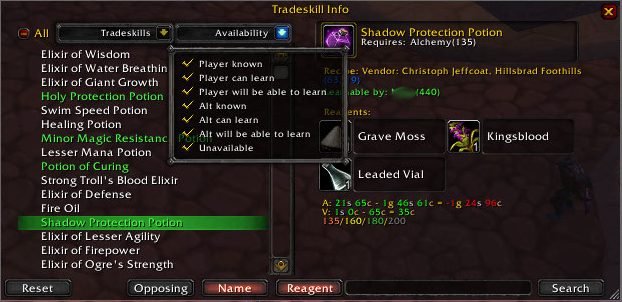
The main window of TradeskillInfoUI.
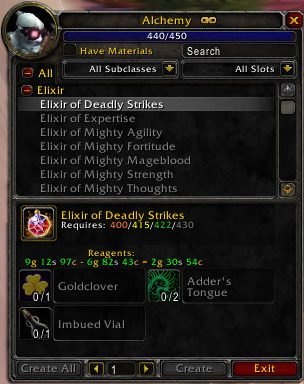
The default tradeskill window is modified.
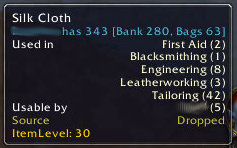
A sample tooltip showing TSI lines (bank information is from another addon).
Description
TradeSkillInfo
Complete tradeskill information.



The Quick Intro
TradeSkillInfo is an add-on that gives you all the information that you need about tradeskills, including the ones that your character cannot craft.
What it does
It can add the following information to the tooltip of an item:
- Which tradeskills the item is used in, and how many different recipes for that tradeskill it is used in.
- Which of your characters can use the item.
- Where the item comes from: bought from a vendor, dropped, disenchanted or crafted.
It can add the following information to the tooltip for recipes and crafted items:
- If any of your characters knows the recipe.
- If any of your characters are able to learn the recipe.
- If any of your characters will be able to learn the recipe in the future.
- Where the recipe comes from: bought from a vendor, quest reward, dropped or crafted.
It can colour-code recipes sold at merchants and on the Auction House.
- White: Current character can learn the recipe now.
- Orange: Current character will be able to learn the recipe later.
- Green: One of your other characters can learn the recipe now.
- Light Blue: One of your other characters will be able to learn the recipe later.
- Red: Current character knows the recipe.
In the tradeskill craft window it will show:
- The cost of the combine (auctioneer or vendor prices), how much the result sells for to a vendor and the profit/loss.
- At what skill levels the recipe will change to a different difficulty level. For example, "40/60/80/120" means the recipe is learnable at skill level 40, will turn yellow at 60, green at 80 and grey at 120.
TradeSkillInfo also has its own Browser module which is installed as a separate load-on-demand add-on. It is opened by typing /tsi or by binding a key in the keybindings interface.
QuickSearch an item in the inventory will open the Browser and show all recipes that use that item. QuickSearch key-mouse combination is configurable. The default setting is shift-right-click.
- Right-clicking a reagent icon in the Browser while visiting an auction house will perform a search for that reagent.
- Shift-clicking on the recipe name in the list will paste the recipe link into an open chat editbox.
In the Browser you can browse all tradeskill recipes in the game.
- Freetext search on recipe name and reagent names.
- Expand or collapse which tradeskills to show.
-
Filter which recipes to show:
- If your current character knows the recipe.
- If your current character can learn the recipe now.
- If your current character will be able to learn the recipe later.
- If one of your other characters knows the recipe.
- If one of your other characters can learn the recipe now.
- If one of your other characters will be able to learn the recipe later.
- If it is not known by any of your characters.
Recipe names are colour-coded in the Browser.
- White: Current character knows the recipe.
- Light Green: Current character can learn the recipe now.
- Yellow: Current character will be able to learn the recipe later.
- Grey: One of your other characters knows the recipe.
- Dark Green: One of your other characters can learn the recipe now.
- Orange: One of your other characters will be able to learn the recipe later.
- Red: Not known by any of your characters.
What it does not do
TradeSkillInfo is purely an informational tool and will not assist you in crafting items.
Configuration
A configuration window can be opened by typing /tsi config, right-clicking on the provided "data broker" object or by binding a key in the keybindings interface.
Almost everything can be turned on or off according to your needs and preferences.
Translations
This add-on was written in English but has been translated into other languages. It should work for everyone but I cannot guarantee completeness or accuracy of the provided translations. If you would like to help with translations, feel free to update the necessary phrases.
Credits
TradeSkillInfo has been developed by many different people over the years, including but not limited to the following:
- Original creator and maintainer - Dys, wmrojer, and evenue.
- Current maintainer - Ravendwyr
Support







The TradeSkillInfo Team


Owner