


TradeShare
- By
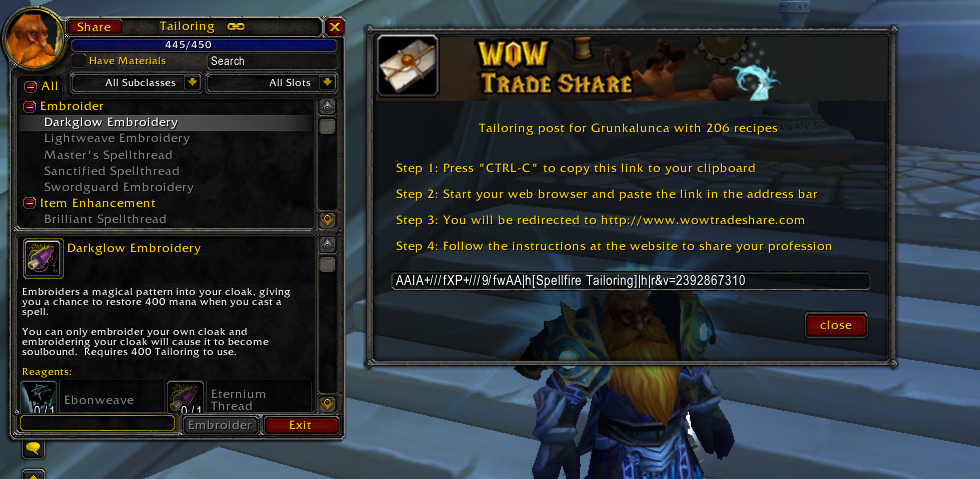
TradeShare users may share their own professions by clicking the "Share" button in the upper left hand corner of the trade skill window.
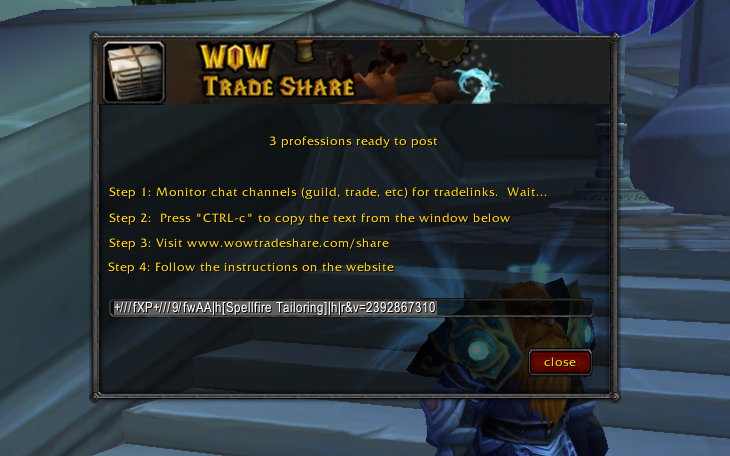
Users may share the professions of their guild members and anyone else that posts links in the raid, trade, yell, and say channels. Simply type "/tradeshare" to get started.
Description
Purpose
The TradeShare addon allows players to share tradeskills on http:www.wowtradeshare.com. Players may post for themselves, their guild (via the guild channel), or other players on their realm (via the trade channel). This is accomplished by copying tradelinks in-game using the TradeShare addon and then posting them on http:www.wowtradeshare.com.
- Search for rare recipes and find the lowest prices across factions and servers
- Submit data for yourself or others to our site anonymously
- Register for an account to add pricing/notes to your recipes and track your submitted professions
Usage
/tradeshare [ list | clear ]
default: Opens TradeShare bulk-post windows, prints usage information
list: Lists all the tradelinks that have been collected since startup
clear: Clears the list of collected tradelinks
Bulk Posting
- Type "/tradeshare" within World of Warcraft to bring up the TradeShare posting window
- Wait for tradelinks to be posted on the guild or trade channel
- Once you have collected all your data, press "CTRL-c" to copy the generated text
- Open your web browser and navigate to wowtradeshare.com/share
- Follow the instructions to post all the professions for your guild online
Individual Posting
- To use TradeShare simply open the tradeskill window of the profession that you intend to share
- Click the "share" button that appears in the upper left hand corner of the window
- A window will appear giving you detailed instructions for how to post to our site
- Copy the link using "CTRL-c"
- Open your web browser and paste the link in your browser's address bar
We appreciate your feedback. Send feature requests and bug reports to questions@wowtradeshare.com
The TradeShare Team
