TradePad
- By
Post an eye-catching trade line whenever and wherever you want. Save items in wish lists for any number of different uses.
ListwTransmog.png
CoreUse.png
Description
TradePad
Save your items once. Post an eye-catching trade line whenever you want — or let it post itself while you go play.
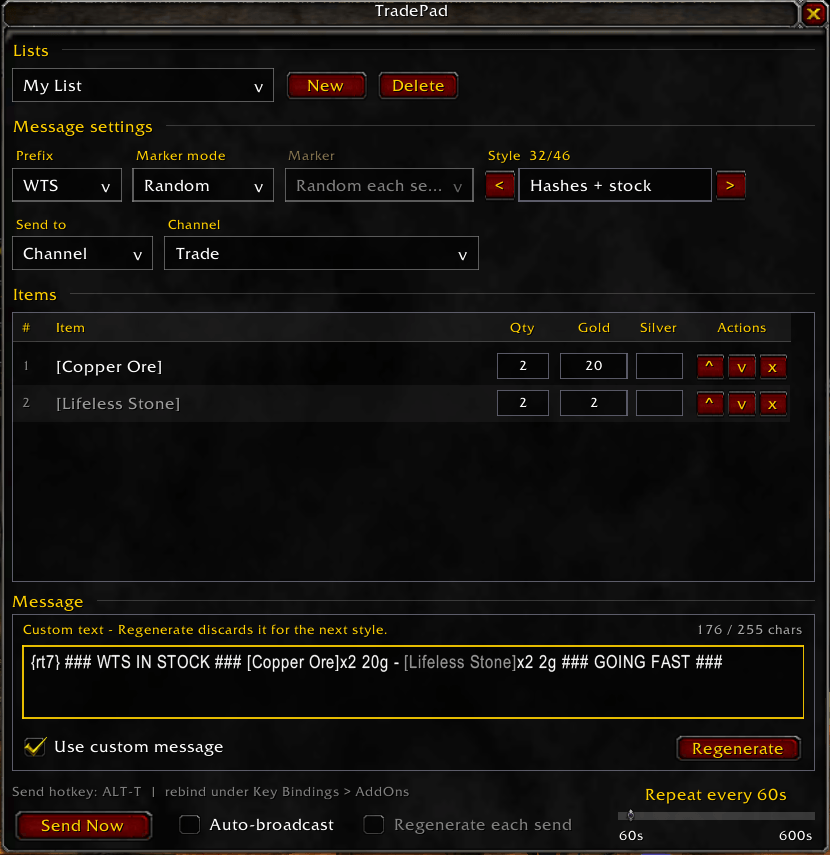
TradePad is a lightweight notepad for trade chat. Drop item links into a list, add prices, and TradePad builds a stylized message you can fire off with a hotkey, a minimap click, or a floating button. It works just as well for buying as it does for selling, and it can keep posting on a timer while you're off doing something else.
No dependencies, no configuration required, no per-character setup. Install it, shift-click a few items, and you're posting.
Your message, not everyone else's
Trade chat is a wall of identical grey text, and WTS [Item] scrolls past unread. TradePad ships 46 message styles, each with its own decoration, wording, and closing call-out:
>>> WTS CHEAP <<< [Copper Ore]x20 20g - [Lifeless Stone]x2 2g <<< OR BEST OFFER >>>

-=[ WTS READY NOW ]=- [Copper Ore]x20 20g / [Lifeless Stone]x2 2g -=[ COD MAIL OK ]=-

~*~ SELLING CHEAP ~*~ [Copper Ore]x20 20g ~ [Lifeless Stone]x2 2g ~*~ THANKS ~*~

+++ WTS +++ [Copper Ore]x20 20g + [Lifeless Stone]x2 2g +++ MORE AVAILABLE +++
Press Regenerate to step to the next one and watch the preview update, or browse with the < and > arrows until something catches your eye. Add a raid target marker to the front — fixed, or a different one on every send — and your line gets a coloured icon that's impossible to scroll past.
Want to write it yourself instead? Click into the message box and type. Your wording is saved with the list and sent exactly as written.
Buying works the same as selling
Switch the prefix to WTB and the whole message rewords itself. "SELLING" becomes "BUYING", "CHEAP" becomes "PAYING WELL", "OR BEST OFFER" becomes "MAKE AN OFFER". A buy order never advertises cheap prices, and you never have to maintain two sets of wording.
Post while you play
Turn on Auto-broadcast and TradePad reposts your list on a timer, anywhere from 60 seconds to 10 minutes. Tick Regenerate each send and it advances to the next style every time, so a repeating listing never posts the same-looking line twice in a row.
Set it running, then go quest, farm, or raid. Right-click the floating button to toggle it without opening anything.
Keep a wishlist, and try it on first
Lists aren't only for things you're selling. Keep one for the transmog set you're hunting, the crafting mats you still need, or the upgrades you're saving for.
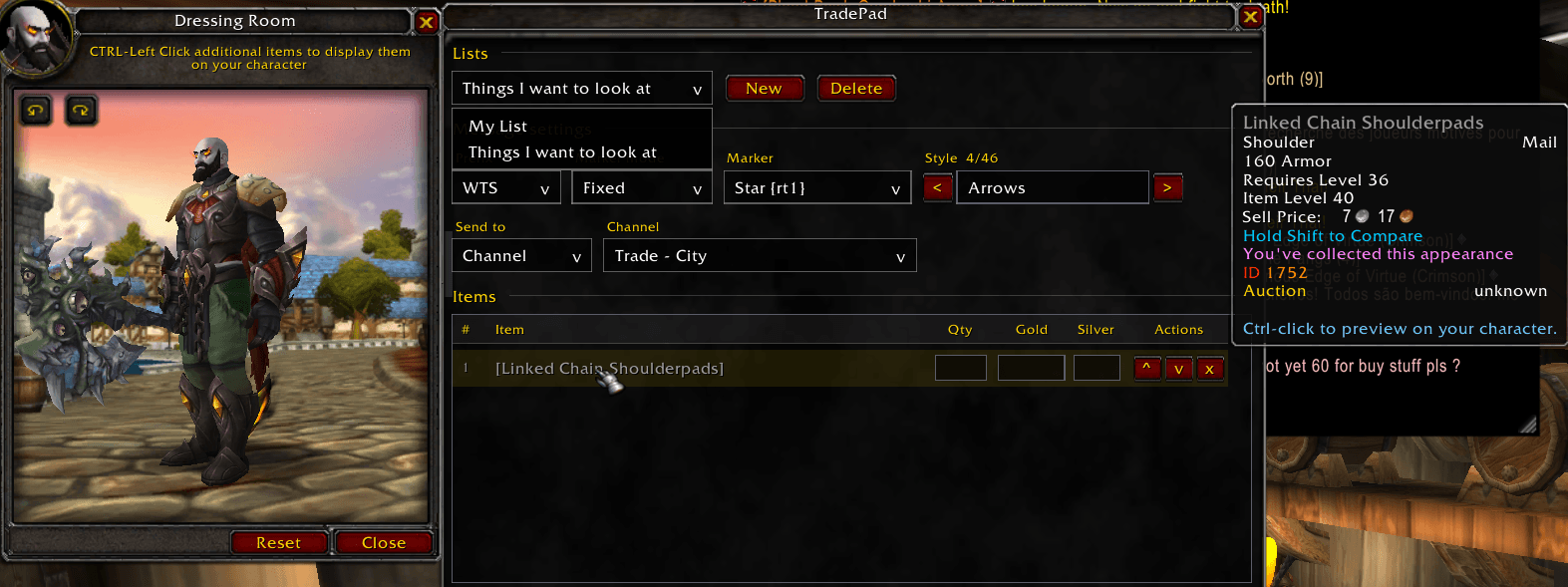
Ctrl-click any wearable item in a list to preview it on your character in the dressing room. Every list has it, so you can browse a whole wishlist of appearances without touching the auction house. Items that can't be worn say so instead of opening an empty preview.
Send it where you want
| Destination | Notes |
|---|---|
| Channel | Trade, General, or any custom channel you've joined |
| Say | For standing outside the bank or auction house |
| Yell | When you really mean it |
| Guild | Offer to your guild first |
Each list remembers its own destination, so your Trade list and your guild list stay separate.
Built to not break
- Character limit handled properly. Chat caps at 255 characters. TradePad packs in as many items as fit, marks the rest with
+more, and never cuts through the middle of an item link or a colour code. - Links stay intact. Stray characters that would make the client reject your whole message are escaped automatically, so a message either sends correctly or tells you why it didn't.
- Everything persists. Lists, links, prices, quantities, styles, and destinations all survive logout and reload.
Features at a glance
- Multiple lists — sell list, buy list, transmog wishlist, whatever you need
- 46 message styles with prefix-aware wording and closing call-outs
- Editable message — override the generated text with your own
- Raid target markers — fixed, random each send, or none
- Per-item quantity and price in gold and silver
- Dressing room preview — Ctrl-click any wearable item
- Live preview with a character counter
- Auto-broadcast — 60 to 600 seconds, optionally cycling styles
- Minimap button — left-click to open, right-click for options
- Floating button — left-click to send, right-click to toggle auto-broadcast, drag anywhere
- Keybind — ALT-T by default, rebindable under Key Bindings → AddOns
- Item tooltips on hover, plus reorder and delete controls per row
Works on every client
One download, one codebase. A built-in compatibility layer adapts the options panel, timers, scroll frames, input fields, and chat APIs to whatever you're running.
| Client | Supported |
|---|---|
| 3.3.5a (Wrath) | Yes |
| Classic Era | Yes |
| Wrath Classic | Yes |
| Cataclysm Classic | Yes |
| Mists Classic | Yes |
| Retail | Yes |
Commands
| Command | Action |
|---|---|
/tp or /tradepad |
Open or close the list editor |
/tp send |
Send the active list now |
/tp auto |
Toggle auto-broadcast on the active list |
/tp list <name> |
Switch the active list |
/tp config |
Open the Interface options panel |
/tp minimap |
Show or hide the minimap button |
/tp scan |
Identify UI elements under your cursor (troubleshooting) |
Getting started
- Type
**/tp** or click the minimap notepad icon - Shift-click items in your bags to add them to the list
- Type a price and quantity next to each one
- Press Regenerate until you like how the line reads
- Click Send Now, or press ALT-T from anywhere
AI Disclaimer: I used Claude to code a heavy portion of this addon (Sorry, I'm pretty terrible at coding). I also used it to help format this description. Apologies if its a bit too robotic, but I wanted to make sure all the features were listed.
☕ Support
This addon is free and always will be. If you'd like to say thanks:
- Ko-fi: https://ko-fi.com/jessemods
- Source & issues: https://github.com/JessePretendstoCode/TonguesOfAzeroth
TradePad Team