TradeBarker
- By
An Addon for profession masters to advertise their services in a simple and customizable manner!
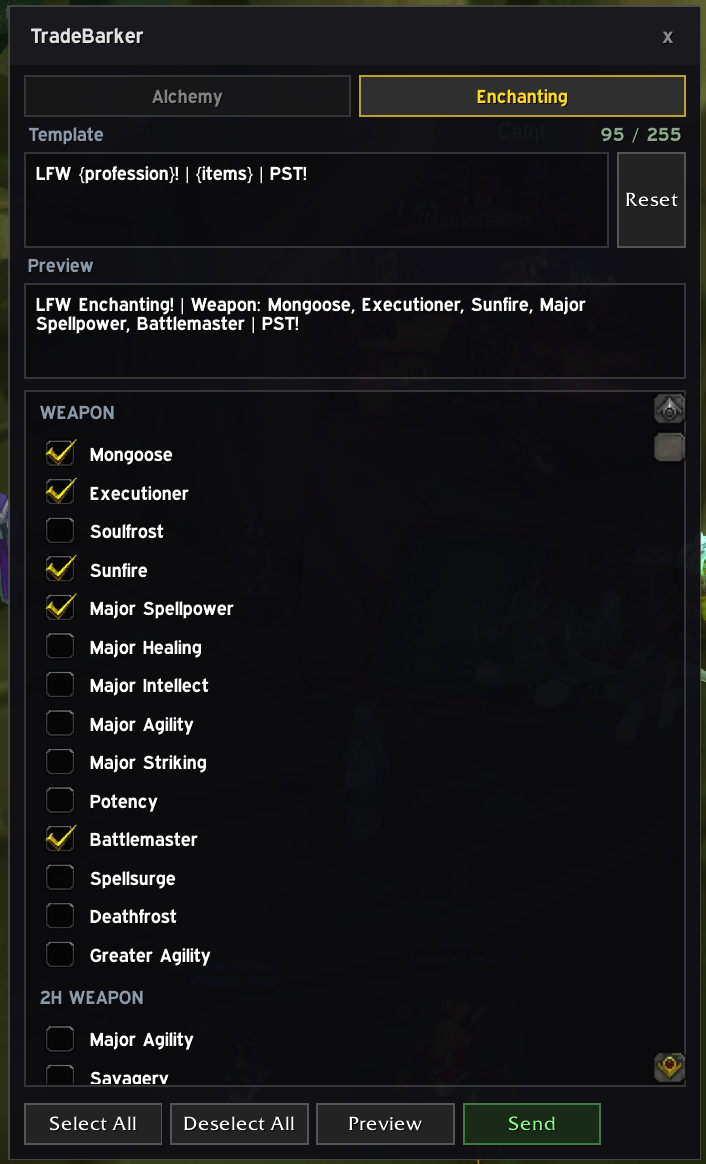
Screenshot 2026-02-10 at 07.57.40.png
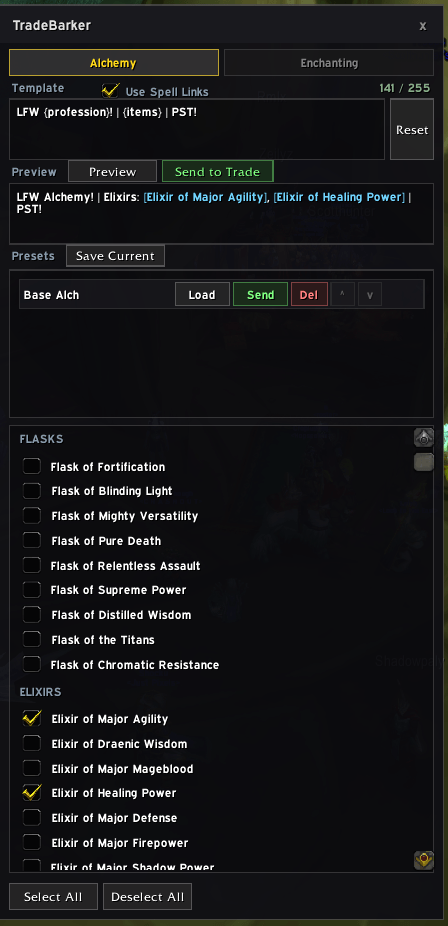
Screenshot 2026-02-10 at 12.45.45.png
Description
TradeBarker
A World of Warcraft TBC Classic addon that helps crafters advertise their profession services in Trade chat.
Supported Professions
- Enchanting - Weapon, 2H Weapon, Chest, Cloak, Boots, Gloves, Bracer, Shield, Ring enchants
- Alchemy - Flasks, Elixirs, Potions, Transmutes
- Jewelcrafting - Meta, Red, Blue, Yellow, Orange, Green, and Purple gem cuts
- Blacksmithing - Weapons, Plate Armor, Mail Armor, Sharpening/Weightstones
- Leatherworking - Drums, Leg Armor, Armor Kits, Leather Armor, Mail Armor
Features
- Profession Tabs - Switch between professions using tabs at the top of the window
- Item Selection - Pick which items/services you want to advertise from a categorized checklist
- Presets - Save, name, and quick-send predefined item selections (NEW!)
- Spell Links - Toggle between plain text and clickable spell links in trade chat
- Message Preview - Preview your generated Trade chat message before sending
- Character Counter - Live counter shows message length vs the 255-character trade chat limit
- Auto-Split - Automatically splits long messages into multiple parts to stay within the limit
- Message Templates - Customize the message format per-profession using
{profession}and{items}placeholders - Saved Selections - Your selections are saved per-character between sessions (including last selected profession and templates)
- Draggable UI - Move the window anywhere on screen
Usage
Type /tb or /tradebarker to open the addon window.
- Select a profession tab (only your character's professions are shown)
- Check the items/services you can craft and want to advertise
- Click Preview to see the generated message
- Click Send to Trade to post to Trade chat (you must be in a city)
Use Select All / Deselect All to quickly toggle all items for the current profession.
Presets
Presets allow you to save frequently-used item selections for quick access. Perfect for managing different advertising strategies (e.g., "Raid Enchants", "Budget Options", "Popular Gems").
Creating Presets
- Select the items you want to include
- Click Save Current in the Presets section
- Enter a name for your preset
- Click Save
Using Presets
Each preset row has several buttons:
- Load - Loads the preset's selections into the UI (replaces current selections)
- Send - Instantly sends the preset to Trade chat without loading it (preserves current selections)
- Del - Deletes the preset
- ↑/↓ - Reorders presets in the list
- Name field - Click to rename the preset (press Enter to save)
Quick Send
The Send button is particularly useful for cycling through multiple advertising strategies without changing your current selections. For example:
- Keep your main setup loaded
- Quickly send "Budget Enchants" preset
- Wait a few minutes
- Quickly send "Premium Enchants" preset
- Your original selections remain unchanged
Presets are saved per-character and per-profession.
Spell Links
Enable "Use Spell Links" checkbox (below the Template header) to post clickable spell links instead of plain text. When people click these links in trade chat, they'll see the actual crafting spell with mats and details.
Example:
- Without Spell Links:
LFW Enchanting! | Weapon: Mongoose, Executioner | PST! - With Spell Links:
LFW Enchanting! | Weapon: [Mongoose], [Executioner] | PST!(clickable links)
Adding Spell IDs
Spell IDs are included for all professions (Enchanting, Alchemy, Jewelcrafting, Blacksmithing, and Leatherworking). To add missing ones or update incorrect IDs:
- Create this macro:
/run local n=GameTooltip:GetSpell() if n then local _,id=GetSpellLink(n):match("spell:(%d+)") print(n,id) end- Hover over the spell in your profession window with the macro's tooltip active
- The spell name and ID will print to your chat
- Edit TradeBarker.lua and add the
spellIDto the item:
{ name = "Mongoose", spellID = 27984 }Message Templates
The message format is customizable via the Template field at the top of the window. Each profession can have its own template. Use these placeholders:
{profession}— replaced with the profession name (e.g. "Enchanting"){items}— replaced with the auto-generated item list (required)
Default template:
LFW {profession}! | {items} | PST!Example outputs:
LFW Enchanting! | Weapon: Mongoose, Executioner | Boots: Cat's Swiftness | PST!
LFW Alchemy! | Flasks: Flask of Fortification | Transmutes: Primal Might | PST!
Custom template example:
WTS {profession} services! {items} -- whisper me!Click Reset to restore the default template.
Installation
Copy the TradeBarker folder into your WoW AddOns directory:
World of Warcraft/_anniversary_/Interface/AddOns/TradeBarker/Disclaimer
TradeBarker is a tool designed to help crafters advertise their profession services. You are solely responsible for the content of the messages you send using this addon.
- The addon and its developer are not responsible for any misuse of in-game chat channels
- Users must comply with World of Warcraft's Terms of Service and Code of Conduct
- Users are responsible for ensuring their messages are appropriate and non-offensive
- Excessive or inappropriate use of trade chat may result in penalties from Blizzard Entertainment
- Use of explicit language, harassment, spam, or other violations of game rules is strictly prohibited
By using TradeBarker, you acknowledge that you are responsible for your own conduct and any consequences that may result from your use of this addon.
Please be respectful, follow server rules, and use trade chat responsibly.
Author
Tidalz - US Nightslayer
The TradeBarker Team