Tradable
Tradable - WoW Loot Trade Eligibility Checker
Bildschirmfoto_20260822_141919.png
Description
Features
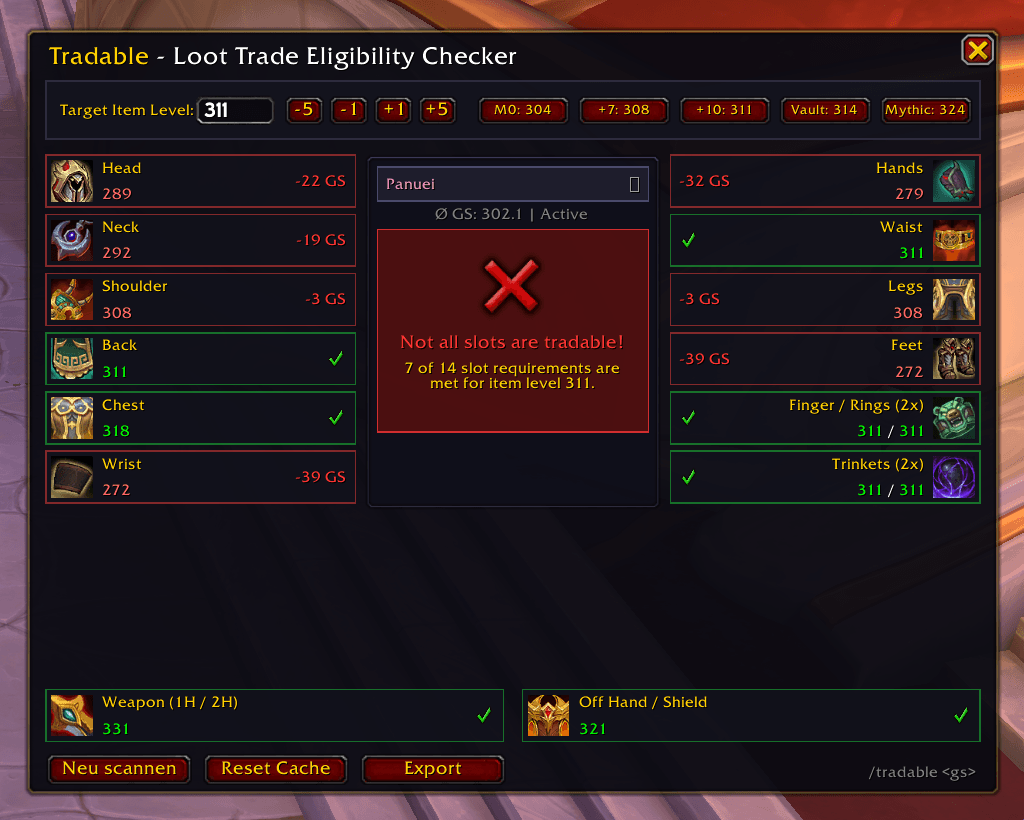
Graphical User Interface (/tradable or /tc):
Character Selector / Multi-Character Overview: Click the character name at the top center to switch between all scanned
characters (alts/twinks) on your account and inspect their trade eligibility.
Export Function: Copy all currently non-tradable slots (e.g. Head, Legs, Hands) to your clipboard (Ctrl+C) or post them directly
into party/raid chat.
Target item level input field (e.g. 311).
Quick preset buttons (M0, +7, +10, Vault, Mythic) as well as +1 / +5 / -1 / -5 stepper buttons.
Status banner (Green when all slots are tradable, Red with a summary of missing slots).
Detailed slot list showing highest ilvl per slot and the missing difference (-3 ilvl).
Mouseover tooltips on each slot showing all detected items.
Chat Quick Check:
/tradable 311 or /tradable check 311: Instant evaluation directly in the chat window.
Automatic Scanning & Account-wide Storage:
Scans equipped gear, bags, and the bank (upon opening).
Saved highest item levels are preserved in your profile even after selling or upgrading gear.
Every logged-in character is automatically recorded for the account-wide overview.
Slash Commands
/tradable or /tc – Toggles the main UI window.
/tradable <ilvl> – Runs a quick check for the specified item level in chat (e.g. /tradable 311).
/tradable rescan – Rescans equipped gear and bags.
/tradable reset – Clears the character cache and rescans from scratch.
Tradable Team