TrackingTime
- By
Auto Track Herbs, Minerals, Treasure and more for World of Warcraft Classic Era.
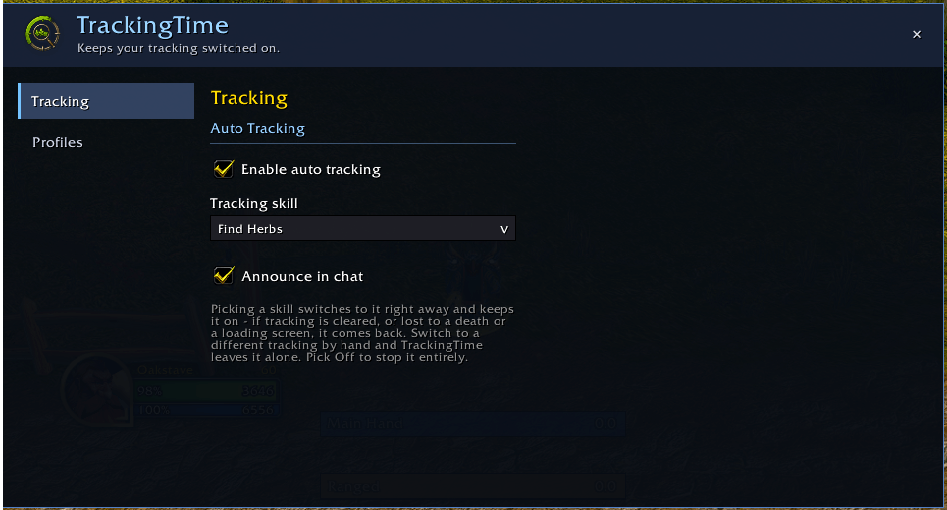
SettingsExample.png
Description
TrackingTime
Keeps your chosen tracking switched on, for World of Warcraft Classic Era.
Pick Find Minerals, Find Herbs, Find Treasure or any tracking your character has, and TrackingTime turns it back on for you after a loading screen, a zone change, or a death, without ever toggling it back off.
Features
- Set it and forget it — pick your skill in the options window and it switches straight away; from then on the addon keeps it on for you.
- Keeps it on — if tracking gets cleared, or is lost to a death or a loading screen, your skill comes back.
- Respects your manual choice — switch to a different tracking by hand and TrackingTime leaves it alone.
- Picking "Off" turns your current tracking off and stops re-applying anything. That, or unticking auto tracking, is how you tell it to stop.
- Auto switch — pick two skills and an interval in seconds and it alternates between them, so a character who can find both herbs and minerals gets a turn at each. While it's on, the rotation owns your tracking; untick it to take control back. It pauses while you're resting or in combat.
- Every tracking you have — the list is read from the game, so it offers exactly what this character can track: professions, the dwarf racial, hunter and druid trackers, Sense Undead, Sense Demons.
- Per-character by default — your miner and your herbalist each get their own setting. Profiles let you share one across alts if you'd rather.
Getting started
- Install and reload.
- Type /tt to open the options window.
- Tick Enable auto tracking and pick your Tracking skill.
Slash commands
- /tt — open the config window
- /tt on / /tt off — enable or disable auto tracking
- /tt list — show everything this character can track
- /tt set <name> — pick tracking by name (partial matches work)
- /tt minerals | herbs | treasure | none — shortcuts
- /tt now — try to activate tracking right now
- /tt status — show the current state
Feedback and bug reports are welcome on the issue tracker.
TrackingTime Team