Track-O-Matic - Revived
- By
Track-O-Matic allows you to track various types of information on the game screen, without having to navigate through a bunch of different UI panels.
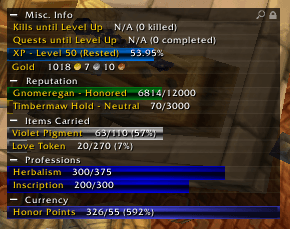
Track-O-Matic Full.png
Track-O-Matic Options.png
Description
Track-O-Matic — On-Screen Goal & Progress Tracker for WoW
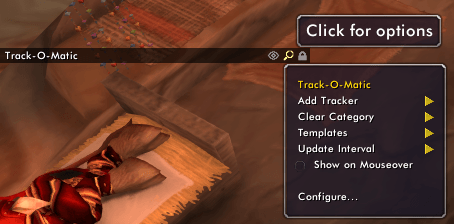
Track-O-Matic shows a tidy stack of progress bars on your screen for the things you actually care about — reputation, profession skill-ups, gold, item counts, durability, bag space, experience, and more. Add a bar in two clicks, drag the tracker anywhere, and watch your goals fill up. Open the menu with the magnifying-glass button on the tracker, or type /tom for settings.
The Problem
The numbers you are working toward are scattered all over the game. Reputation lives in one tab, skill levels in another, currencies in a third, and item counts only show up when you open your bags and add them up yourself. Checking how close you are to Exalted, your next skill rank or a crafting goal means opening window after window, and the game never tells you how much longer it will take.
The Solution
Track-O-Matic puts all of it in one small, movable stack of bars that stays on screen while you play. Each bar updates by itself as you earn reputation, skill up, loot or spend, and can glow when it reaches a goal you set — so a glance at the corner of your screen tells you where you stand, and the tooltips estimate how many kills, quests or turn-ins are left.
Core Features
What You Can Track
- Reputation — pick any faction and watch a bar to your next standing, with a tooltip that can estimate mob kills, turn-ins, or daily quests remaining, plus reputation-per-hour and time-until-Exalted. Right-click a faction in your Reputation tab to add it.
- Professions & skills — track skill-ups toward the next rank, with a glow when you're ready to train the next tier. On Classic Era, TBC and WoW Forever this covers profession and weapon skills; on Mists Classic, the skills listed in your Skills window (add them from there). On Retail it covers your professions, each expansion tracked separately.
- Items — <kbd>Ctrl</kbd>+<kbd>Alt</kbd>+click any item in your bags to track how many you're carrying, set a goal, and optionally include your bank in the count.
- Currency — track any currency or token toward a goal; right-click a row in your Currency tab to add it.
- Gold — how much you've gained or lost this session; the bar turns green when you're up, red when you're down.
- Experience & leveling — XP to level, rested bonus, time-to-level, and estimated kills and quests until you ding (with selectable estimation methods).
- Equipment durability — track average and lowest-item durability as separate bars (show either or both), with a glow when something breaks.
- Bag space — free (or used) slots, with an option to ignore profession bags.
- Honor — PvP rank and progress. (Classic-line clients with the old honor system.)
- Hunter pet — pet experience and happiness/loyalty. (Clients that still have pet happiness.)
Adding and Managing Bars
- Add bars in two clicks — the magnifying-glass menu on the tracker lists every category; right-click factions, skills, currencies and items to add them directly.
- Goals — set a target on item and currency bars and the bar fills toward it.
- Remove or reorder — right-click a bar for its options, and arrange your categories the way you like.
- Templates — save a whole tracker layout and reload it on any character, or set one as your default.
- Per-character — each character keeps its own tracker layout and options.
Glow Effects
- Glow on a goal — make a bar glow when it hits its goal, or when something needs your attention, such as broken gear or a skill ready to train.
- Glow colors — pick a global glow color (presets or a custom
#RRGGBBvalue), or right-click any single bar ▸ Custom Glow Color to give just that bar its own color. - Enable Glowing Borders turns the whole system on or off.
Look & Feel
- Minimap button — left-click to show or hide the tracker, right-click to open settings, and drag it around the minimap edge. Hide it from Settings if you prefer.
- Bar textures — choose from the bundled textures or any texture another addon shares through LibSharedMedia.
- Scale and width — size the tracker to fit your UI.
- Category headers — show or hide them.
- Lock the position — with an optional <kbd>Shift</kbd>-drag quick-unlock.
- Mouse-over auto-hide — keep the tracker out of the way until you point at it.
Every Version of the Game
- One download for every version — Classic Era, Burning Crusade Classic / Anniversary, Mists of Pandaria Classic, Retail and the WoW Forever beta. The game picks the right setup for itself.
- Nothing errors on a version that lacks a system — trackers that depend on something a version doesn't have (weapon skills, the old PvP honor ranks, hunter-pet happiness) are simply hidden there. Every other tracker works everywhere.
Multi-Language Support
- Translated into the languages WoW ships clients for, and the addon follows your game's language automatically.
How It Works
- Add a bar — from the magnifying-glass menu, or by right-clicking a faction, skill, currency or item in the game's own windows.
- It keeps itself up to date — each bar refreshes as you earn reputation, skill up, gain experience, loot, spend or take damage to your gear. There is nothing to press.
- Hover for the details — the tooltip on a bar shows the numbers behind it and, where it can, how much is left: kills, quests or turn-ins to go, and how long at your current pace.
- Glow when it matters — a bar that reaches its goal, or needs your attention, lights up in the color you chose.
- It remembers — your bars, their order and your options are saved per character and are there when you log back in.
Slash Commands
- /tom — open Track-O-Matic settings
- /tom show — show the tracker if it's hidden
- /tom hide — hide the tracker
- /tom debug — toggle debug messages in chat, for troubleshooting
Requirements
- Ace3 and VersionCheck-1.0 — CurseForge installs these automatically; manual installers must add them too. LibSharedMedia-3.0 and LibDropDownMenu are bundled inside the addon, so there's nothing else to install.
- WoW version: Classic Era (11509) · Burning Crusade Classic / Anniversary (20506) · MoP Classic (50504) · Retail (the 11.2 / 12.0 / 12.1 line) · WoW Forever (16001, beta)
Recent Updates
v1.5.0 (2026-10-10)
New
- ⭐ WoW Forever support — reputation, profession and weapon skills, items, currency and every other tracker work on the WoW Forever beta. Right-click a faction, skill or currency row to add it, just as on the other versions.
- Mists of Pandaria Classic support — Track-O-Matic now loads on Mists Classic.
- Feral Combat can be tracked as a weapon skill on WoW Forever.
Changed
- On WoW Forever, the Defense bar includes your gear's Defense bonus, the same number the Skills window shows.
- On WoW Forever, weapon and Defense skills are recognised in every game language.
- The addon's name shows in orange in the in-game AddOns list.
- Classic Era and Retail no longer list Track-O-Matic as out of date.
Fixed
- Burning Crusade Classic / Anniversary did not load the addon at all after the game stopped recognising its old file name.
- Right-clicking a faction or skill to add it could do nothing if the game's window loaded after Track-O-Matic.
- Track-O-Matic no longer overwrites a few shared game variables that other addons could also be using.
- A developer-only script was being included in the download; it no longer is.
v1.4.1 (2026-06-14)
Fixed
- On Retail, item-count bars could display with a black (invisible) fill. They now use the item's quality color.
v1.4.0 (2026-06-11)
New
- ⭐ Track-O-Matic now runs on Retail — the big one. The same tracker from Classic Era and Burning Crusade Classic now works on the modern game, with reputation, currency, professions, items, gold, experience/leveling, durability, and bag space all supported. Client-specific systems are hidden automatically, so nothing errors.
- A minimap button — left-click to show/hide the tracker, right-click for settings, drag to reposition (can be hidden in Settings).
- Glow colors — choose a global glow color, or give any single bar its own color with right-click ▸ Custom Glow Color.
- Currency tracking on every version.
Changed
- Durability now tracks average and lowest-item as separate bars.
- Every setting now has a proper tooltip, and the General settings layout was tidied up.
Fixed
- Garbled popup and panel borders, the settings window opening blank, and several options that weren't saving.
Credits
Germbread — original author of Track-O-Matic.
Pimptasty — co-author, ongoing maintenance, Retail support, multi-version TOCs, and new feature development.
Community
Bug reports, feature requests, questions, or chatting with other Track-O-Matic users: Join the Discord.
Track-O-Matic - Revived Team

Owner