


Touch of the Grave - Tracker
- By
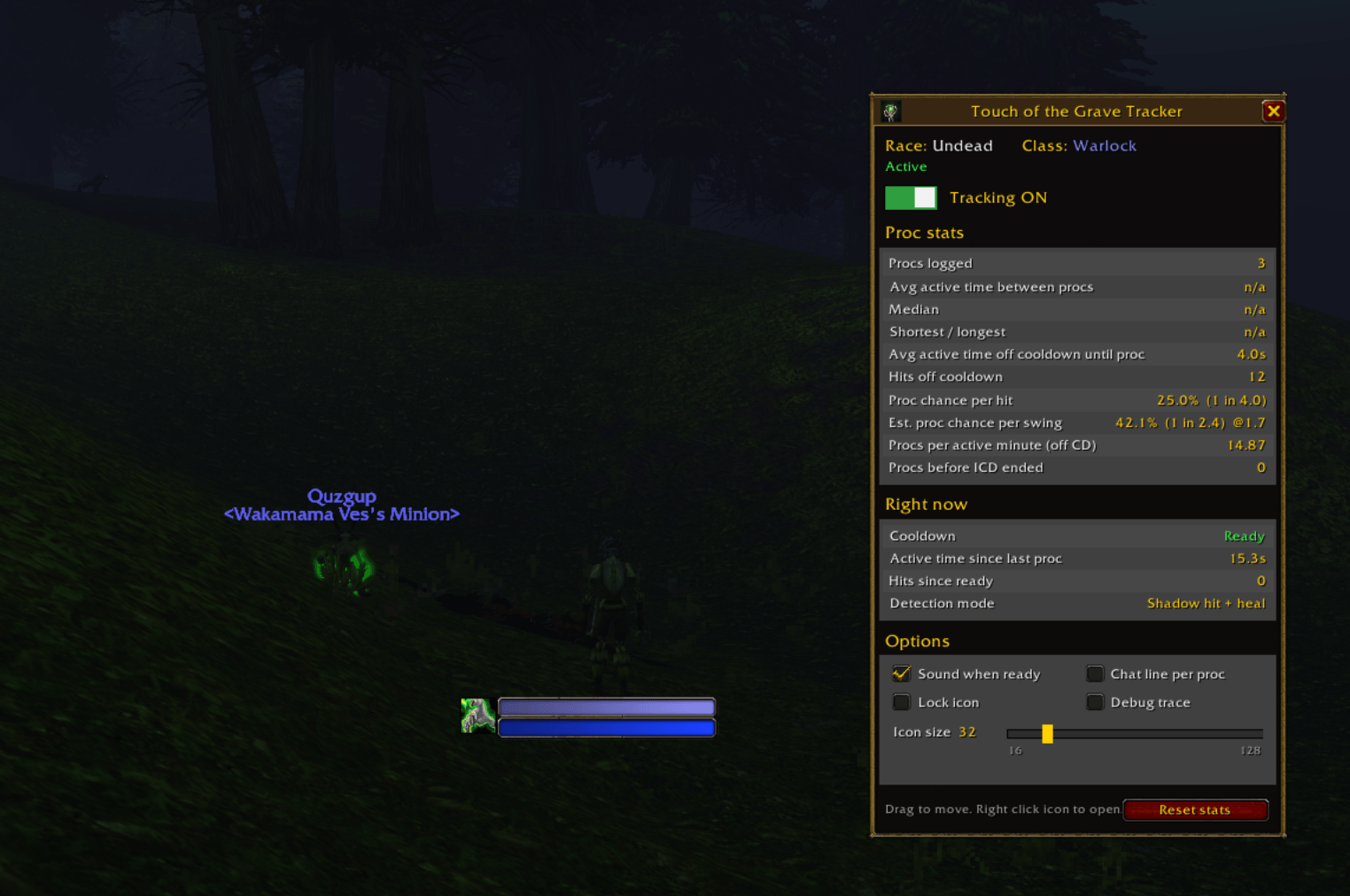
panel.png
Description
TL;DR: A lightweight addon that shows when Touch of the Grave is ready to proc again, with live stats on your real proc rate. Works for every Undead class.
About
Touch of the Grave Tracker is an addon for World of Warcraft: Forever that shows when the Undead racial Touch of the Grave can proc again. The game doesn’t show its internal cooldown anywhere, so the addon sees each proc and runs the cooldown timer for you. It also measures your real proc rate, counting only the time you actually spend fighting.
Cooldown icon. A single icon sits on your screen. When Touch of the Grave procs, the icon greys out, a cooldown sweep starts, and the seconds left show on top. When the cooldown ends, the icon lights up again, pulses and plays a sound, so you know your next hit can proc. Drag it anywhere, and right click it to open the panel.
Automatic detection. Forever blocks the combat log for addons, so Touch of the Grave Tracker watches for the Shadow damage the proc deals to your target instead. No setup is needed.
Works for every Undead class. Mages, Paladins, Rogues and Warriors deal no Shadow damage of their own, so every Shadow hit on the target is the proc. Priests and Warlocks have spells that look exactly like it, so for them the addon also requires a heal on you that matches the damage. It ignores channeled drains (Drain Life, Mind Flay) and pauses for Devouring Plague, Siphon Life and Death Coil, so your own spells are never counted as procs.
Active time stats. The stats only count time when you’re in combat and hitting something. Looting, running between pulls and standing around are left out, so the numbers show the real proc rate.
Panel. One window shows your race, class, every stat and all the settings, updating live.
Undead only. On any other race the addon disables itself: no icon, nothing recorded, and the panel explains why.
Results so far. Over 136 logged procs on a Paladin, 135 respected a 25 second cooldown. The proc chance came out around 28% per swing with a 2.9 speed weapon. Your numbers will build up as you play.
Install
- Install from CurseForge: in the CurseForge app, search for “Touch of the Grave Tracker” under World of Warcraft (Forever) and click Install.
- Manual install: download the zip and unzip it into your game’s
Interface\AddOnsfolder.TotGTracker.tocmust sit directly insideAddOns\TotGTracker, not one level deeper. - Log in. Chat shows TotG: Loaded. Type /totg or right click the icon for stats and settings.
- Hit something with it targeted. When Touch of the Grave procs, the icon starts counting down.
The CurseForge app keeps it updated. For a manual install, replace the folder and /reload. Your stats and settings are kept either way.
Panel
Open it with /totg or a right click on the icon. Drag it to move it, and close it with Esc or X.
- Header: your race and class, an Active, Off or Disabled status, and the on/off switch.
- Proc stats: procs logged, average and median active time between procs, shortest and longest, active time off cooldown until a proc, hits off cooldown, proc chance per hit, estimated proc chance per swing (uses your weapon speed), procs per active minute, and procs that came before the cooldown ended.
- Right now: cooldown remaining, active time since the last proc, hits since ready, and the detection mode.
- Options: sound when ready, a chat line per proc, lock icon, debug trace, an icon size slider, and Reset stats (click twice to confirm).
Commands
You only need /totg. The rest is optional.
/totgopens or closes the panel./totg icd <seconds>changes the cooldown length (default 25)./totg grace <seconds>sets how long after your last hit you still count as active (default 4). Keep it above your weapon speed./totg strict on,offorautoforces the matching heal check on or off. Auto picks by class./totg procmarks a proc by hand./totg learnprints every combat event the addon receives, for debugging.
Good to know
- Only procs on your current target are seen, so keep the mob you’re hitting targeted.
- In a group, other players’ hits on your target also count as hits, which lowers the per hit chance. Solo numbers are the most accurate.
- Extra damage from Seals counts as its own hit, so a Paladin’s per hit chance reads lower than the per swing chance.
- Priests and Warlocks: a real proc that lands while one of the drain spells above is active is skipped, and the stats pause during that time so they stay accurate.
- The game never tells addons about internal cooldowns. The timer starts the moment the proc is seen, which keeps it accurate to a fraction of a second even at high latency.
Troubleshooting
- The icon never counts down: open the panel and check it says Tracking ON. Keep your target selected. Turn on Debug trace and watch chat when it procs.
- The panel says Disabled: your character isn’t Undead. Touch of the Grave is an Undead racial.
- The addon list says Incompatible: tick “Load out of date AddOns” at character select, or update the addon.
- Stats look wrong after a long break: reset stats in the panel to start a fresh sample.
- Something errored: install BugGrabber and BugSack, and send the error text to the addon author.
Touch of the Grave - Tracker Team
