TotemMover
- By
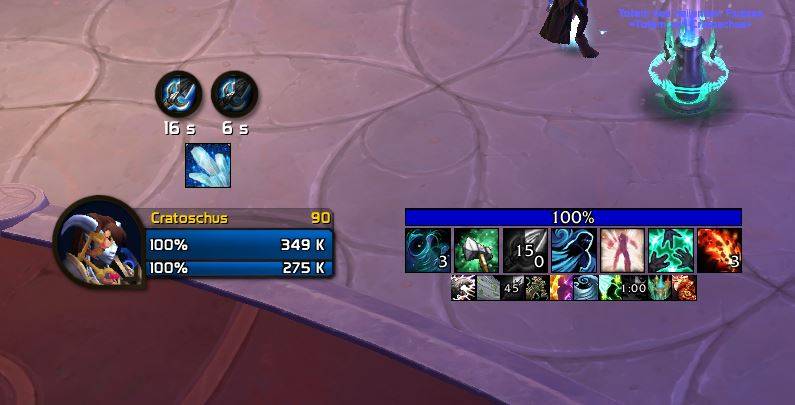
A lightweight addon to freely reposition and scale the default Blizzard totem frames via a simple anchor and in-game settings.
Unbenannt.JPG
Unbenannt1.JPG
Description
TotemMover is a minimalistic, lightweight addon for WoW (Dragonflight & The War Within) that gives you full control over the default Blizzard totem display. No more fixed positions—move and scale your totems exactly where you need them!
Features
- Free Repositioning: Use the graphical anchor to drag your totem icons to any location on your screen.
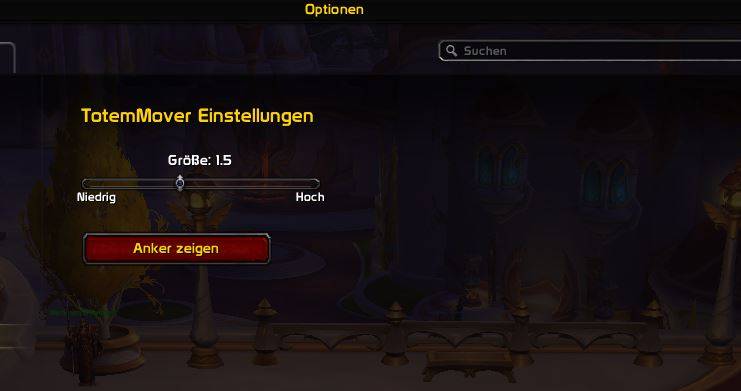
- Smooth Scaling: Adjust the size of the icons (from 50% to 300%) easily via a slider.
- Perfect Integration: Settings are located directly within the official Blizzard Addon menu (Options > Addons > TotemMover).
- Lock Function: Once you have found the perfect position, you can hide the anchor and lock the location to prevent accidental moving.
- Chat Feedback: The addon provides a brief confirmation in the chat upon login to let you know it is ready to use.
How to Use
-
Type /totemconfig in the chat to jump directly to the settings.
-
Click "Show Anchor" to make the green movement frame visible.
-
Drag the totems to your desired location.
-
Adjust the Size using the slider.
-
Click "Hide Anchor" to lock the layout.
Installation
Simply copy the folder into your Interface\AddOns directory or install it via the CurseForge client. The addon is extremely resource-efficient and does not require any additional libraries.
The TotemMover Team