TotemDeck
- By
Streamlined totem management with one-click casting, hover popups, weapon buff buttons, and Ankh tracking—all in a minimal, moveable bar.
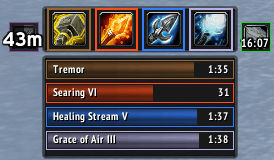
bartimers.png
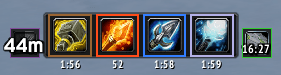
texttimers.png
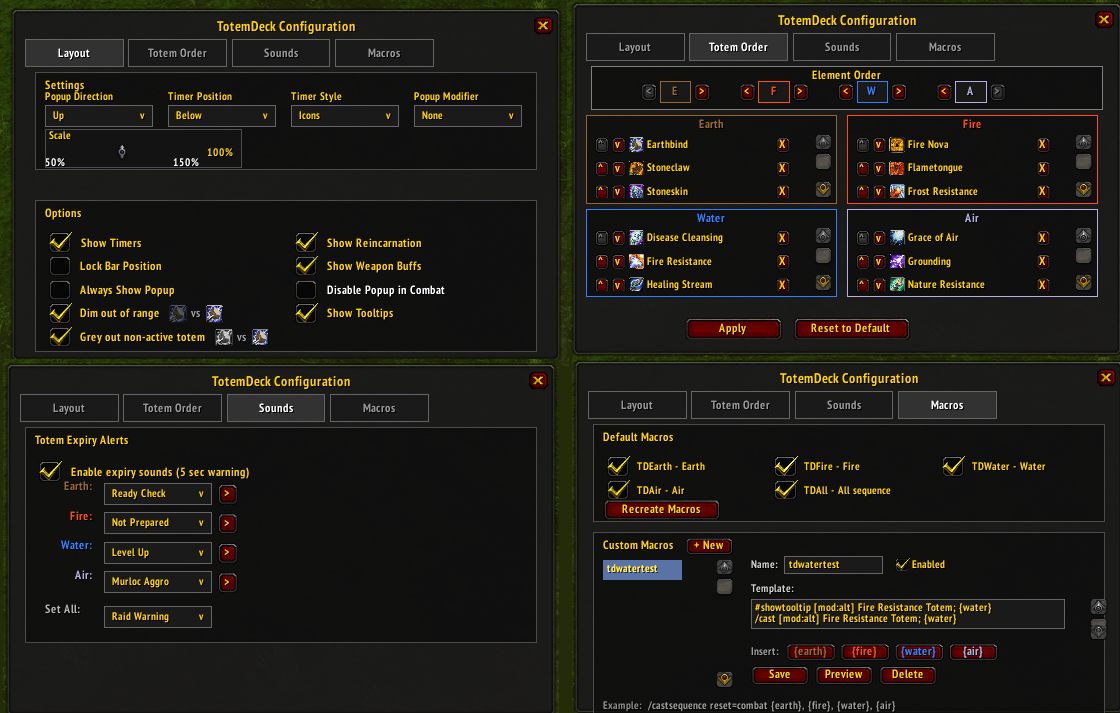
config.png
Description
TotemDeck
A lightweight shaman totem management addon for WoW Classic. Streamlined totem bar with hover popups, weapon buff management, and Reincarnation tracking.
Features
Totem Bar
- 4-button bar for Earth, Fire, Water, Air totems
- Hover popup shows all trained totems for each element
- Left-click to cast, Right-click to set as active or dismiss
- Shift+Right-click to recall all totems (Totemic Call)
- Custom ordering for both elements and individual totems
- Hide unused totems from the popup
- Popup modifier key - Optionally require Shift/Ctrl/Alt to show popups (prevents accidental clicks)
- Dim out of range - Icons dim when you move out of range of buff-providing totems (Windfury, Strength of Earth, Stoneskin, Mana Spring, resistance totems, etc.)
Timers
- Bar style - Traditional timer bars positioned above/below/left/right of the bar
- Icon style - Compact countdown text positioned above/below/left/right of each button
- Placed totem indicator - Shows when placed totem differs from active selection (desaturated icon)
- Expiry sound alerts - Configurable sound when totems have 5 seconds remaining (per-element)
Reincarnation Tracker
- Small button showing Reincarnation with Ankh count overlay
- Cooldown sweep display
- Green border when ready, Red border when no Ankhs
Weapon Buffs
- Quick access to all weapon enchants (Rockbiter, Flametongue, Frostbrand, Windfury)
- Hover popup with all known weapon buffs
- Left-click applies to main hand, Right-click applies to off-hand
- Green border when buffed, Red border when no enchant active
- Icon updates to show currently active buff with remaining duration
Macros
Creates 5 macros for your action bars or create your own custom macro:
| Macro | Description |
|---|---|
TDEarth |
Cast active Earth totem |
TDFire |
Cast active Fire totem |
TDWater |
Cast active Water totem |
TDAir |
Cast active Air totem |
TDAll |
Cast all 4 totems in sequence |
Controls
| Action | Main Bar | Popup Totems |
|---|---|---|
| Left-click | Cast active totem | Cast totem |
| Right-click | Dismiss totem | Set as active |
| Shift+Right-click | Totemic Call | - |
| Ctrl+drag | Move bar | - |
Configuration
Open config: /td config
| Setting | Options |
|---|---|
| Popup Direction | Up / Down / Left / Right |
| Timer Position | Above / Below / Left / Right |
| Timer Style | Bars / Icons |
| Popup Modifier | None / Shift / Ctrl / Alt |
| Show Timers | On / Off |
| Lock Position | On / Off |
| Always Show Popup | On / Off |
| Dim Out of Range | On / Off |
| Show Reincarnation | On / Off |
| Show Weapon Buffs | On / Off |
| Expiry Sounds | Per-element sound selection |
Combat Note
In combat, Blizzard restricts hiding UI frames. Popup bars become invisible but remain clickable in their last position. Enable Always Show Popup to avoid accidental clicks during combat.
Commands
| Command | Description |
|---|---|
/td |
Show help |
/td config |
Open config window |
/td show |
Toggle visibility |
/td timers |
Toggle timers |
/td macros |
Recreate macros |
Installation
- Extract to
Interface/AddOns/TotemDeck - Restart WoW or
/reload - Bar appears automatically for Shaman characters
License
MIT
TotemDeck Team