Tooltips Evolved
- By
Evolve your tooltips and customize them to how you see fit. Includes recolors, styles, talents and more.
t1.png
t3.png
t4.png
t2.png
Description
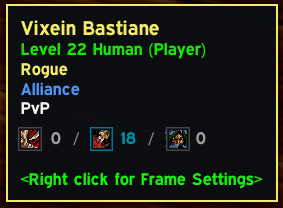
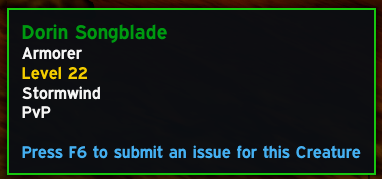
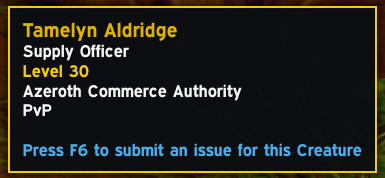
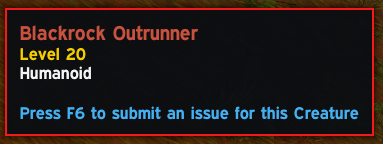
Cleaner, more useful tooltips. See a player's talent spec at a glance, read names, levels and classes in colour, and pick a tooltip look you like.
Features
- Talents on player tooltips: shows each tree's points with its icon, like
20/6/2 - Class colours: player names, class text and the tooltip border use the player's class colour
- Coloured levels: player levels shade from grey to orange as they go up, and mob levels use the same difficulty colour as your target frame
- Guild and faction colours: guild in green, Alliance in blue, Horde in red
- Tooltip styles: Default (Modern style!), Blizzard, Classic
- No health bar: hides the health bar under unit tooltips
Every feature can be turned on or off. They're all on by default.
How to use
- Install it and log in. It works straight away.
- Hover over a player or mob to see the new tooltip.
- Type /te (or /tooltipsevolved) to open the settings. You can also find them under Options → AddOns → Tooltips Evolved.
- Pick a Tooltip style from the dropdown and tick the options you want.
Other players' talents load the first time you hover over them while you're nearby and out of combat.
Contact me on discord: "kdimka." if you have found any bugs, issues or have ideas for improvements.
Alternatively leave a comment on the addon page itself.
Tooltips Evolved Team