Tooltip Customizer
- By
dgadgasdgag.png
dgadgagagag.png
fdagdagadgag.png

dgadgagag.png
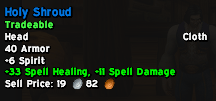
image2.png
Description
Tooltip Customizer
Take control of your tooltips in World of Warcraft Forever. Hide the lines you never read, shorten the long ones, and add the ones you wish were there. Every option is a simple dropdown, and settings can be shared across your account or kept per character.
Open the settings with /tc or the minimap button.
WHAT IT DOES
Items tab
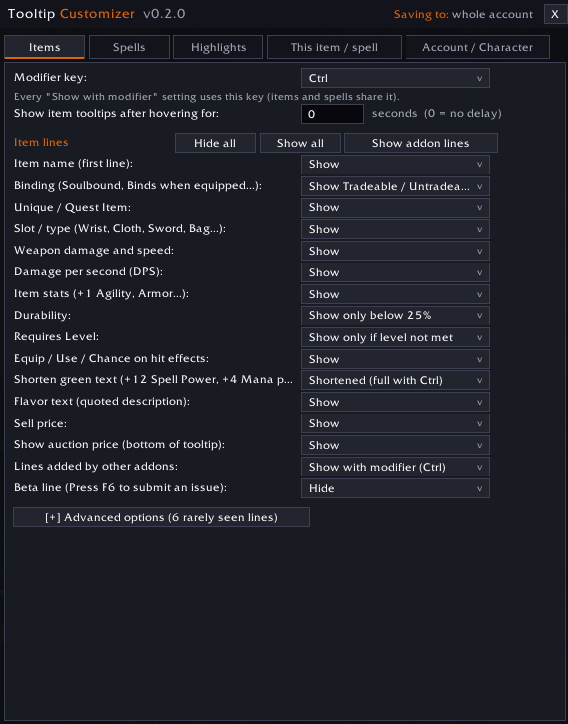
- Hide, show, or "show only while holding Ctrl/Shift/Alt" for each tooltip line: item name, binding, slot, damage, DPS, stats, durability, required level, effects, flavor text, sell price, crafter, charges and more.
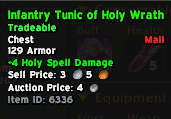
- Binding: hide it, show only Bind on Equip, or show Tradeable / Untradeable instead (equipment only).
- Shorten green text: turns "Equip: Increases healing done by spells and effects by up to 33." into +33 Spell Healing, and shortens attack power, spell power, mana and health per 5, crit/hit/dodge/parry/block, and food and elixir lines. Lines it does not recognize are left exactly as the game wrote them.
- Auction price: shows the item's auction house price (stack total, with gold/silver/copper icons) under the sell price. Prices come from a silent scan every 15 minutes while the auction house is open, and need no other addon. Hidden for items you can't trade. Turn the option off and the scan stops and the saved prices for that realm are forgotten.
- Show the item ID at the bottom of the tooltip.
- Hide lines that other addons add to tooltips.
- Durability and required-level options such as "only show when below 25%" or "only show if my level is too low".
Spells tab
- The same idea for spell tooltips: rank, cost, range, cast time, cooldown, description, next rank preview, spell ID.
Highlights tab
- Color any word or phrase wherever it appears in tooltips.
This item / spell tab
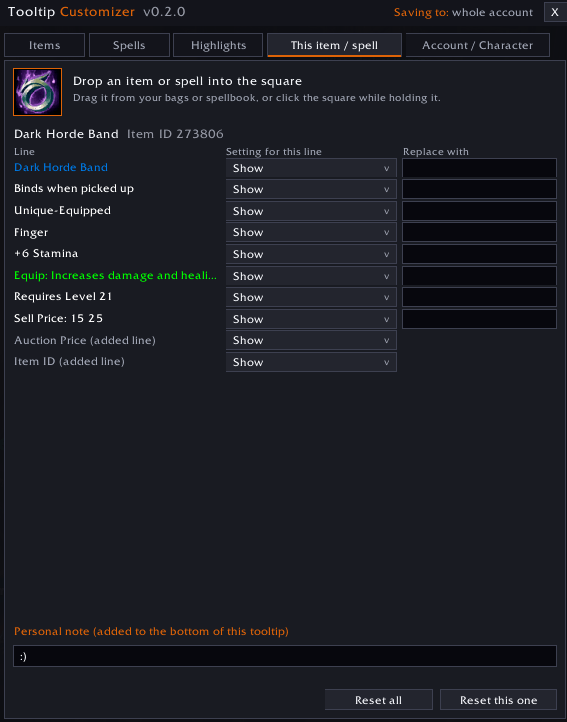
- Drag an item or spell onto the window to hide or rewrite individual lines of just that tooltip, and add your own notes.
Account / Character tab
- Choose whether your settings are shared account-wide or kept separately for each character.
Also: an optional tooltip delay, and one shared modifier key for every "show with modifier" setting.
COMMANDS
- /tc opens the settings window (also /tooltipcustomizer, /ftt)
- /tc account and /tc char pick shared or per-character settings
- /tc minimap shows or hides the minimap button
- /tc help lists everything, including /tc debug for bug reports
NOTES
- Made for WoW Forever. It only changes how tooltips are displayed and does not touch your items.
- Currently English only.
- Found a line that was not shortened or hidden correctly? Hover the item, type /tc debug, then /reload, and include the lastDebug entry from WTF/Account/<name>/SavedVariables/TooltipCustomizer.lua in your bug report.
Tooltip Customizer Team