Tool Belt Pro
- By
One minimap button that unfolds a belt of tools for WoW Forever: click-to-heal raid panel, your own unlocked world map with layers, gear advisor, rare scanner and a damage/healing meter.

logo.png
Captura de pantalla 2026-10-14 112115.png
Captura de pantalla 2026-10-14 112458.png
Captura de pantalla 2026-10-14 112813.png
Captura de pantalla 2026-10-14 112255.png
Description
Tool Belt Pro — five tools, one minimap button
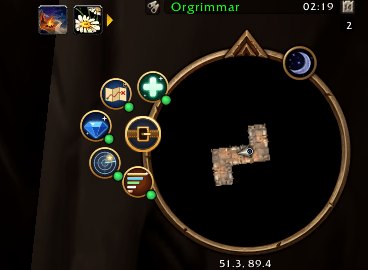
Tool Belt is the toolbox for World of Warcraft: Forever that keeps your screen clean. One small button on your minimap unfolds a belt of tools; each tool has its own light (green = on, red = off), so you only run what you actually want. Left click = on/off · right click = its settings · Shift + click = open it. Everything is in English and Spanish.
♥ Tool Belt is free and is made by one person. If it makes your game better, please consider a small donation: it is what lets me keep creating, fixing and improving these addons after every patch. Donate with PayPal. Thank you, really!
The five tools
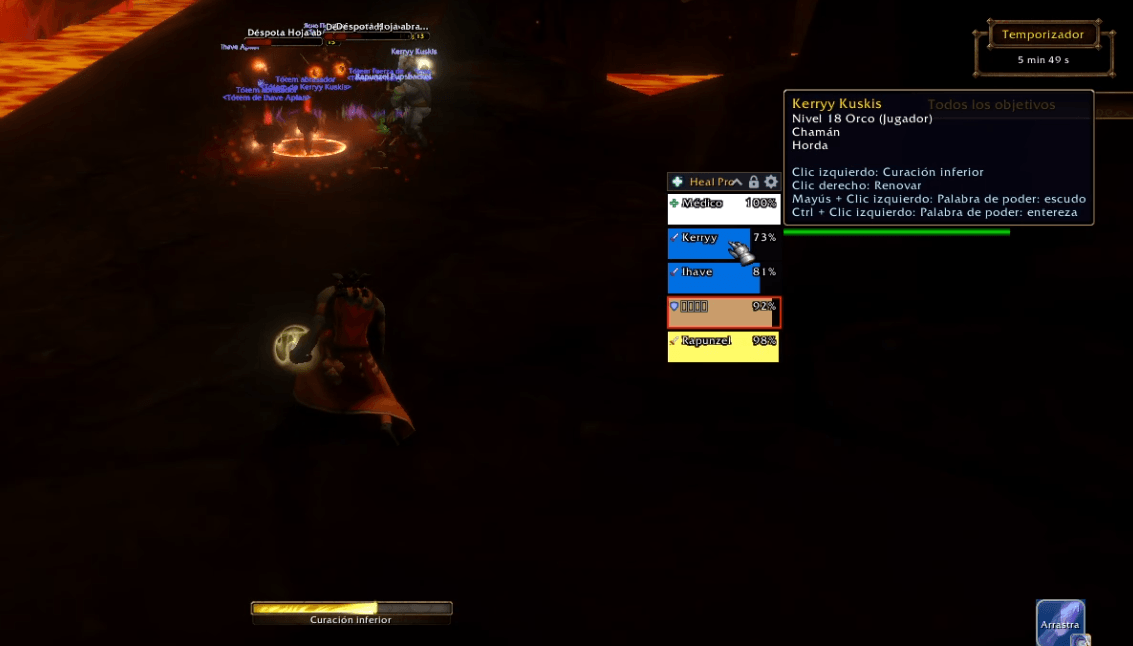
Heal Pro — click-to-heal raid panel
- One bar per group or raid member: health, incoming heals, mana, role, raid marker, range, dead/offline. Pets are optional.
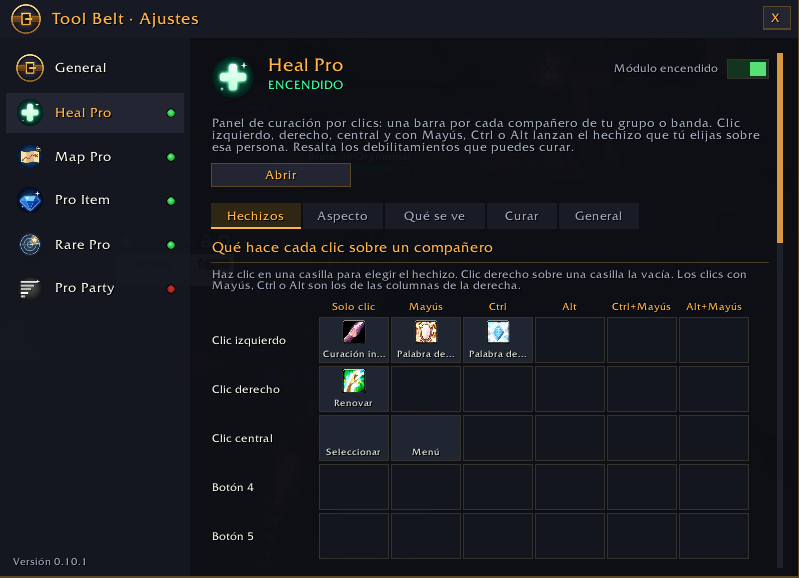
- Spells on left, right and middle click and with Shift, Ctrl and Alt, set in a simple spell grid like the classic click-casting addons. Sensible presets for every class.
- Highlights who has something you can dispel, and keeps working in combat (it uses the game's secure unit buttons).
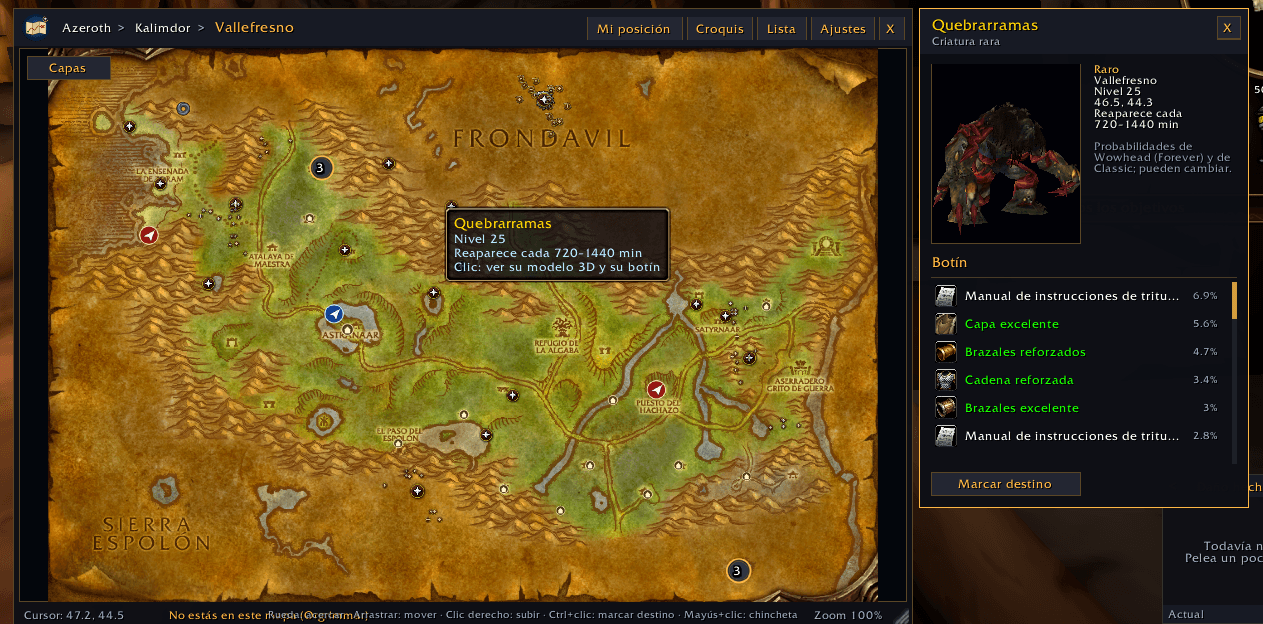
Map Pro — your own world map, always unlocked
- A separate map window with every Forever zone and city revealed, with your arrow and your group's position in real time. It never touches the game's own map.
- Layers (button "Layers" in the corner). On by default: cities, towns, harbors, dungeon and raid entrances (at the exact portal position) and flight paths split by Alliance / Horde, showing where you can fly from each one. Off by default, switch them on when you want them: mailboxes, inns, banks, auction houses, stable masters, your class trainers, profession trainers, repair vendors, vendors and battlemasters.
- Icons that sit very close together merge into one numbered icon: click it and pick exactly the one you want — no more clicking the wrong one.
- Dungeon and raid maps from the inside (Blizzard's own art, floors and wings), with your dot and your group's dots, and the bosses with their position, 3D model and loot chances.
- Ctrl + click sets a waypoint with an on-screen arrow; Shift + click drops your own pins; search box and zone list.
Pro Item — gear advisor
- Glowing upgrades in your bags, vendor windows and quest rewards (red if they need a higher level), dice or coins on loot rolls (with a hint when another group member would benefit more), a warning before you destroy an upgrade, a best-in-slot window that tells you where to get each piece, and PvE / PvP modes.
- It is the same advisor as the standalone Pro Item Forever addon, built in.
Rare Pro — rare creature scanner
- Alerts for rare creatures, treasures and events with a card, portrait and sound; click to target. Everything you find is noted in a list and as pins in Map Pro.
- Comes with all 349 Classic open-world rares: exact spawn points, level, respawn, 3D model and what they drop with the drop chances — including the ones you have not seen yet.
Pro Party — damage and healing meter
- Up to 3 windows with class-coloured bars. Choose what each one measures: damage, DPS, healing, HPS, absorbs, interrupts, dispels, damage taken, avoidable damage taken, deaths, damage to enemies.
- Current fight, overall, or any earlier fight; per-spell detail when you click a bar; death summary; chat report (say / party / raid / instance / guild / whisper); your own bar always visible; drag, resize and lock the windows.
- It uses the data of the game's own damage meter (the same as Blizzard's), because in Forever the combat log is not available to addons. During combat the game hides the numbers from addons, so percentages, detail and reports work right after combat.
Getting started
- Install, then close the game completely and start it again (a /reload is not enough the first time).
- Click the golden belt button next to your minimap. Switch on the tools you want.
- Right click a tool's circle for its settings, Shift + click to open it.
Commands: /tb (settings), /tb party reset, /tb sonda (diagnostics), /tb errores (last errors).
Please note
WoW Forever is in beta and changes often, and some features depend on what the beta client provides (for example, your position inside dungeons or the game's damage meter). Anything that fails is logged instead of breaking the interface. Reports are very welcome: type /tb sonda, then /reload, and send the diagnostics file (WTF/Account/.../SavedVariables/ToolBelt.lua) together with a screenshot.
If you also use the standalone Pro Item Forever addon, keep only one of the two switched on (otherwise glows and loot advice would appear twice); Tool Belt warns you the first time.
Support the project
I build these addons on my own, in my free time, and I give them away for free. Making a map from scratch, a heal panel that works in combat or a meter on a client that hides its numbers takes many hours, and every new patch can break something. I need your help to keep creating.
If Tool Belt saves you time or makes your raids and questing nicer, please donate whatever you can: donate with PayPal. Every donation, small or big, goes straight into more tools, fixes and updates. And if you cannot donate, no problem at all: a rating, a share with your guild or a bug report helps just as much. Thank you!
Credits
Positions, loot chances and NPC data come from the CMaNGOS Classic database (GPL-2.0); game tables and the original map tiles from wago.tools; dungeon, rare, flight path and town lists from theforeverera.com; loot tables and Spanish names from Wowhead Forever; best-in-slot lists from foreverchanges.pro and talent trees from wowforevertalent.com. Map and interface art © Blizzard Entertainment. Heal Pro, Map Pro, Rare Pro and Pro Party are original work and contain no code from other addons. Released under the GPL-2.0 (see LICENSE.txt and CREDITS.txt inside the addon). Huge thanks to all of them.
En español
Tool Belt Pro — cinco herramientas, un solo botón en el minimapa
Tool Belt (Cinturón de herramientas) es la caja de herramientas para World of Warcraft: Forever que te deja la pantalla limpia. Un solo botón pequeño en el minimapa despliega un cinturón de herramientas; cada una tiene su lucecita (verde = encendida, roja = apagada), así que solo usas lo que quieres. Clic izquierdo = encender/apagar · clic derecho = sus ajustes · Mayús + clic = abrirla. Todo está en español e inglés.
♥ Tool Belt es gratis y lo hace una sola persona. Si te mejora el juego, te pido que consideres una pequeña donación: es lo que me permite seguir creando, arreglando y mejorando estos addons después de cada parche. Dona con PayPal. ¡Muchas gracias de corazón!
Las cinco herramientas
Heal Pro — panel de curación por clics
- Una barra por compañero de grupo o banda: vida, curas entrantes, maná, rol, marca, alcance, muerto/desconectado. Las mascotas son opcionales.
- Hechizos en clic izquierdo, derecho y central y con Mayús, Ctrl y Alt, configurados en una rejilla sencilla como los addons clásicos de curar por clics. Preajustes sensatos para cada clase.
- Resalta quién tiene algo que puedes disipar y sigue funcionando en combate (usa los botones seguros del juego).
Map Pro — tu propio mapa del mundo, siempre desbloqueado
- Una ventana de mapa aparte con todas las zonas y ciudades de Forever reveladas, con tu flecha y la posición de tu grupo en tiempo real. No toca el mapa del juego.
- Capas (botón «Capas» en la esquina). De serie están encendidas: ciudades, pueblos, puertos, entradas de mazmorra y banda (en el sitio exacto del portal) y los puntos de vuelo separados por Alianza / Horda, con los sitios a los que se vuela desde cada uno. Apagadas de serie, las enciendes tú: buzones, posadas, bancos, casas de subastas, establos, instructores de tu clase y de oficios, reparación, vendedores y maestros de batalla.
- Los iconos que quedan muy juntos se juntan en uno con número: lo pulsas y eliges exactamente el que quieres, sin pulsar el equivocado.
- Mapas de mazmorras y bandas por dentro (dibujos de Blizzard, pisos y alas), con tu punto y el de tu grupo, y los jefes con su sitio, modelo 3D y probabilidades de botín.
- Ctrl + clic marca un destino con flecha en pantalla; Mayús + clic pone tus propias chinchetas; buscador y lista de zonas.
Pro Item — asesor de equipo
- Brillo en las mejoras de la mochila, los vendedores y las recompensas de misión (rojo si piden más nivel), dados o monedas al repartir botín (con aviso si a otro del grupo le vendría mejor), aviso antes de destruir una mejora, ventana de mejor equipo (BIS) que te dice dónde conseguir cada pieza y modos JcE / JcJ.
- Es el mismo asesor que el addon independiente Pro Item Forever, incluido.
Rare Pro — escáner de criaturas raras
- Avisa de criaturas raras, tesoros y sucesos con tarjeta, retrato y sonido; clic para seleccionarla. Lo que encuentras queda apuntado en una lista y como chinchetas en Map Pro.
- Trae de fábrica los 349 raros de Classic del mundo abierto: puntos de aparición exactos, nivel, reaparición, modelo 3D y lo que sueltan con su probabilidad, también los que aún no has visto.
Pro Party — medidor de daño y curación
- Hasta 3 ventanas con barras del color de la clase. Eliges qué mide cada una: daño, DPS, curación, HPS, absorciones, interrupciones, disipaciones, daño recibido, daño evitable recibido, muertes, daño a enemigos.
- Combate actual, general o uno anterior; detalle por hechizo al pulsar una barra; resumen de la muerte; informe al chat (decir / grupo / banda / instancia / hermandad / susurro); tu propia barra siempre visible; ventanas que se arrastran, cambian de tamaño y se bloquean.
- Usa los datos del medidor de daño del propio juego (los mismos que el de Blizzard), porque en Forever el registro de combate no está a disposición de los addons. Durante el combate el juego esconde los números a los addons, así que los porcentajes, el detalle y los informes funcionan justo al acabar el combate.
Primeros pasos
- Instala y cierra el juego del todo y vuelve a abrirlo (la primera vez, un /reload no basta).
- Pulsa el botón dorado del cinturón, junto al minimapa. Enciende las herramientas que quieras.
- Clic derecho en el círculo de una herramienta = sus ajustes; Mayús + clic = abrirla.
Comandos: /tb (ajustes), /tb party reset, /tb sonda (diagnóstico), /tb errores (últimos fallos).
Ojo
WoW Forever está en beta y cambia a menudo, y algunas funciones dependen de lo que dé el cliente de la beta (por ejemplo, tu posición dentro de las mazmorras o el medidor de daño del juego). Cualquier fallo se apunta en lugar de romper la interfaz. Los avisos son muy bienvenidos: escribe /tb sonda, luego /reload, y envía el archivo de diagnóstico (WTF/Account/.../SavedVariables/ToolBelt.lua) junto con una captura.
Si también usas el addon independiente Pro Item Forever, deja encendido solo uno de los dos (si no, los brillos y consejos saldrían dobles); Tool Belt te avisa la primera vez.
Apoya el proyecto
Hago estos addons yo solo, en mi tiempo libre, y los regalo. Crear un mapa desde cero, un panel de curación que funcione en combate o un medidor en un cliente que esconde sus números lleva muchas horas, y cada parche nuevo puede romper algo. Necesito tu ayuda para poder seguir creando.
Si Tool Belt te ahorra tiempo o te hace más agradables las bandas y las misiones, por favor dona lo que puedas: dona con PayPal. Cada donación, pequeña o grande, se convierte en más herramientas, arreglos y actualizaciones. Y si no puedes donar, no pasa nada: una valoración, compartirlo con tu hermandad o avisar de un fallo ayuda igual de mucho. ¡Gracias!
Créditos
Las posiciones, probabilidades de botín y datos de NPC salen de la base de datos de Classic de CMaNGOS (GPL-2.0); las tablas del juego y los azulejos originales de los mapas, de wago.tools; las listas de mazmorras, raros, puntos de vuelo y pueblos, de theforeverera.com; el botín y los nombres en castellano, de Wowhead Forever; las listas de mejor equipo, de foreverchanges.pro y los talentos, de wowforevertalent.com. Imágenes de mapas e interfaz © Blizzard Entertainment. Heal Pro, Map Pro, Rare Pro y Pro Party son obra propia, sin código de otros addons. Licencia GPL-2.0 (ver LICENSE.txt y CREDITS.txt dentro del addon). ¡Gracias a todos!
Tool Belt Pro Team